Thanks for the bug report!
This should be fixed with Native Windows Support by pierotofy · Pull Request #1283 · OpenDroneMap/ODM · GitHub
Thanks for the bug report!
This should be fixed with Native Windows Support by pierotofy · Pull Request #1283 · OpenDroneMap/ODM · GitHub
Hi Piero,
Testing continues…
Blockquote
===== Dumping Info for Geeks (developers need this to fix bugs) =====
Child returned 3221225477
Traceback (most recent call last):
File “C:\ODM\stages\odm_app.py”, line 83, in execute self.first_stage.run()
File “C:\ODM\opendm\types.py”, line 338, in run self.next_stage.run(outputs)
File “C:\ODM\opendm\types.py”, line 338, in run self.next_stage.run(outputs)
File “C:\ODM\opendm\types.py”, line 338, in run self.next_stage.run(outputs)
[Previous line repeated 2 more times]
File “C:\ODM\opendm\types.py”, line 319, in run self.process(self.args, outputs)
File “C:\ODM\stages\odm_meshing.py”, line 66, in process mesh.create_25dmesh(tree.filtered_point_cloud, tree.odm_25dmesh,
File “C:\ODM\opendm\mesh.py”, line 42, in create_25dmesh
mesh = screened_poisson_reconstruction(dsm_points, outMesh, depth=depth,
File “C:\ODM\opendm\mesh.py”, line 161, in screened_poisson_reconstruction
system.run('“{bin}” --in “{infile}” ’
File “C:\ODM\opendm\system.py”, line 90, in run raise SubprocessException(“Child returned {}”.format(retcode), retcode)
opendm.system.SubprocessException: Child returned 3221225477
===== Done, human-readable information to follow… =====
Cheers,
Jeff
Hi Piero,
Here is one more trouble spot? The process just seemed to hang at this point. I killed the process and ran the command again.
Blockquote
2021-05-23 18:06:20,718 DEBUG: Undistorting image DJI_0659.JPG
[INFO] running C:\ODM\SuperBuild\install\bin\opensfm\bin\opensfm export_visualsfm --points “D:\Projects\Gaudette Deer Lake Rd 2020_05_30\opensfm”
[INFO] running C:\ODM\SuperBuild\install\bin\opensfm\bin\opensfm export_ply --no-cameras --point-num-views “D:\Projects\Gaudette Deer Lake Rd 2020_05_30\opensfm”
[INFO] Finished opensfm stage
[INFO] Running odm_filterpoints stage
[INFO] Filtering D:\Projects\Gaudette Deer Lake Rd 2020_05_30\opensfm\reconstruction.ply (statistical, meanK 16, standard deviation 2.5)
[INFO] running pdal translate -i “D:\Projects\Gaudette Deer Lake Rd 2020_05_30\opensfm\reconstruction.ply” -o “D:\Projects\Gaudette Deer Lake Rd 2020_05_30\odm_filterpoints\point_cloud.ply” outlier range --writers.ply.sized_types=false --writers.ply.storage_mode=“little endian” --writers.ply.dims=“x=float,y=float,z=float,red=uchar,blue=uchar,green=uchar,views=uchar” --filters.outlier.method=“statistical” --filters.outlier.mean_k=16 --filters.outlier.multiplier=2.5 --filters.range.limits=“Classification![7:7]”
[INFO] Finished odm_filterpoints stage
[INFO] Running odm_meshing stage
[INFO] Writing ODM 2.5D Mesh file in: D:\Projects\Gaudette Deer Lake Rd 2020_05_30\odm_meshing\odm_25dmesh.ply
[WARNING] Negative GSD estimated, this might indicate a flipped Z-axis.
[INFO] ODM 2.5D DSM resolution: 0.11465000000000002
[INFO] Created temporary directory: D:\Projects\Gaudette Deer Lake Rd 2020_05_30\odm_meshing\tmp
[INFO] Creating DSM for 2.5D mesh
[INFO] running pdal info “D:\Projects\Gaudette Deer Lake Rd 2020_05_30\odm_filterpoints\point_cloud.ply” > “C:\Users\FALCON~1\AppData\Local\Temp\tmpv4j4qum6.json”
[INFO] Point cloud bounds are [minx: -18781.16016, maxx: 4699.25] [miny: -45248.53906, maxy: 29715.7207]
[INFO] DEM resolution is (653854, 204801), max tile size is 4096, will split DEM generation into 169 tiles
[INFO] Generating D:\Projects\Gaudette Deer Lake Rd 2020_05_30\odm_meshing\tmp\mesh_dsm_r0.3242791698521508_x0_y0.tif (max, radius: 0.3242791698521508, resolution: 0.11465000000000002)
[INFO] Generating D:\Projects\Gaudette Deer Lake Rd 2020_05_30\odm_meshing\tmp\mesh_dsm_r0.3242791698521508_x0_y1.tif (max, radius: 0.3242791698521508, resolution: 0.11465000000000002)
[INFO] Generating D:\Projects\Gaudette Deer Lake Rd 2020_05_30\odm_meshing\tmp\mesh_dsm_r0.3242791698521508_x0_y4.tif (max, radius: 0.3242791698521508, resolution: 0.11465000000000002)
[INFO] Generating D:\Projects\Gaudette Deer Lake Rd 2020_05_30\odm_meshing\tmp\mesh_dsm_r0.3242791698521508_x0_y7.tif (max, radius: 0.3242791698521508, resolution: 0.11465000000000002)
[INFO] Generating D:\Projects\Gaudette Deer Lake Rd 2020_05_30\odm_meshing\tmp\mesh_dsm_r0.3242791698521508_x0_y10.tif (max, radius: 0.3242791698521508, resolution: 0.11465000000000002)
[INFO] Generating D:\Projects\Gaudette Deer Lake Rd 2020_05_30\odm_meshing\tmp\mesh_dsm_r0.3242791698521508_x0_y3.tif (max, radius: 0.3242791698521508, resolution: 0.11465000000000002)
[INFO] Generating D:\Projects\Gaudette Deer Lake Rd 2020_05_30\odm_meshing\tmp\mesh_dsm_r0.3242791698521508_x0_y6.tif (max, radius: 0.3242791698521508, resolution: 0.11465000000000002)
[INFO] Generating D:\Projects\Gaudette Deer Lake Rd 2020_05_30\odm_meshing\tmp\mesh_dsm_r0.3242791698521508_x0_y11.tif (max, radius: 0.3242791698521508, resolution: 0.11465000000000002)
[INFO] Generating D:\Projects\Gaudette Deer Lake Rd 2020_05_30\odm_meshing\tmp\mesh_dsm_r0.3242791698521508_x0_y5.tif (max, radius: 0.3242791698521508, resolution: 0.11465000000000002)
[INFO] Generating D:\Projects\Gaudette Deer Lake Rd 2020_05_30\odm_meshing\tmp\mesh_dsm_r0.3242791698521508_x0_y2.tif (max, radius: 0.3242791698521508, resolution: 0.11465000000000002)
[INFO] Generating D:\Projects\Gaudette Deer Lake Rd 2020_05_30\odm_meshing\tmp\mesh_dsm_r0.3242791698521508_x0_y9.tif (max, radius: 0.3242791698521508, resolution: 0.11465000000000002)
[INFO] running pdal pipeline -i C:\Users\FALCON~1\AppData\Local\Temp\tmpxn7vofvj.json
[INFO] running pdal pipeline -i C:\Users\FALCON~1\AppData\Local\Temp\tmp_9yhn7j_.json
[INFO] Generating D:\Projects\Gaudette Deer Lake Rd 2020_05_30\odm_meshing\tmp\mesh_dsm_r0.3242791698521508_x0_y8.tif (max, radius: 0.3242791698521508, resolution: 0.11465000000000002)
[INFO] running pdal pipeline -i C:\Users\FALCON~1\AppData\Local\Temp\tmplwm8aoaw.json
[INFO] running pdal pipeline -i C:\Users\FALCON~1\AppData\Local\Temp\tmpldkht8hd.json
[INFO] running pdal pipeline -i C:\Users\FALCON~1\AppData\Local\Temp\tmpc1erxsnv.json
[INFO] running pdal pipeline -i C:\Users\FALCON~1\AppData\Local\Temp\tmpjnvczzqe.json
[INFO] running pdal pipeline -i C:\Users\FALCON~1\AppData\Local\Temp\tmpvfp7a9ye.json
[INFO] running pdal pipeline -i C:\Users\FALCON~1\AppData\Local\Temp\tmpafcjlz8x.json
[INFO] running pdal pipeline -i C:\Users\FALCON~1\AppData\Local\Temp\tmp8dqvvm1o.json
[INFO] running pdal pipeline -i C:\Users\FALCON~1\AppData\Local\Temp\tmpqorraogb.json
[INFO] running pdal pipeline -i C:\Users\FALCON~1\AppData\Local\Temp\tmpp2b973m1.json
[INFO] running pdal pipeline -i C:\Users\FALCON~1\AppData\Local\Temp\tmpv2umclxo.json
PDAL: bad allocation
PDAL: bad allocationPDAL: PDAL: PDAL: PDAL: PDAL: PDAL: PDAL:
bad allocation
bad allocationbad allocationbad allocationbad allocationbad allocation
bad allocation
PDAL: bad allocation
PDAL: bad allocation
PDAL: bad allocation
I stopped the process at this point.
Cheers,
Jeff
Hi Piero,
After re-starting the process I got the following feedback.
Blockquote
Point visibility checks 324828 (100%, 1s128ms)
18:54:05 [App ] MEMORYINFO: {
18:54:05 [App ] PageFaultCount 11876
18:54:05 [App ] PeakWorkingSetSize 43.24MB
18:54:05 [App ] WorkingSetSize 38.61MB
18:54:05 [App ] QuotaPeakPagedPoolUsage 137.77KB
18:54:05 [App ] QuotaPagedPoolUsage 137.77KB
18:54:05 [App ] QuotaPeakNonPagedPoolUsage 11.94KB
18:54:05 [App ] QuotaNonPagedPoolUsage 11.55KB
18:54:05 [App ] PagefileUsage 35.59MB
18:54:05 [App ] PeakPagefileUsage 40.26MB
18:54:05 [App ] } ENDINFO
[INFO] Finished openmvs stage
[INFO] Running odm_filterpoints stage
[WARNING] Found a valid point cloud file in: D:\Projects\Gaudette Deer Lake Rd 2020_05_30\odm_filterpoints\point_cloud.ply
[INFO] Finished odm_filterpoints stage
[INFO] Running odm_meshing stage
[INFO] Writing ODM Mesh file in: D:\Projects\Gaudette Deer Lake Rd 2020_05_30\odm_meshing\odm_mesh.ply
[INFO] running “C:\ODM\SuperBuild\install\bin\PoissonRecon” --in “D:\Projects\Gaudette Deer Lake Rd 2020_05_30\odm_filterpoints\point_cloud.ply” --out “D:\Projects\Gaudette Deer Lake Rd 2020_05_30\odm_meshing\odm_mesh.dirty.ply” --depth 11 --pointWeight 4.0 --samplesPerNode 1.0 --threads 11 --linearFit
[ERROR] Failed to validate properties in file
[INFO] running “C:\ODM\SuperBuild\install\bin\OpenMVS\ReconstructMesh” -i “D:\Projects\Gaudette Deer Lake Rd 2020_05_30\odm_meshing\odm_mesh.dirty.ply” -o “D:\Projects\Gaudette Deer Lake Rd 2020_05_30\odm_meshing\odm_mesh.ply” --remove-spikes 0 --remove-spurious 0 --smooth 0 --target-face-num 400000
18:54:05 [App ] Build date: May 12 2021, 13:12:36
18:54:05 [App ] CPU: Intel(R) Core™ i7-10750H CPU @ 2.60GHz (12 cores)
18:54:05 [App ] RAM: 15.77GB Physical Memory 128.00TB Virtual Memory
18:54:05 [App ] OS: Windows 8 x64
18:54:05 [App ] SSE & AVX compatible CPU & OS detected
18:54:05 [App ] Command line: -i D:\Projects\Gaudette Deer Lake Rd 2020_05_30\odm_meshing\odm_mesh.dirty.ply -o D:\Projects\Gaudette Deer Lake Rd 2020_05_30\odm_meshing\odm_mesh.ply --remove-spikes 0 --remove-spurious 0 --smooth 0 --target-face-num 400000
===== Dumping Info for Geeks (developers need this to fix bugs) =====
Child returned 1
Traceback (most recent call last):
File “C:\ODM\stages\odm_app.py”, line 83, in execute
self.first_stage.run()
File “C:\ODM\opendm\types.py”, line 338, in run
self.next_stage.run(outputs)
File “C:\ODM\opendm\types.py”, line 338, in run
self.next_stage.run(outputs)
File “C:\ODM\opendm\types.py”, line 338, in run
self.next_stage.run(outputs)
[Previous line repeated 3 more times]
File “C:\ODM\opendm\types.py”, line 319, in run
self.process(self.args, outputs)
File “C:\ODM\stages\odm_meshing.py”, line 24, in process
mesh.screened_poisson_reconstruction(tree.filtered_point_cloud,
File “C:\ODM\opendm\mesh.py”, line 178, in screened_poisson_reconstruction
system.run('“{reconstructmesh}” -i “{infile}” ’
File “C:\ODM\opendm\system.py”, line 90, in run
raise SubprocessException(“Child returned {}”.format(retcode), retcode)
opendm.system.SubprocessException: Child returned 1
===== Done, human-readable information to follow… =====
I have deleted all of the products for this dataset and have restarted the process. I looked at the images and all seem to be reasonable nadir photos, though there is some lake surface.
Ran it a second time and got the same result.
The images processed fine on Map Made Easy.
Regards,
Jeff
Do these process with the docker release of ODM? Would be good to try, to see if it’s a Windows specific issue, or possibly a machine or dataset issue.
Any chance for GPU without docker? 
Anyway, great job Piero!
Eventually!
Hello,
For those who are unfamiliar with the workings of github like myself. Here is a link to install ODM to work natively with windows without Docker. (link to the github releases area for ODM below)
Here is the link to the installer windows installer 2.5.1 More updates will follow I am sure.
Download and run the installer.
It will install and create a desktop shortcut to a DOS like command line shell ODM Console.bat (On your desktop.) double click to launch.
Hats off to @Pierorofy and all others that have contributed for this excellent work! 
Regards,
Jeff
Hello,
I had a similar problem, my partition with OS was fairly small.
The Windows version will allow us to use a drive letter other than C:
In my case ODM is located in C:\ODM, I have also installed on D:
My project datasets are on an external USB SSD drive that mounts as D:/
Photos placed in the folder /images in the project path.
Use the command run “D:\Projects\2Jansen Lake Field Island” or whatever your project folder structure looks like.
Cheers,
Jeff
Thanks, Jeff.
Temporary processing products still go by default to the user’s temp directory.
There shouldn’t be a whole lot of temp file storage being done on the C: drive. Most stuff happens on the directory where the dataset is stored.
It was non-zero. Handful of gigs. If the data directory is meant to be the working directory, can we make ODM set a temp folder there?
I’m a bit confused; which files are being created that take a lot of space in the temp folder?
Wohohohoho!
Link to Beta installer?

good news, thank you very much Piero.
Hi Saijin,
Wondering if you created a dtm file with your processed dataset?
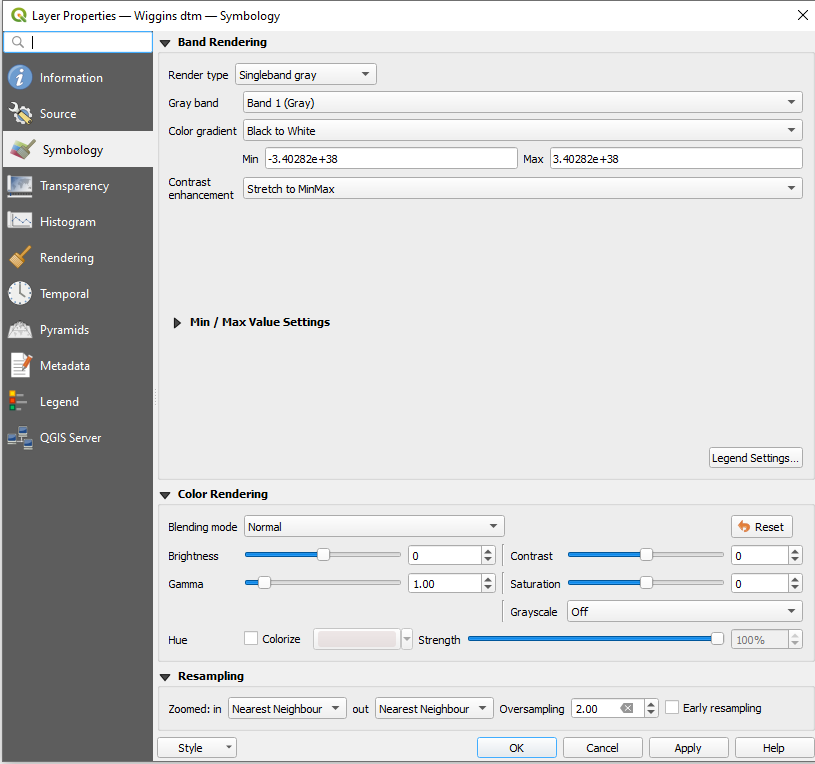
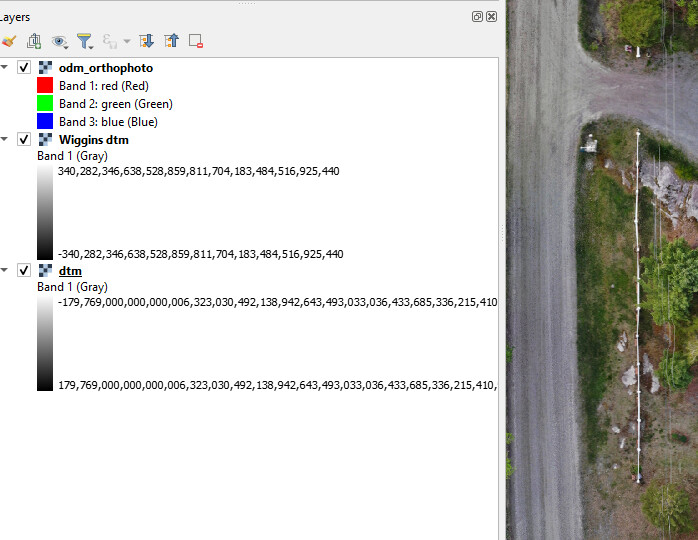
I have run a couple now and am getting a white only model when viewed in QGIS, trying to cut contours also yields no results. Wondering if it’s a bug?
I converted to ascii and opend in CloudCompare to see only a flat surface (which explains no contours.)
The range also look incorrect.
Not expecting data in the range -3.4E+38 or +3.4e+38 {extremely large numbers}
This is what appears in the QGIS layers…
Any tips or suggestions are welcome & appreciated.