Need to rewrite the cutline computation algorithm, so that we can remove the dependency on GRASS.
It’s unstable anyway: it just doesn’t look that way until you run it lots of times on lots of big datasets….
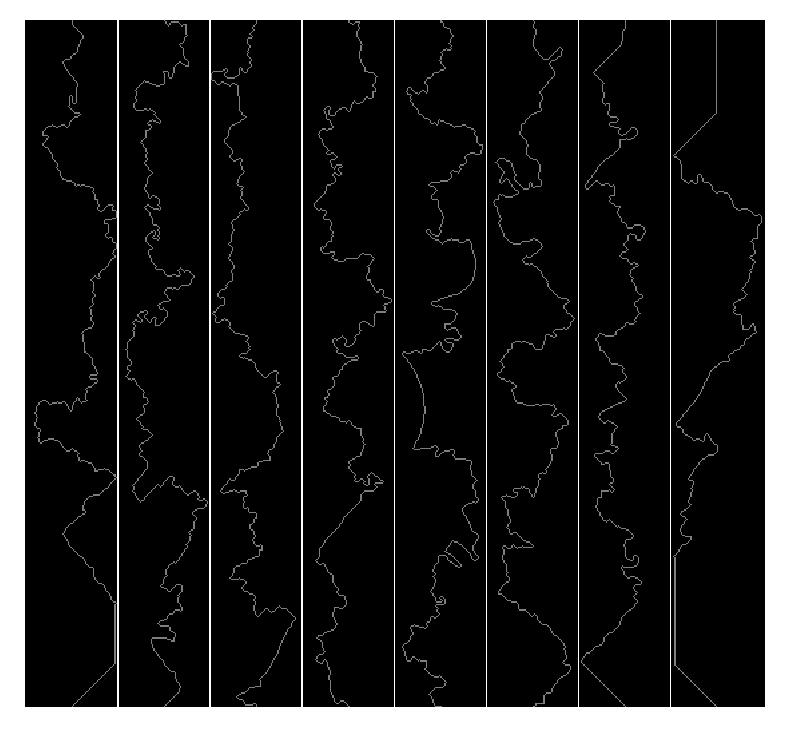


Local split-merge working! 
Now test remote.
Remote split merge works too!
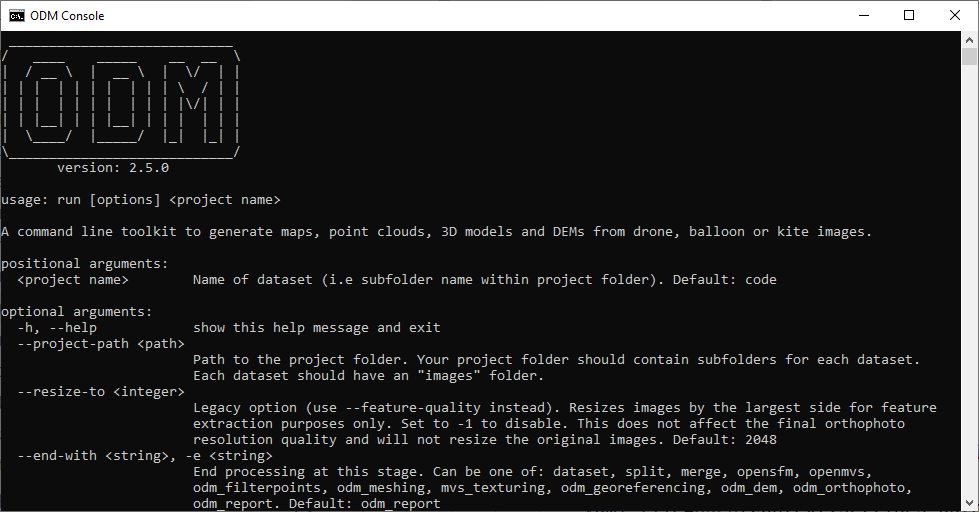
Piero, gib binary pls


Also, probably a dumb question (especially this late), but this respects the commandline syntax of the linux/docker version, right?
Not a dumb question at all, yes, it works exactly like the Linux version.
Hoping to release a beta installer by end of this week, maybe next week. This is pretty exciting. It brings Windows from a third class citizen to a first class citizen overnight.
You can try to build it early by cloning https://github.com/pierotofy/ODM/tree/win32 and issuing:
python configure.py build
You’ll need Visual Studio (I used 2019 but I think others will work too), cmake, and Python 3.8 (must be 3.8).
Then opening console.bat will launch the ODM console.
Handling of CTRL+C needed some tweaks, but now works!
It’s pretty much ready  Native Windows Support by pierotofy · Pull Request #1283 · OpenDroneMap/ODM · GitHub
Beta setup link posted in the PR thread on GitHub. Help test it if you have a Windows machine! 
This weekend! After I finish redesigning my quadcopter frame (and weeping about how bad it is going to be  )
)
Hello There!
Great work with the Native windows support.
I was able to install using the github PR link provided above.
I scratched my head a little to figure out the command line to make it “go” in the “ODM Console” window.
Perhaps obvious for command line users of ODM. I am coming from the Docker/Windows install side of things.
I have tried to process two data sets (one new set captured yesterday, it’s not perfect, 3, flights with one of them at a lower altitude, mostly open grassy field. The second is a mostly forested area that I have been able to process using Lightning ODM.)
Both fail to complete processing and appear to stop at the same process?
Directory path to the images are as such:
C:\Users\Falcon Dell\datasets\Projects\2021-05-14_Korc_Field\images
and
C:\Users\Falcon Dell\datasets\Projects\2020-06-06 Gaudette Contracting\images
To start processing I pasted this on the command line: run “C:/Users/Falcon Dell/datasets/Projects/2020-06-06 Gaudette Contracting” --project-path “/datasets project”
NOte that the slashes needed to be reversed if copied from Windows Explorer. /<>\
For the new data set the processing gave the following:
Blockquote
===== Dumping Info for Geeks (developers need this to fix bugs) =====
Child returned 1
Traceback (most recent call last):
File “C:\ODM\stages\odm_app.py”, line 83, in execute self.first_stage.run()
File “C:\ODM\opendm\types.py”, line 338, in run self.next_stage.run(outputs)
File “C:\ODM\opendm\types.py”, line 338, in run self.next_stage.run(outputs)
File “C:\ODM\opendm\types.py”, line 338, in run self.next_stage.run(outputs)
[Previous line repeated 3 more times]
File “C:\ODM\opendm\types.py”, line 319, in run self.process(self.args, outputs)
File “C:\ODM\stages\odm_meshing.py”, line 24, in process mesh.screened_poisson_reconstruction(tree.filtered_point_cloud,
File “C:\ODM\opendm\mesh.py”, line 178, in screened_poisson_reconstruction
system.run('{reconstructmesh} -i “{infile}” ’
File “C:\ODM\opendm\system.py”, line 87, in run
raise SubprocessException(“Child returned {}”.format(retcode), retcode)
opendm.system.SubprocessException: Child returned 1
===== Done, human-readable information to follow… =====
[ERROR] Uh oh! Processing stopped because of strange values in the reconstruction. This is often a sign that the input data has some issues or the software cannot deal with it. Have you followed best practices for data acquisition? See https://docs.opendronemap.org/flying.html
(venv) C:\ODM>run “C:/Users/Falcon Dell/datasets/Projects/2021-05-14_Korc_Field” --project-path “/datasets project”
Blockquote
First Attempt to process the forested area dataset processing yields similar (at least my my initial cursory view.)
Blockquote
[WARNING] Parameter name should be of the form –: Dell\datasets\Projects\2020-06-06
[WARNING] Parameter name should be of the form –: Gaudette
[WARNING] Parameter name should be of the form –: Contracting\odm_filterpoints\point_cloud.ply
[WARNING] Parameter name should be of the form –: Dell\datasets\Projects\2020-06-06
[WARNING] Parameter name should be of the form –: Gaudette
[WARNING] Parameter name should be of the form –: Contracting\odm_meshing\odm_mesh.dirty.ply
[INFO] running C:\ODM\SuperBuild\install\bin\OpenMVS\ReconstructMesh -i “C:\Users\Falcon Dell\datasets\Projects\2020-06-06 Gaudette Contracting\odm_meshing\odm_mesh.dirty.ply” -o “C:\Users\Falcon Dell\datasets\Projects\2020-06-06 Gaudette Contracting\odm_meshing\odm_mesh.ply” --remove-spikes 0 --remove-spurious 0 --smooth 0 --target-face-num 400000
15:26:33 [App ] Build date: May 12 2021, 13:12:36
15:26:33 [App ] CPU: Intel(R) Core™ i7-10750H CPU @ 2.60GHz (12 cores)
15:26:33 [App ] RAM: 15.77GB Physical Memory 128.00TB Virtual Memory
15:26:33 [App ] OS: Windows 8 x64
15:26:33 [App ] SSE & AVX compatible CPU & OS detected
15:26:33 [App ] Command line: -i C:\Users\Falcon Dell\datasets\Projects\2020-06-06 Gaudette Contracting\odm_meshing\odm_mesh.dirty.ply -o C:\Users\Falcon Dell\datasets\Projects\2020-06-06 Gaudette Contracting\odm_meshing\odm_mesh.ply --remove-spikes 0 --remove-spurious 0 --smooth 0 --target-face-num 400000
===== Dumping Info for Geeks (developers need this to fix bugs) =====
Child returned 1
Traceback (most recent call last):
File “C:\ODM\stages\odm_app.py”, line 83, in execute
self.first_stage.run()
File “C:\ODM\opendm\types.py”, line 338, in run
self.next_stage.run(outputs)
File “C:\ODM\opendm\types.py”, line 338, in run
self.next_stage.run(outputs)
File “C:\ODM\opendm\types.py”, line 338, in run
self.next_stage.run(outputs)
[Previous line repeated 3 more times]
File “C:\ODM\opendm\types.py”, line 319, in run
self.process(self.args, outputs)
File “C:\ODM\stages\odm_meshing.py”, line 24, in process
mesh.screened_poisson_reconstruction(tree.filtered_point_cloud,
File “C:\ODM\opendm\mesh.py”, line 178, in screened_poisson_reconstruction
system.run('{reconstructmesh} -i “{infile}” ’
File “C:\ODM\opendm\system.py”, line 87, in run
raise SubprocessException(“Child returned {}”.format(retcode), retcode)
opendm.system.SubprocessException: Child returned 1
===== Done, human-readable information to follow… =====
[ERROR] Uh oh! Processing stopped because of strange values in the reconstruction. This is often a sign that the input data has some issues or the software cannot deal with it. Have you followed best practices for data acquisition? See https://docs.opendronemap.org/flying.html
(venv) C:\ODM>
Blockquote
Let me know if there is anything additional I can provide that could be of assistance.
Should this be posted to github as well?
Regards,
Miner_jeff
Thanks Jeff!
You actually just need to run:
run “C:/Users/Falcon Dell/datasets/Projects/2020-06-06 Gaudette Contracting”
But the problem is not the command, but the spaces in the path.
I’ve fixed this and should be working now with the changes in Native Windows Support by pierotofy · Pull Request #1283 · OpenDroneMap/ODM · GitHub
If you download the new setup file (use the same link) and rerun it should work this time around.
Hi Piero,
I continue to test/explore with some of my datasets.
During one test with a failed process I got the following:
Blockquote
File “C:\ODM\venv\lib\site-packages\numpy\lib\npyio.py”, line 416, in load
fid = stack.enter_context(open(os_fspath(file), “rb”))
FileNotFoundError: [Errno 2] No such file or directory: ‘D:\Projects\Korc Field 2018_05_14\opensfm\features\DJI_0330.JPG.features.npz’
[INFO] running C:\ODM\SuperBuild\install\bin\opensfm\bin\opensfm create_tracks “D:\Projects\Korc Field 2018_05_14\opensfm”
2021-05-22 11:39:45,162 INFO: reading features
Traceback (most recent call last):
File “C:\ODM\SuperBuild\install\bin\opensfm\bin\opensfm_main.py”, line 15, in
commands.command_runner(commands.opensfm_commands, default_dataset_type)
File “C:\ODM\SuperBuild\install\bin\opensfm\opensfm\commands\command_runner.py”, line 31, in command_runner
command.run(data, args)
File “C:\ODM\SuperBuild\install\bin\opensfm\opensfm\commands\command.py”, line 12, in run
self.run_impl(data, args)
File “C:\ODM\SuperBuild\install\bin\opensfm\opensfm\commands\create_tracks.py”, line 11, in run_impl
create_tracks.run_dataset(dataset)
File “C:\ODM\SuperBuild\install\bin\opensfm\opensfm\actions\create_tracks.py”, line 11, in run_dataset
features, colors = tracking.load_features(data, data.images())
File “C:\ODM\SuperBuild\install\bin\opensfm\opensfm\tracking.py”, line 17, in load_features
p, f, c = dataset.load_features(im)
File “C:\ODM\SuperBuild\install\bin\opensfm\opensfm\dataset.py”, line 340, in load_features
return features.load_features(self._feature_file(image), self.config)
File “C:\ODM\SuperBuild\install\bin\opensfm\opensfm\features.py”, line 425, in load_features
s = np.load(filepath)
File “C:\ODM\venv\lib\site-packages\numpy\lib\npyio.py”, line 416, in load
fid = stack.enter_context(open(os_fspath(file), “rb”))
FileNotFoundError: [Errno 2] No such file or directory: ‘D:\Projects\Korc Field 2018_05_14\opensfm\features\DJI_0132.JPG.features.npz’
[INFO] running C:\ODM\SuperBuild\install\bin\opensfm\bin\opensfm reconstruct “D:\Projects\Korc Field 2018_05_14\opensfm”
Traceback (most recent call last):
I noticed the double back slashes in the file path and single quote surrounding the path in the error code.
I was attempting to process images on D: external drive as opposed to the C: drive as the hard drive was getting full.
Thoughts?
Miner_Jeff
I removed a number of non nadir images in the data set. Deleted all ODM created folders and files and began processing again:
Seems to have gotten further in the rpocess this time:
Got the following message:
Blockquote
[INFO] Starting smoothing…
[INFO] Smoothing iteration 1
Traceback (most recent call last):
File “C:\ODM\run.py”, line 68, in
retcode = app.execute()
File “C:\ODM\stages\odm_app.py”, line 83, in execute
self.first_stage.run()
File “C:\ODM\opendm\types.py”, line 338, in run self.next_stage.run(outputs)
File “C:\ODM\opendm\types.py”, line 338, in run self.next_stage.run(outputs)
File “C:\ODM\opendm\types.py”, line 338, in run self.next_stage.run(outputs)
[Previous line repeated 3 more times]
File “C:\ODM\opendm\types.py”, line 319, in run self.process(self.args, outputs)
File “C:\ODM\stages\odm_meshing.py”, line 66, in process
mesh.create_25dmesh(tree.filtered_point_cloud, tree.odm_25dmesh,
File “C:\ODM\opendm\mesh.py”, line 25, in create_25dmesh
commands.create_dem(
File “C:\ODM\opendm\dem\commands.py”, line 258, in create_dem
median_smoothing(geotiff_path, output_path)
File “C:\ODM\opendm\dem\commands.py”, line 335, in median_smoothing
log.ODM_INFO(‘Completed smoothing to create %s in %s’ % (os.path.relpath(output_path), datetime.now() - start))
File “ntpath.py”, line 703, in relpath
ValueError: path is on mount ‘D:’, start on mount ‘C:’
I initiated this with run “D:/Projects/Korc Field 2018_05_14” --dem-resolution 50
Regards,
Jeff