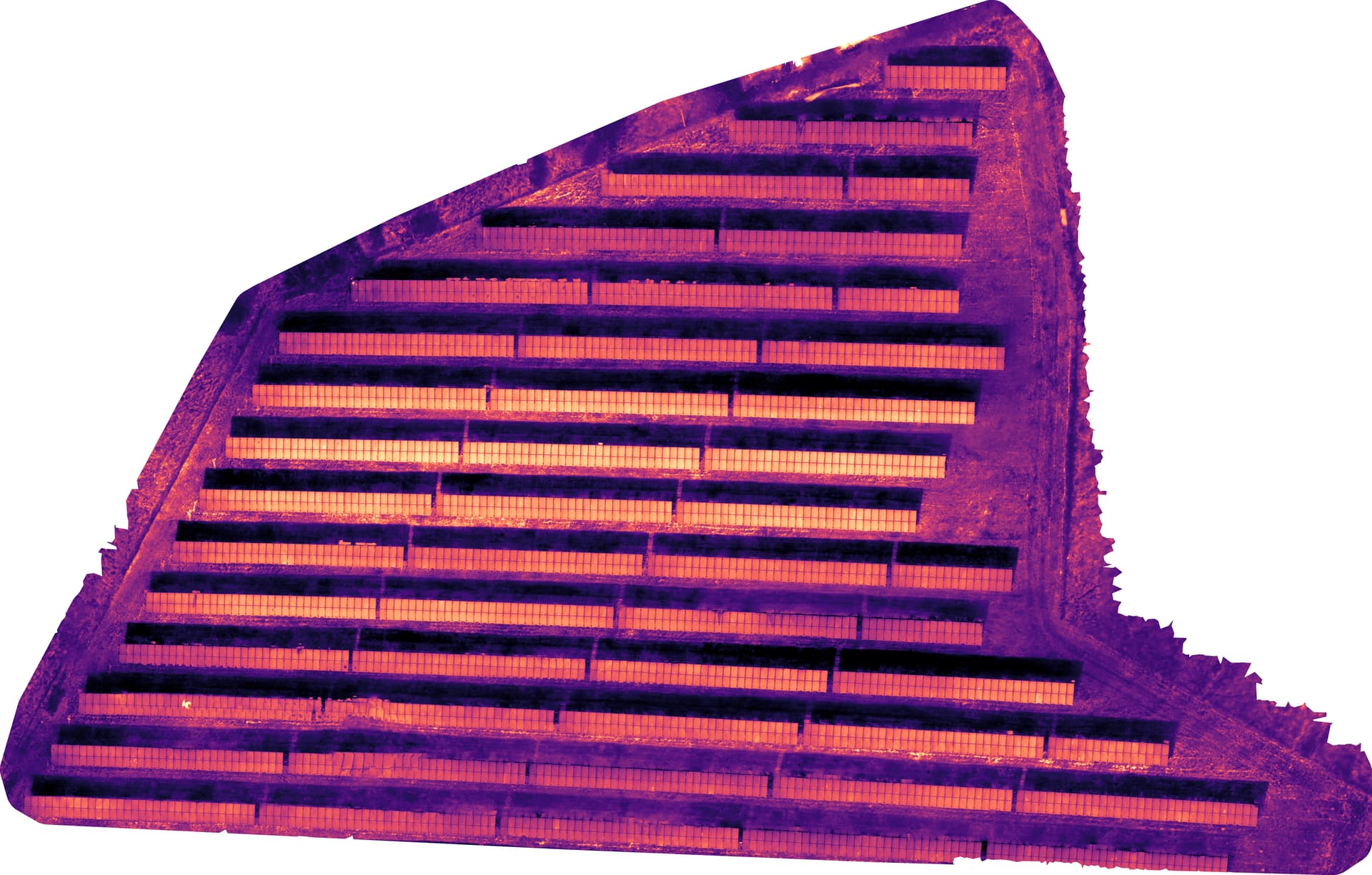
For the past few months, I’ve been experimenting with ODM and WebODM in areas related to photogrammetry in general and processing thermal images for creating orthomosaics. My main focus is on using these techniques to inspect solar panels.
To collect data and capture images, I’ve been using a DJI Mavic 3T drone.
I’ve been following many forums here, code on Github, EXIFtools forums, issues on GitHub, etc., regarding the issue with the drone’s thermal sensor data. (Links below)
At the moment, the only way I’ve been able to process the thermal orthomosaic map is by converting the resulting drone images *T.JPG (R.JPG?) to a single-band .TIFF using codes available on GitHub from different sources. Although all of them are based on the DJI Thermal SDK, I’ve been able to achieve results with a lot of opportunities for improvement.
In an effort to improve the processing, I acquired the book “OpenDroneMap - The Missing Guide” 1st Edition by Piero Toffanin. After reading the entire book, I was able to improve the results slightly. However, I still believe that to improve the ODM result, I also need to improve image acquisition.
That said, I would like you to share with me and the community your recommendations for obtaining high-quality thermal images, as well as your recommendations for obtaining the best possible thermal orthomosaic.
Any help would be much appreciated.
Even if you don’t know for sure the answer, try to help anyway. Some help is better than no help. Piero Toffanin, “OpenDroneMap - The Missing Guide” 1st Edition
We’re using the exact same drone for thermal inspection of solar power plants. Converting the images to .tiff seems to work fine for you, nice! I found that after you converted the images to tiff you absolutely have to copy the original exif-file-tags to the tiff-images, otherwise strange things will happen in ODM.
The command I’ve been using in scripts for that is:
This takes the tags from the files in the local “pre” folder and copies them onto the files in the “post” folder. You can check the tags with exiftool ‘path/to/image/imagename.tiff’.
Thank you so much for your recommendations. I have done some research and found out that the R.JPG to .TIFF conversion that I’m using already copies the original exif-file-tags to the tiff-images (referenced to the code below).
Besides this, I’m thinking about the flight itself and the drone configuration. After this, I’m also considering calibration, as mentioned before. But I still believe there is room for improvement in the flight.
Could you or anyone share some tips or your current configuration for the image taking process? Also, which parameters do you use for converting the R.JPG pictures? (Emissivity, especially).
For that I’ve been orienting myself on flight guides of commercial software. An example of such a flight guide is: DJI Mavic 3 Thermal (M3T) Flight Guidelines - Raptor Maps They are specifying a 70% side overlap and a 20% front overlap, I’ve been playing it safe with 80%/80%. Biggest issue so far are random artifacts in the thermal orthophotos.
But as you can see, still lots of artifacts, sadly. Also the brightness of the middle rows seems to be a sky reflection. The parameters for the image calculation in WebODM are:
Hi, Sorry for my late response. I’ve been taking some data, following your recommendations, and experimenting with it. Fortunately, the data now seems to be more accurate. Nevertheless, I haven’t been able to find the right configuration for generating the thermal orthomosaic.
As of now, the only things to be the generated image composition and quality.
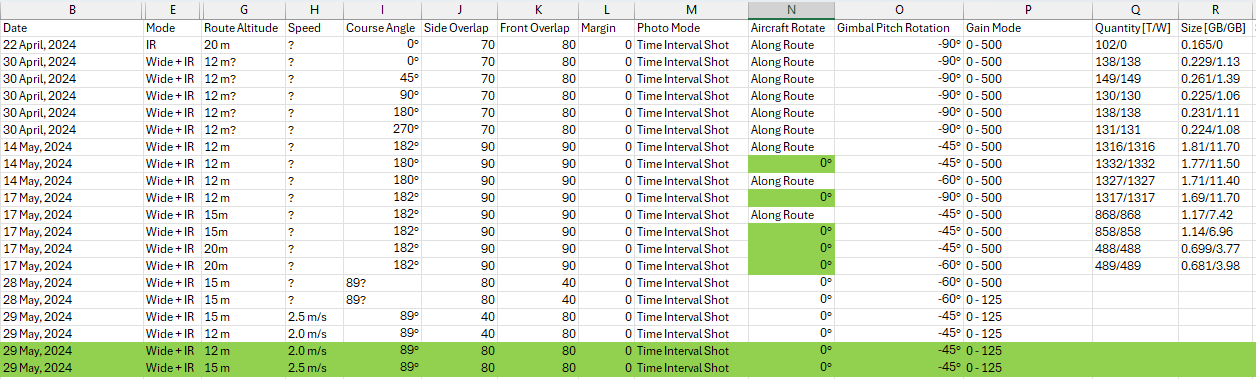
Related to the image taking process, see the Excel table below with the flights done at the time of writing this. The whether have not been great for the past week, so I’m planning to perform other flights at the end of next week. Any recommendations?
Alright folks, took me a while to get back to you but here we go!
Looks good to me! One thing which came to mind was the use of GCPs. One could use black and white tiles as gcp-markers… maybe. Not sure about that and the effects on the reconstruction in ODM.
Actually without them! A lot of experimenting with different parameters brought me there. I still haven’t found the time to conduct the calibration, sadly. But still got the checkerboard pattern on my desk! So I won’t forget it.
The conversion to .tiff is a MUST! Without it ODM can only use the different pixels and some metadata in the JPG, all the thermal data is lost since ODM can’t interpret the proprietary DJI-format. Converting the images to .tiff fixes that! Makes a huge difference!
I’m really looking forward to your own results, please share them here, if you can.
Cheers!
The result is actually a plain gray image. If you are on WebODM when switching to “Plant Health” you will be able to see the thermal orthomosaic. If everything works well, you should see on Layers the Algorithm “Celsius” and the Color applied to it. Normally, Magma.
Looking forward to seeing your results. I’m still worried about quality.
I’m planning on making a much larger area by the end of this week. Hope to get back to you soon.
 Still haven’t managed to, but planning to create some proper camera calibration values for the distortion using OpenCV.