I was able to make a nice 3D textured model with WebODM. I now want to display it on a web page. It appears this can be done using QGIS and the qgis2threejs plugin. I can get a flat model into QGIS and the plugin does make a web page which I can see. But I do not want a flat model.
What should I export from WebODM to properly import into QGIS?
OR
Not the QGIS forum I know, but are there specific setting in QGIS to make a 3D textured model?
Thanks for any help.
Added: OR, can this be done directly from WebODM? Which would be the preference!
I posted to the wrong thread. Adding this comment to see if it will now accept it here.
That would work for sure, and the one you made is very nice! I was hoping to actually produce a web page that I could put on my own site which is what the QGIS plugin creates. I looked at the export options here and did not see anything that looks like what I want. Did I miss it?
Otherwise I’ll keep looking, thanks for the response.
No web page export options as such, but I have used plenty of WebODM output files on my web page. For the animations I produced a suitably sized ortho or screen grab of DSM or 3D model and link it to a video created with Potree or an interactive 3D model as above.
It’s a work in progress, which I will rearrange one of these days https://ottdrones.com.au
I do the web 3D model in QGIS loading the DSM and the Orthomosaic as raster layers.
Although you can load the textured triangular mesh in QGIS, even display it in a 3D map view, I’m not sure the plugin is ready to use it as a 3D model for threejs.
The plugin creates the web model from DEMs, and that is the only layer that is added in the plugin dialog. But the orthomosaic layer must be turned on in the map, and the plugin dialog tells it to texture the model based on the map canvas view.
The viewer that Gordon mentioned is actually open source, totally FOSS even.
So you can go to their Github page to load the latest release:
It is actually a javascript app that runs in the browser. I do not know how tech savvy you are, but there is a manual how to embed the engine in your own website:
Another actually amazing possibility is Blend4Web
I used it occasionally and it produces a single HTML file containing your model and the viewer. You can then just upload that single HTML file or embed it as an iframe. It relies on HTML5. It only works on Blender 2.79, but it’s almost ridiculously easy to use (subjectively). Means I can edit my models with anything I like also Blender 3.x and only for the export I use Blender 2.79 with the Blend4Web plugin.
And here a short Video that explains how to use it:
Only downpoint is, that I had to scale down the model, since it has a max visible distance and then adds “fog”. But if you do not need to take measurements and stuff, you can retain full detail even in small models and it runs beautifully in all modern browsers that I used it with (Edge and Gecko based).
There are many more options, but none that I am aware of that do not either cost money (like Verge3D) or rely on externally hosted viewer engines, with trial watermarks etc.
But totally possible to use FOSS to put your 3D model on your selfhosted website
P.S.: Though reading my own post: if you plan on publishing a 3D model once in a while, it is probably worthwhile to setup Online3DViewer since you will then be able so simply import WebODM output.
Thanks to all for some very helpful suggestions. After the first read through it appears that it is maybe beyond my limited abilities. I learned (and that is a stretch) “Basic” when I was in school and I don’t think that works well for this The Blend4Web seemed promising, but I am doing larger objects, like the current one is an old water tower. If I read correctly it would be to large. I’ll play around and maybe figure something out. Perhaps a more detailed install video for Online3DViewer.
With larger I meant areas above 3 ha / 7 acres
But even scaling things down to 0.1 or 0.05 still retains all details (vertexes) and avoids the distance “fog”.
I enjoyed Blend4Web mainly for its simplicity and that it outputs a single HTML file, which I could not only copy on my webserver but also on a tablet or phone and it would just work.
Yep, one has to decide what to spend time on For once in a while, I think Blend4Web is an easy click-and-go answer. For more frequent use and spending a couple of hours on it to make it work, Online3DViewer looks promising.
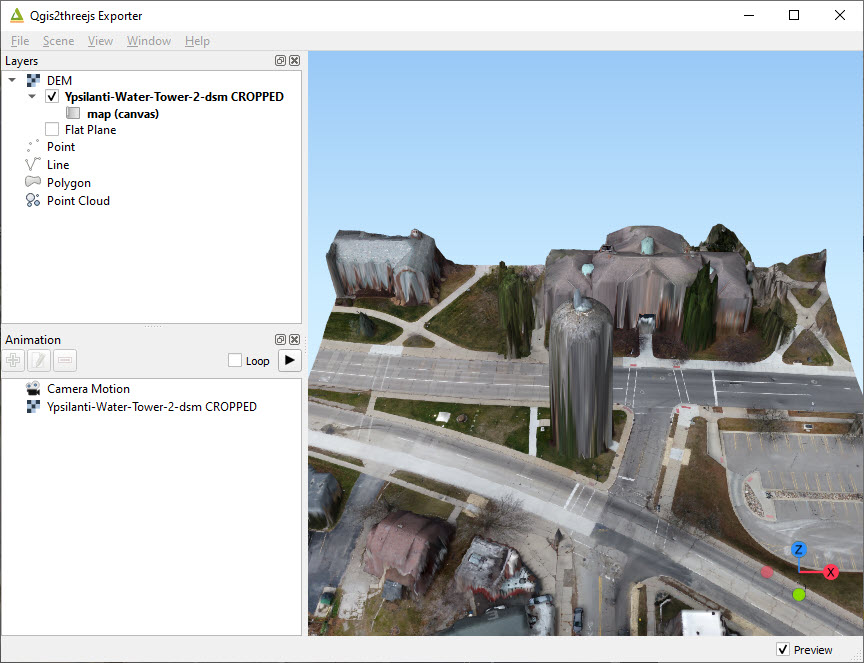
If you don’t mind, another question. I have made some progress, but my model ends up looking like a “Christo” project. While it’s arty, it isn’t what I want. Do you know what step I missed? In QGIS it looks okay. I have been trying to find a good video, or even walk through but not having much luck. Thanks!
(This is using the QGIS2threejs plugin.
Can’t solve this for you, but your source is a DSM which is not a 3D model but a kind of shaded image.
The result looks like your screenshot with the orthophoto pulled over it like a skin.
There is also a way to import OBJ files into QGIS, but I haven’t done this.
Another remark: since the question of this topic changed, I am not sure if QGIS is a good tool to generate 3D models for online display. It can do some 3D, but I found it “handicapped” (compared to Blender and consorts) since QGIS focus is not particularly on 3D, though there are some plugins.
QGIS has definitely added some fantastic 3D support allowing for viewing in app, but I think the assumptions underlying QGIS2threejs are 2.5D not fully 3D, and this output strongly suggest that you are getting 2.5D output, not 3D, so QGIS is not your solution yet for web exports.


 For once in a while, I think Blend4Web is an easy click-and-go answer. For more frequent use and spending a couple of hours on it to make it work, Online3DViewer looks promising.