Hi,
I try to install webodm on WIN11 from an old installer (2018) and get this message:
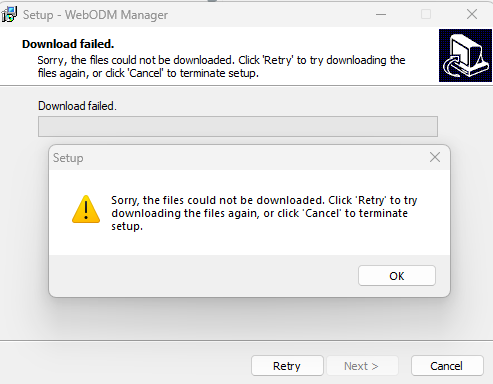
qb53PAOnS.png)
Is this version too old or whats the problem?
Thanks
Sven
Hi,
I try to install webodm on WIN11 from an old installer (2018) and get this message:
Is this version too old or whats the problem?
Thanks
Sven
Yes. WebODM Manager has been deprecated in favor of WebODM for Windows native.
Reach out to help@opendronemap.org and we will send you the current installer.
Thank you very much, I have received the install package.
I have already added the following rules to the firewall (Windows 11 pro):
D:\WebODM\WebODM.exe allowed
Ports 29000-30000 allowed
Unfortunately, the following error message appears after the logs:
“Booting WebODM 2.8.0 build 119…”
“Trying to connect to NodeODM localhost:29301…”
“nodeodm: (node:23188) NOTE: The AWS SDK for JavaScript (v2) will enter maintenance mode\non September 8, 2024 and reach end-of-support on September 8, 2025.\n\nPlease migrate your code to use AWS SDK for JavaScript (v3).\nFor more information, check blog post at https://a.co/cUPnyil\n”
“nodeodm: info: Authentication using SimpleToken\r\n”
“nodeodm: info: Listening on 0.0.0.0:6367 UDP for progress updates\r\n”
“nodeodm: info: No tasks dump found\r\n”
“nodeodm: info: Checking for orphaned directories to be removed…\r\n”
“nodeodm: info: Server has started on port 29301\r\n”
“Connected to NodeODM 2.2.3”
“redis-server: . \n .-__ ''-._ \n _.- . . ‘’-._ Redis 3.2.100 (00000000/0) 64 bit\n .- .-```. ```\\/ _.,_ ''-._ \n ( ' , .-` | `, ) Running in standalone mode\n |`-._`-...-` __...-.-.|'_.-'| Port: 29379\n | -. ._ / _.-' | PID: 16276\n -._ -._ -./ .-’ .-’ \n |-._-. -.__.-' _.-'_.-'| \n | -.-._ _.-'_.-' | http://redis.io \n -._ -._-..-'.-’ .-’ \n |-._-. -.__.-' _.-'_.-'| \n | -.-._ _.-'_.-' | \n -._ -._-..-‘_.-’ _.-’ \n -._ -..-’ _.-’ \n -._ _.-' \n -..-’ \n\n[16276] 28 Apr 10:42:30.221 # Server started, Redis version 3.2.100\n[16276] 28 Apr 10:42:30.221 * DB loaded from disk: 0.000 seconds\n[16276] 28 Apr 10:42:30.221 * The server is now ready to accept connections on port 29379\n”
“D:\WebODM\resources\app\apps\pgsql/bin/pg_ctl: warte auf Herunterfahren des Servers…”
“D:\WebODM\resources\app\apps\pgsql/bin/pg_ctl: fertig\r\nServer angehalten\r\n”
“D:\WebODM\resources\app\apps\pgsql/bin/pg_ctl: exited with code 0”
“Trying to connect to postgres localhost:29543…”
“D:\WebODM\resources\app\apps\pgsql/bin/pg_ctl: Server startet\r\n”
“D:\WebODM\resources\app\apps\pgsql/bin/psql: exited with code 0”
“python: Traceback (most recent call last):\r\n File "D:\WebODM\resources\app\apps\WebODM\manage.py", line 22, in \r\n execute_from_command_line(sys.argv)\r\n File "D:\WebODM\resources\app\apps\grass78\Python39\lib\site-packages\django\core\management\init.py", line 381, in execute_from_command_line\r\n”
“python: utility.execute()\r\n File "D:\WebODM\resources\app\apps\grass78\Python39\lib\site-packages\django\core\management\init.py", line 357, in execute\r\n django.setup()\r\n File "D:\WebODM\resources\app\apps\grass78\Python39\lib\site-packages\django\init.py", line 24, in setup\r\n apps.populate(settings.INSTALLED_APPS)\r\n File "D:\WebODM\resources\app\apps\grass78\Python39\lib\site-packages\django\apps\registry.py", line 114, in populate\r\n”
“python: app_config.import_models()\r\n File "D:\WebODM\resources\app\apps\grass78\Python39\lib\site-packages\django\apps\config.py", line 211, in import_models\r\n self.models_module = import_module(models_module_name)\r\n File "D:\WebODM\resources\app\apps\grass78\Python39\lib\importlib\init.py", line 127, in import_module\r\n return _bootstrap._gcd_import(name[level:], package, level)\r\n File "", line 1030, in _gcd_import\r\n File "", line 1007, in _find_and_load\r\n File "", line 986, in _find_and_load_unlocked\r\n File "", line 680, in _load_unlocked\r\n”
“python: File "", line 855, in exec_module\r\n File "", line 228, in _call_with_frames_removed\r\n”
“python: File "D:\WebODM\resources\app\apps\WebODM\app\models\init.py", line 2, in \r\n from .task import Task, validate_task_options, gcp_directory_path\r\n File "D:\WebODM\resources\app\apps\WebODM\app\models\task.py", line 38, in \r\n”
“python: from app.cogeo import assure_cogeo\r\n File "D:\WebODM\resources\app\apps\WebODM\app\cogeo.py", line 9, in \r\n from rio_cogeo.cogeo import cog_validate, cog_translate\r\n File "D:\WebODM\resources\app\apps\grass78\Python39\lib\site-packages\rio_cogeo\init.py", line 3, in \r\n from rio_cogeo.cogeo import cog_info, cog_translate, cog_validate # noqa\r\n File "D:\WebODM\resources\app\apps\grass78\Python39\lib\site-packages\rio_cogeo\cogeo.py", line 13, in \r\n”
“python: import morecantile\r\n File "D:\WebODM\resources\app\apps\grass78\Python39\lib\site-packages\morecantile\init.py", line 14, in \r\n”
“python: from .defaults import tms # noqa\r\n File "D:\WebODM\resources\app\apps\grass78\Python39\lib\site-packages\morecantile\defaults.py", line 11, in \r\n from .models import TileMatrixSet\r\n File "D:\WebODM\resources\app\apps\grass78\Python39\lib\site-packages\morecantile\models.py", line 34, in \r\n”
“python: class CRSType(CRS, AnyHttpUrl):\r\nTypeError: multiple bases have instance lay-out conflict\r\n”
“python: exited with code 1”
{}
any idea?
Sven
Looks like a system-wide Python interfering.
Uninstall it, delete the Python folder from %AppData%, reboot, then re-install WebODM.
This topic was automatically closed 30 days after the last reply. New replies are no longer allowed.