Will increasing the virtual memory on my Windows-10 computer prevent WebODM from switching to tiling when available RAM memory is exhausted?
And since paging virtual memory obviously slows down processing - is it perhaps preferable to actually eliminate virtual memory so that WebODM will switch to tiling when memory is limited so that can be done more quickly in RAM?
The trick is to allocate some, but not too much virtual memory. Brett and others can better speak to windows use cases, but on Linux, this value is 1-2x RAM. So if I have 64GB RAM, I want 64-128GB swap (Linux equivalent of virtual memory).
The reason this is the recommendation is that there are some processes that for a very brief period of time use a lot of memory. As these are not long-running processes, it’s safe to run these in virtual memory with minimal time penalty.
If you allocate more virtual memory, then if you run jobs that are too big, they’ll take an unpredictable, very long time. And depending on the allocations, may still fail. So: best to keep it in that 1-2x window.
Your suggestion follows the general rules of thumb for memory management - at least the ones I’ve learned over the years.
But software like WebODM is a bit unusual - so I was curious if there were special or unique considerations.
For what it’s worth - other photogrammetry software I’ve tried, Pix4D for example, seem to handle memory management without user intervention. Of course for the price they charge for it, they’re forced to bridge gaps that may be left open in open source development.
I’ve thought about setting up a node on Linux. I use Digital Ocean droplets for lamp stacks supporting Wordpress. I’m not particularly skilled at Linux, but I’m thinking I could setup a docker container for WebODM.
But unless WebODM runs across multiple instances, I’m wondering if there’s much of an advantage. I can order a multi-core high RAM dedicated machine on Digital Ocean or other cloud services. But a single machine instance isn’t likely to be any bigger than what I can setup here in my workshop.
At some point I’m going to migrate to a 13th gen i7 or i9 that can support 128 gig of RAM. But if my 659 image job pushes the limits of my 64 gig, I wonder if even a larger machine might still be limitation.
No doubt, it’s not necessarily about using a bigger hammer. It’s about using the hammer you have more effectively. I appreciate your comments and guidance on such matters. As I become more skilled with WebODM I’ll be able to make more use of your helpful direction. Many Thanks!
On Linux, WebODM uses all memory available. On Windows, with the installer (as opposed to the docker version) the same is true, I believe. Mac OS is the only exception as it runs through docker.
Pix4D is also extremely memory hungry. Only with Pix4D, you have to pay them an annual monopoly cost as well as the hardware costs to run (or just run it on their cloud). There are proprietary solutions that are memory and processor efficient, but last time I reviewed Pix4D, it was not one of them. Perhaps this has changed, but I suspect if you turned up all the quality parameters in Pix4D, you would have similar difficulties.
Free and Open Source vs. Proprietary
One of the great fictions of the last 40 years is that somehow an entities software copyright (legal monopoly) is a benefit to their users. And often it is, for short periods of time, but rarely is it ever so over the long term.
To be clear: free and open source vs. proprietary is not non-commercial vs. commercial. OpenDroneMap is a commercial project with commercial support. It simply uses a different purpose for the application of that copyright, and does so it a way that:
acquires sufficient resources to be sustainable
does so in a way that requires all code contributed is permanently a public good protected by copyright
is maintained by a few commercial entities (and now a non-profit as well) that seek to be sustainable over the long term.
So, when you invest your time in this ecosystem, you get the benefit of a group of experts to help you grow, you get software that will always be available to you and isn’t owned and controlled by a single legal monopoly whose needs may not consistently align with your own.
In short: welcome to a professional, global ecosystem or tools and collaborators whose values and objectives align with your needs now and in the long run.
And if you find in the short term that a proprietary tool serves your needs better: cool. Except the rare purists, we all have some proprietary tools we use on the daily when the alternatives cannot provide what we need.
(Edit: and apologies for the long response. It’s a topic close to my heart).
For some projects where I used tiling (split & merge) I had mixed results. In the end it often used more time then using more virtual memory (swap from here on). Especially the last step where the submodels get merged to a bigger single model.
I have done and am doing benchmarking and close monitoring of ODMs resource usage and I can fully agree to to @smathermathers statement:
Which expressed differently means: as long as my peak memory need is 196Gbyte, I am well off with 64Gb memory and 128Gb swap. I generally use at double swap then physical memory.
If it goes beyond that the process can drag immensely.
If you were to get a PC with 128Gb of memory, add 256Gb of swap (best on NVMe ) you should be good to compute rather “large” projects. Off course depending on your settings and the resolution of your images, but with 384Gbyte of memory (physical+virtual combined) you would certainly be able to compute 1500 images @ 20MP @ ultra settings or 4000+ images @ 20MP @ default to high settings or 2000+ images @ 45MP @ default to high settings.
All those should run with hardly any penalty for using swap.
And if you would have an occasional project that is larger, just allocate the time for it. Going beyond 128Gb becomes complex and costly if you do it on your own hardware. Cloud services etc are another story there.
But generally saying: with 64Gb and 128Gb of swap you can already run a lot of things. And yes, the 64Gb will clearly not be enough but
and if I would want to contain those spikes in my physical memory, I would have needed Threadripper or server hardware for many of my projects
But for 659 images, even at 45MP, already 64Gb of memory plus swap should enable you to use ODM efficiently. If you invest in your own hardware, make sure to place the swap (virtual memory) on a fast NVMe. I did some benchmarking of that and more things here:
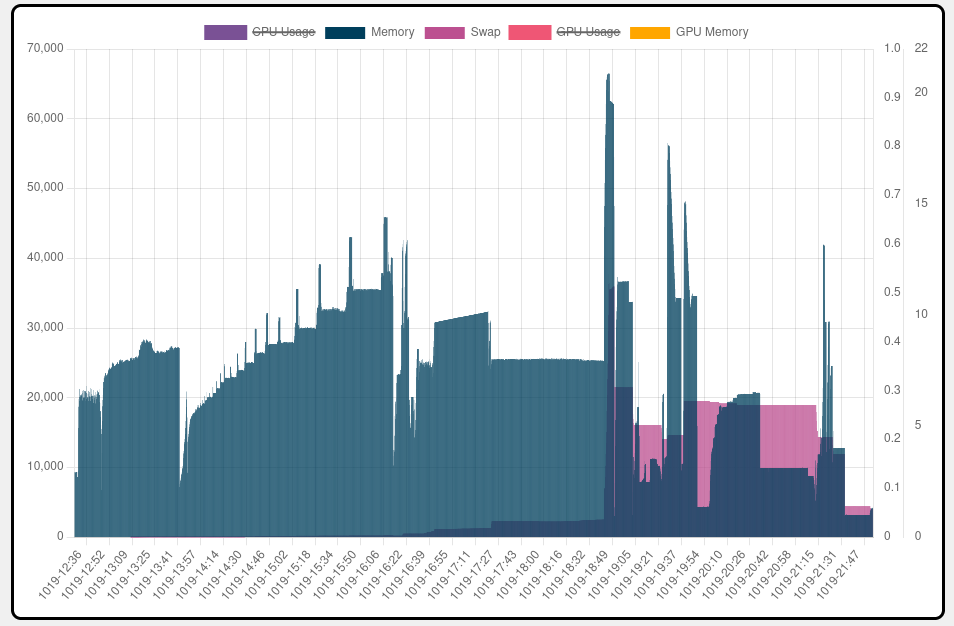
The picture shows a rather typical ODM run on my system. The blue bars are physical memory, the red is swap usage.
You can clearly see that for most of the time the physical memory is enough and only at some points the system has to rely on swap. But the red bars towards the end are just swap that isn’t cleared, means there is not intensive swap usage anymore. The intense swap usage, measured by monitoring NVMe storage activity, is during the tall blue spikes.
I think that picture shows why the memory x 2 = swap amount is good equation to go by
If you would have more memory, it would idle most of the time.
Your comments mirror my findings from other sources. Thank you.
Your point about using a PCIe NVMe drive is well taken. I’m going to try adding one that’s dedicated to virtual memory. My system presently has two drives - a NVMe and a SATA. I have WebODM loaded on the SATA drive - I’ll swap that out to a NVMe drive too.
The extra speed of a NVMe is perceivable for swap / virtual memory use.
For project files SATA or NVMe do not affect processing times. At least when I tried it out by running the same project once on SATA then on NVMe.
But for swap usage NVMe is a major benefit, while HDD is not even realistic (takes >10-20x longer).
 ) you should be good to compute rather “large” projects. Off course depending on your settings and the resolution of your images, but with 384Gbyte of memory (physical+virtual combined) you would certainly be able to compute 1500 images @ 20MP @ ultra settings or 4000+ images @ 20MP @ default to high settings or 2000+ images @ 45MP @ default to high settings.