Any tips for getting better quality orthos?
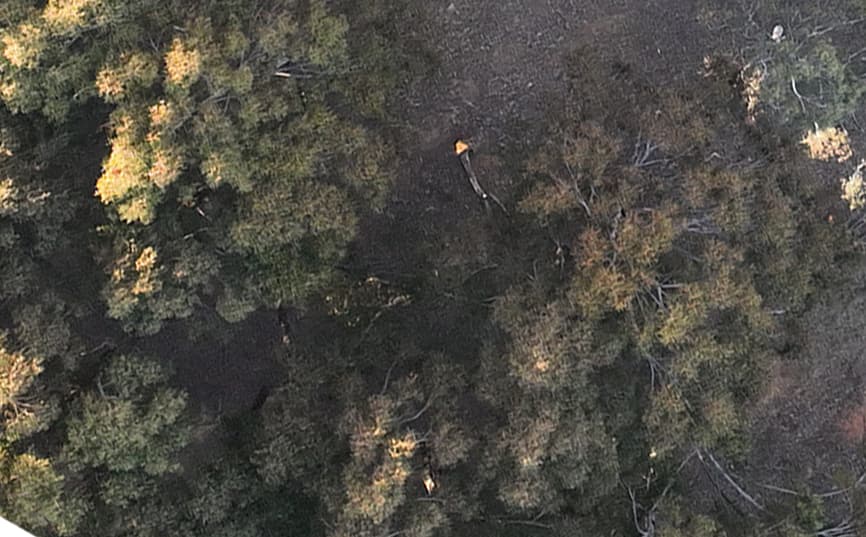
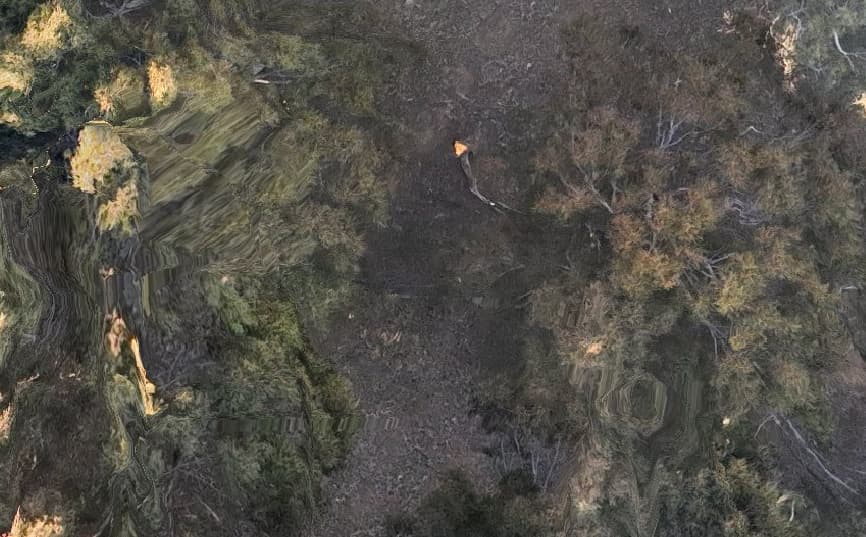
My understanding is that the ortho is made as a reprojection of the 3D model… is that correct? I imagine this is a good approach some times but it also results in a lot of distortions that aren’t in the original images. For example, the first image below is the image from the drone and the second one is the ortho, which has all sorts of weird artifacts that aren’t in the original.
Forests are a real challenge always. I’d be interested to see what your surface model looks like: that is the origin of the orthophoto, and if it’s very poor, especially over a forest, then the orthophoto will reflect those deficiencies. So less 3D model and more 2.5D model.
Generally, the fix is at time of collection: ensure minimum 77% overlap/sidelap in forests, don’t fly on windy days unless it’s pretty high up, fly as high as legally allowed unless you have the capacity to fly at even higher overlap rates (83% as your theoretical ceiling).
That said, increasing feature numbers by a lot, or changing feature types can help (others have opinions on this that I haven’t tested yet, but I’m guessing those folks will weigh in).
Standard questions apply: what is your overlap and sidelap, tree height and flight height, and if you have a subset to share, I can throw it on a machine and twist some knobs as time allows.
Thanks for the suggestions. Overlap was around 70% (I can’t remember what the default setting was but I probably should have upped it to 80). I need to double check if the full dataset uploaded since I had to stop mid flight and restart so images might have gotten lost in sub folders.
For scenes with lots of fine details I’ve seen consistently over 500000 detected features in almost every image, so changing that parameter would make no difference if you are already getting >60000.
In my experience, smeared tree foliage is always associated with movement due to wind- each overlapping image will see the leaves in a different place, resulting in a smear in the ortho. Generally it is the tallest/most exposed parts of the trees suffering from this the most.
Looks like I’m getting plenty of features. Reconstructed Images 64 over 67 shots (95.5%)
Reconstructed Points (Sparse) 64076 over 104330 points (61.4%)
Reconstructed Points (Dense) 20,280,394 points
Detected Features 117,817 features
Reconstructed Features 1,649 features
I guess my question was more technical/philosophical as in given that there are existing methods for stitching images into a panorama, are we really stuck with the artifacts that come from reprojecting a 3D model to get our flat ortho? Prior to drones coming along a did a lot of work with gigapixel panoramas so I’ve spent a lot of time with various software stitching images into panos. And for example, in this case, if I take the raw drone images from the same area and merge them in photoshop, I get a nice clean shot of the trees. no distortion. Are there technical reasons why we have to use the 3d model to get the ortho rather than using more traditional image stitching methods that have less artifacts??
I don’t doubt you are getting lots of features and lots of matches. Nevertheless, turning that value up often helps, as it can help compensate for lack of overlap.
You could definitely try a more traditional approach by using fast-orthophoto, or use the fields preset. And in many places it will look better. You’ll see some consequences from that choice as well. I’d give both a try
The full photogrammetry solution, however, is to fly with more overlap: for a forest with a drone, 70% is very low. Even 75% would be better, but for forests I recommend 77% as the minimum, and 83 as a very time expensive optimum.
I actually meant features (points) in each image, which is what that setting refers to, although as I’ve previously posted, setting a value doesn’t work for all feature extraction methods.
2023-05-31 11:11:29,654 DEBUG: Found 24841 points in 7.12605357170105s
2023-05-31 11:11:29,734 DEBUG: Found 24857 points in 7.242056131362915s
2023-05-31 11:11:29,986 DEBUG: Found 26741 points in 7.65756630897522s
2023-05-31 11:11:30,250 DEBUG: Found 27098 points in 7.782564640045166s
2023-05-31 11:11:30,506 DEBUG: Found 24711 points in 7.897563219070435s
2023-05-31 11:11:30,551 DEBUG: Found 26905 points in 7.945563316345215s
oh, ok, sorry for the confusion. I’m getting: DEBUG: Found 13123 points in 6.3750550746917725s
That’s a somewhat lower number than what you were getting. What would you suggest I try to improve this? should I be setting min-features to a lot higher or is there a different feature detection algorithm that might work better than Sift?
So does “fast orthophoto” use a more traditional image alignment method rather than deriving the ortho from the 3D? Apologies if I should already know this
With images like you posted above, I’d expect more detected points, however, looking closely I see that the image is covered in JPEG compression artifacts, (the leaves aren’t really resolved, the compression artifacts dominate) which will severely limit the feature detection and output quality.
Was that an additionally compressed image for posting here, or are the originals like that?
Good point. I noticed that as well but hadn’t had time to look into the cause. The camera is 25mp and that posted image was from the original images (I think) but I’m just learning the M3 controller, so there may be jpg quality settings that need updating. Hopefully the weather is good tomorrow and I can just redo the whole flight
No worries. I should have expounded. Fast orthophoto uses the sparse cloud for the mesh which is usually considerably less detailed and flatter. The fields preset applies an explicitly planar approach to stitching.