I’ve been trying to install WebODM on my Windows 10 Home laptop - an MSI GS63VR 7RF.
I installed Docker Toolbox since Docker for Windows is not available on Windows 10 Home. I got Docker Toolbox up and running and successfully cloned the repository. I’ve been following the instruction at GitHub - OpenDroneMap/WebODM: User-friendly, commercial-grade software for processing aerial imagery. 🛩
After the command ./webodm.sh start I get the following output:
arunabha42@MSI MINGW64 ~/WebODM (master)
$ ./webodm.sh start
Checking for docker...   OK
Checking for git...   OK
Checking for python...   OK
Checking for pip...   OK
Checking for docker-compose...   OK
Starting WebODM...

Using the following environment:
================================
Host: localhost
Port: 8000
Media directory: appmedia
SSL: NO
SSL key:
SSL certificate:
SSL insecure port redirect: 80
================================
Make sure to issue a ./webodm.sh down if you decide to change the environment.

docker-compose -f docker-compose.yml -f docker-compose.nodeodm.yml start || docker-compose -f docker-compose.yml -f docker-compose.nodeodm.yml up
Starting db         ... done
Starting node-odm-1 ... done
Starting webapp     ... done
ERROR: No containers to start
Pulling db (opendronemap/webodm_db:latest)...
latest: Pulling from opendronemap/webodm_db
10a267c67f42: Pull complete
e9a920522e33: Pull complete
6888e696bd71: Pull complete
798096eed143: Pull complete
fb58419959b5: Pull complete
97f9ec09cb68: Pull complete
8a3c81c4f1ea: Pull complete
948206ff7803: Pull complete
1447edda3d55: Pull complete
7e356caad655: Pull complete
549029a9fb44: Pull complete
6ce96c0fe15b: Pull complete
896b710098ab: Pull complete
e116ad74ee4d: Pull complete
8883d5ab70bd: Pull complete
38d5e5133ef7: Pull complete
Digest: sha256:437e8772fddeb7e740fe38ca8213eaee6b05584104efc6c75eb26f9f7da1da9d
Status: Downloaded newer image for opendronemap/webodm_db:latest
Pulling node-odm-1 (opendronemap/node-opendronemap:latest)...
latest: Pulling from opendronemap/node-opendronemap
d54efb8db41d: Pull complete
f8b845f45a87: Pull complete
e8db7bf7c39f: Pull complete
9654c40e9079: Pull complete
6d9ef359eaaa: Pull complete
a3ed95caeb02: Pull complete
39a6e97e0cc9: Pull complete
781d059f5a4e: Pull complete
af8c71d07457: Pull complete
d3988a910fe5: Pull complete
6e4b94d2f68a: Pull complete
34063124144f: Pull complete
c63dc72e0774: Pull complete
37b01bec3b94: Pull complete
49b302e3b747: Pull complete
31cc44e5e299: Pull complete
41b2b624c18d: Pull complete
2f7c2b8d6b5d: Pull complete
3501ca0cbcf4: Pull complete
06b73db7dc54: Pull complete
27ea935d6011: Pull complete
36e5c26ba671: Pull complete
062905a9b264: Pull complete
488f6ce72d2d: Pull complete
f84356ae4a87: Pull complete
33d423c44b8f: Pull complete
76d447944466: Pull complete
00e4df7c9b26: Pull complete
8e41a8ad06d4: Pull complete
dfa56f4d6907: Pull complete
59391bc88da0: Pull complete
e3ec217fffdc: Pull complete
616c00be8fff: Pull complete
6324e874d302: Pull complete
7d0c7d533782: Pull complete
e81f7d362a80: Pull complete
04cfa502bf86: Pull complete
9245c1014d79: Pull complete
8511eb1af185: Pull complete
be94fb8be6b0: Pull complete
8f2839f32b1f: Pull complete
1aed3f876761: Pull complete
ffb20ed02610: Pull complete
c302ae787cac: Pull complete
0046c68f3019: Pull complete
a10fe01dcdcf: Downloading [================================================>  ]  24.89MB/25.42MB
34c7038241dc: Downloading  18.92MB
55c04c3527f9: Download complete
It’s stuck at the
a10fe01dcdcf: Downloading [================================================> ] 24.89MB/25.42MB
I went into the directory where the machine is and the disk file is about 8.2GB:
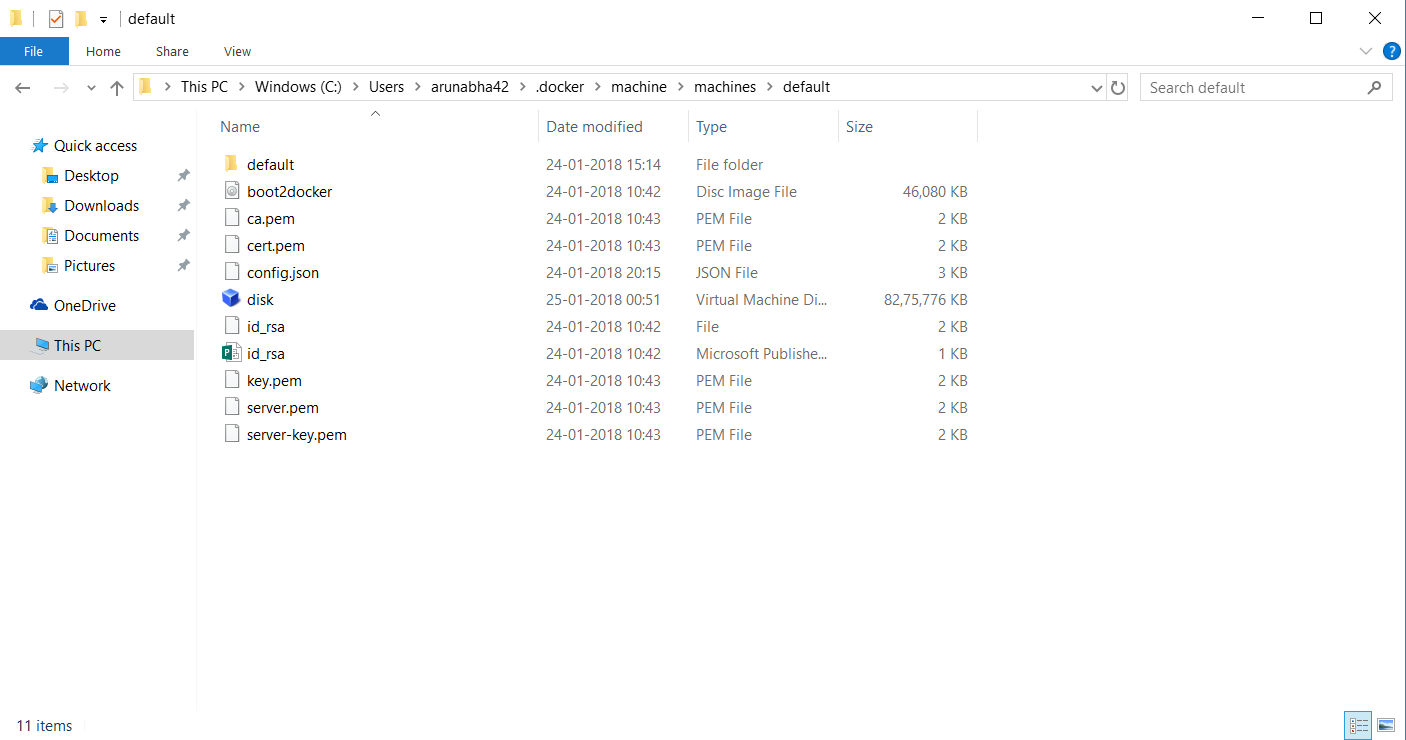
Any ideas as to why it’s getting stuck here? I’ve left the download on for about a good three hours.
I was also checking Task Manager for network usage and during the initial part there was network usage by the process called “VBoxHeadless” but now there’s no network usage by that process.
How do I troubleshoot this? Thanks!