Hi,
I am creating multispectral orthophotos based on images from a DJI Mavic 3M. Since the drone has a down-welling light sensor I am using: radiometric-calibration:camera+sun
The computed reflectance values look much too low for me.
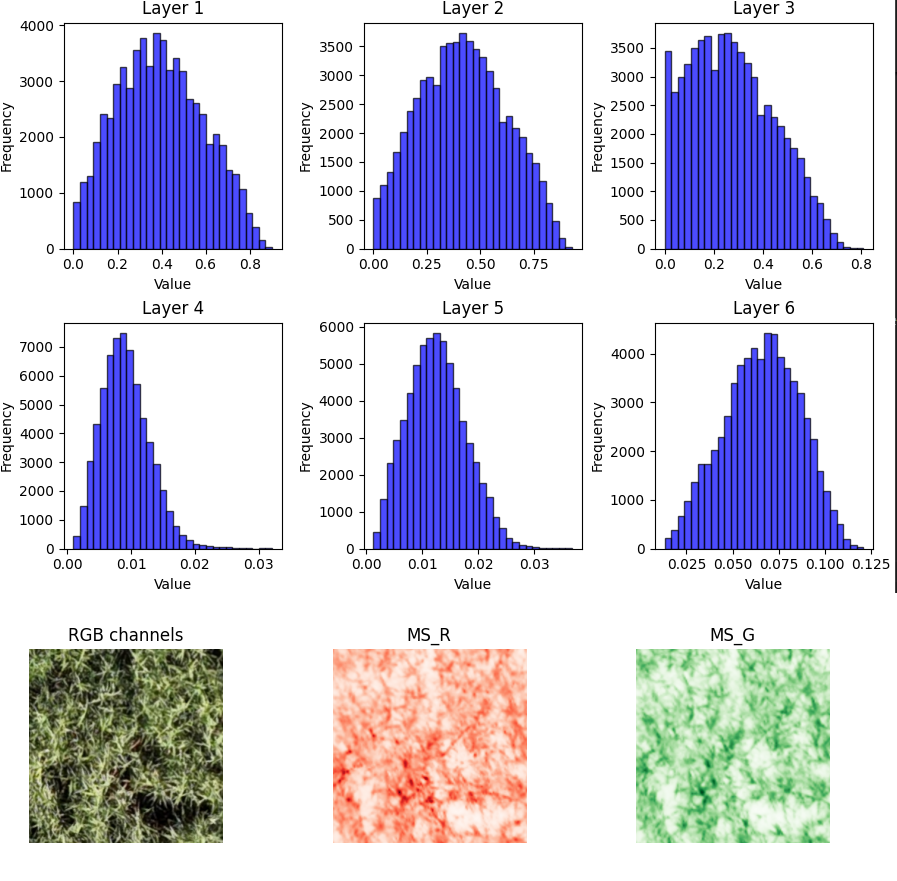
In the figure below layer 1-3 are RGB, normalized to values between 0 and 1 (via division by 255).
Layer 4-6 are Red, Green and NIR (obviously not standardized since it is already the reflectance value)
Only 1-3% reflectance for grassland vegetation seems one order of magnitude too low. What are your thoughts on that?
@Yario, i am getting the same issue and i didn’t find a solution to it yet. Grateful if somebody from ODM can cast light on it as it is very important to understand whether the extremely low reflectance values should be considered as correct.
I have no experience collecting data with the 3M and I have no idea what WebODM might be doing for the radcal, but glancing at the Image Processing Guide, it looks like Equation 9 on page 10 might be what you’re looking for. 3M Image Processing Guide. I also noticed in the WedODM github issues that resizing images was dropping exif data needed for radiometric calibration, but they might have solved this already, in case you are resizing. I’m currently looking for the radcal source code.
Have you tried normalizing (0-1) the MS images? This would be more of a band-aid fix. I wonder if the radcal is just missing the “Sensor Gain Adjustment” step?
DJI sensors do not have the conditions to determine absolute radiance and irradiance values, and the sensitivity between sensors (DLS and multispectral for the same band or between bands) on the same camera may be biased. This is explained in the processing guide shared by vonnonn. For this reason, and as I understand it, it is not possible to determine reflectance values directly, but rather relative values in vegetation indices following the processing guide.
For this same reason, perhaps other programs such as Pix4D declare the need to use calibration panels with DJI sensors for reflectance maps in temporal or between sensors comparisons where an absolute value is required. However, the proprietary nature of the calibration models in these programs does not allow us to see how the radiometric calibration is actually being performed.
I have an idea how to add calibration with a reflectance panel, using existing code in ODM. Maybe you could check if this is logical and would be feasible to implement.
As far as I understand the multispectral cameras of the M3M are “relatively” calibrated, but not absolutely. Analogy: we have distance measurements but do not know the unit (cm, m, inch …)
Because of that we can correctly compute self-calibrating indices like NDVI, but reflectance values are biased by a factor “B”.
If we have an image of a reflectance panel, and thus know the correct reflectance values, we can compute our correction factor “B”: B = correct_value / biased_value
But we cannot directly use the image of the reflection panel. First we need to apply all the correction with shutter speed, gain, vignetting, DLS… I think this is what the function
So for the WebODM GUI it would be great if there was an option to process a single image with dn_to_reflectance, then select a rectangle (the panel) and return the average pixel values (for each band) in the rectangle. Enter the known correct reflectance values for each spectral band (R,G, RE, NIR) and compute the correction factor.
Finally, multiply the correction factor(s) with the processed MS-Orthophoto
I am not sure, but I think the correction factor should be the same for all channels because the cameras are calibrated relatively (to each other) and the relationship is proportional/linear!?
Any flaws in this logic?