Post processing after ODM

Hi! :waving_hand:

First of all, this is my first time using ODM (and even flying a drone). So, I may have done less optimal choice for my flying missions, despite all the reading I did on this forum and around the Internet.

Project description

My project is to create a 3D map of a building scheduled for demolition. The building is 30 meters high with an interesting V shape. As I wanted to have a good resolution, I planned several missions (19 to be precise):

  • 2 global cross grid at different altitudes
  • 3 horizontal missions for the roof, balcony and pool
  • 14 missions for facades and angles between those facades

I used Mission Planner to generate the missions and Litchi for flying the drones, converting from Mission Planner to Litchi with this python script.

To reduce the time one site, I used 3 drones (and 18 batteries :grinning_face_with_smiling_eyes:) with some help to fly 2 at a time. In total, we kept 2115 pictures for the reconstruction.

The 3 drones are all DJI but with different cameras:

Mavic Air 2 Mavic Pro 2 Phantom 4
Focal length (mm) 4.5 10.3 8.8
Image Width (px) 4000 5472 5472
Image Height (px) 3000 3648 3648
Sensor Width (mm) 6.4 13.31 13.31
Sensor Height (mm) 4.8 8.88 8.88
Proportion 4/3 3/2 3/2

ODM reconstruction

For the reconstruction, I used the ODM GPU docker image.
I sticked to the default parameters.

First, I tried to reconstruct everything at once. It crashed after ~15hours with the Uh oh! Processing stopped because of strange values in the reconstruction. error.

Then, I reconstructed mission by mission. I remove a few problematic images presenting GPS coordinates aberration or having a tree masking 70% of the image.

Finally, I reconstructed everything at once successfullly in about 8 hours.

I kept all the logs and reports. I can do a pastebin if needed.

Questions

Now I have some questions.


Worse result with more images

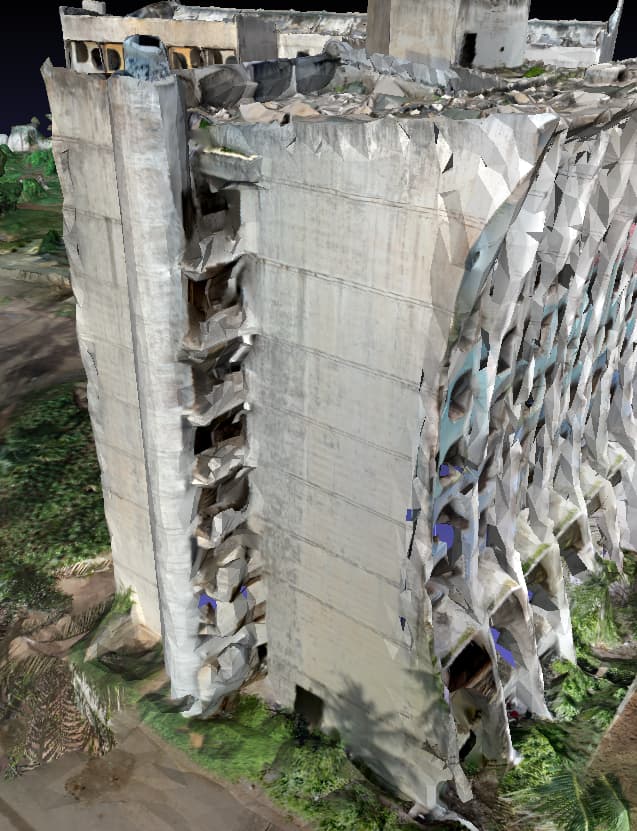
For some parts of the building, I had better results reconstructing mission by mission than whole at once. See these images:
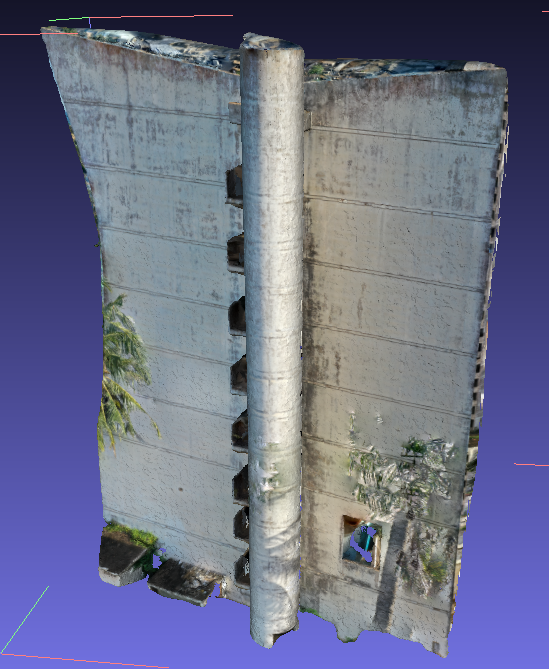
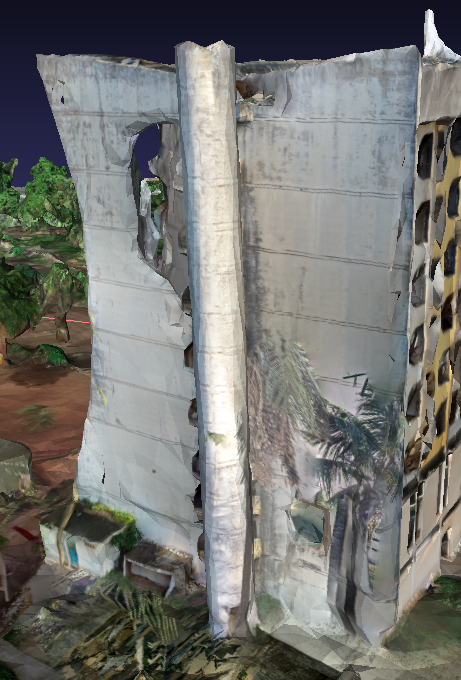
Single mission Whole at once
Hole in facade
Staircase resolution

What can create this?
Are there parameters to tweak to make this better?


Post processing outside of ODM

Do you have some tips to post process the result from ODM with other tools?

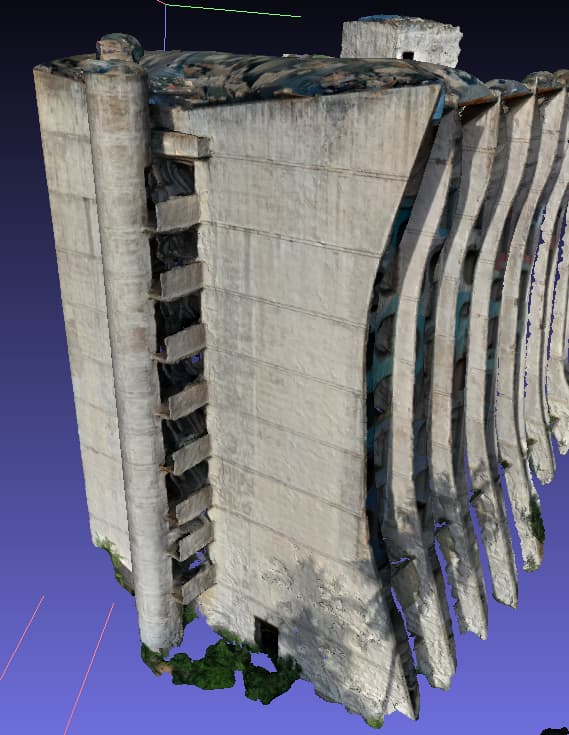
Especially, I would like to clean the artifacts above and fix wrong color pojections like the image below.
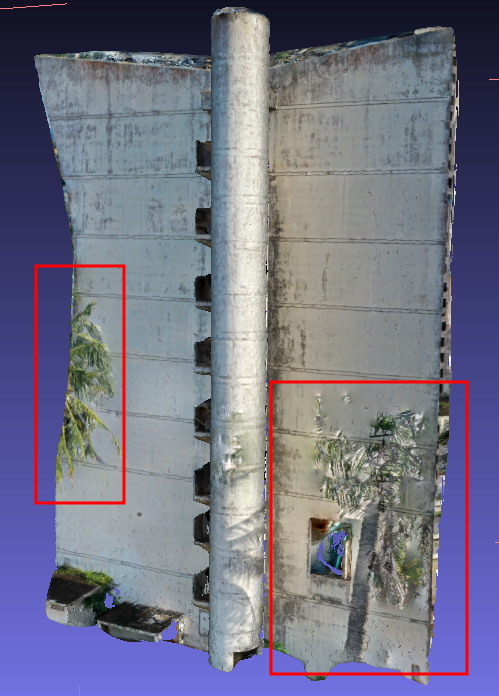
I thought of editing it in blender, but I have little experience with this tool.
I tried to realign a single mission result with the whole at once result in Meshlab but I could not make it work.


Anyway, a GREAT THANKS for a GREAT TOOL! :rocket:

4 Likes

Hello,

Great scanning project.

I think I remember reading somewhere on this forum that ODM can’t handle images from different cameras in the same dataset because it only does one calibration for all images.

If that’s the case and I’m not crazy, it’s certainly your problem.

Hi,

Thanks! :smile:

I looked about it before flying and it should not be a problem according to smathermather response on Using Images from Multiple Drones.

ODM creates a camera model by camera.

I did not explore exif parameters in depth but the drones are from the same brand. So I suppose there should not be any problem about different references for the same metadata.

1 Like

Did you have RTK, and if not, did you try using GCP’s to help ODM know that it is looking at the same thing in all the flights? (this will be painful to do in ODM, so you might try first with a sub-area of the whole site, as noted below)

Also, you might try upping the feature-quality and min-num-features and see if that helps. Given the long processing times, it might work to either do say two flights together to see if it helps, and then go from there, or you could do a sub-area of the whole scan so you can throw in all flights and see if it is working before you commit to processing the full run.

3 Likes

Try not using the GPU Docker image, as the CPU-based feature detection and extraction is far more robust (though slower).

Also, please post your Task Options to help folks suggesting improvements.

3 Likes

Not true, I’ve combined drone and DSLR images successfully. ODM does separate calibrations for each camera.

3 Likes

Correct. If you have multiple (non-fixed) cameras of the same type and want to be extra fussy/careful you may need to change your exif data to differentiate your different cameras of the same type. In this case, you have so many images and angles, it likely doesn’t matter (if this is even a problem you have).

3 Likes

@Tim

I did not have RTK nor GPS’s. I did not know about it to be honest. Thank you, it is noted for the future!
Unfortunatly, I don’t have the possibility to make another acquisition.

About that, could bad GPS metadata make the reconstruction worse?
I discovered and got A Comprehensive Guide To Use OpenDroneMap recently (after the acquisition :sweat_smile:). I read that GPS coordinates are not needed for ODM to work, but that they are used as hints when provided.
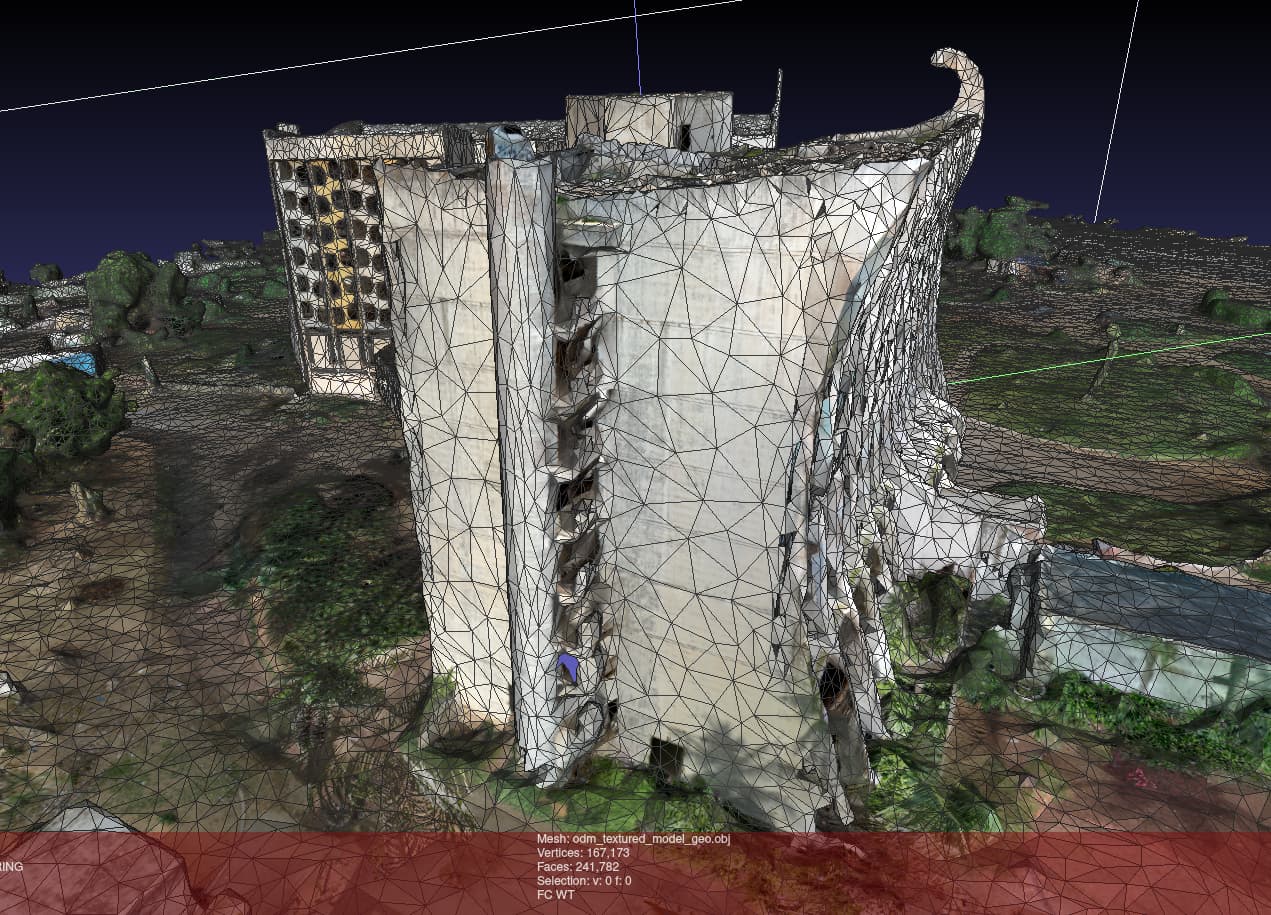
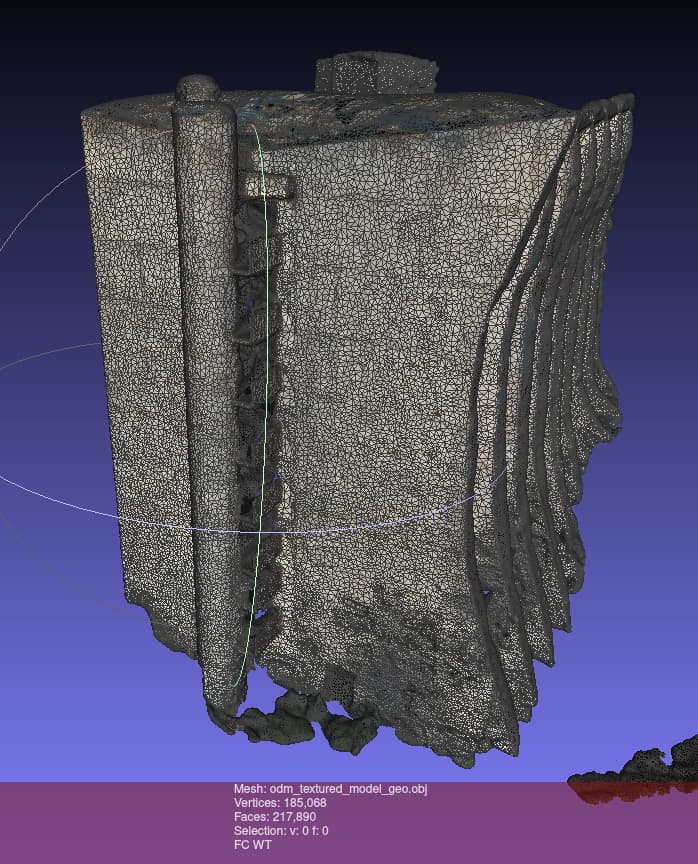
I have a GPS error of 1 meter or less for single missions reconstructions and ~7 meters for the whole reconstruction. Could I have better results without GPS? Or would it do more harm than good?

Thank you for pointing to feature-quality and min-num-features.
I will try to create a minimal group of missions that reproduce the problem of low resolution and test on it.

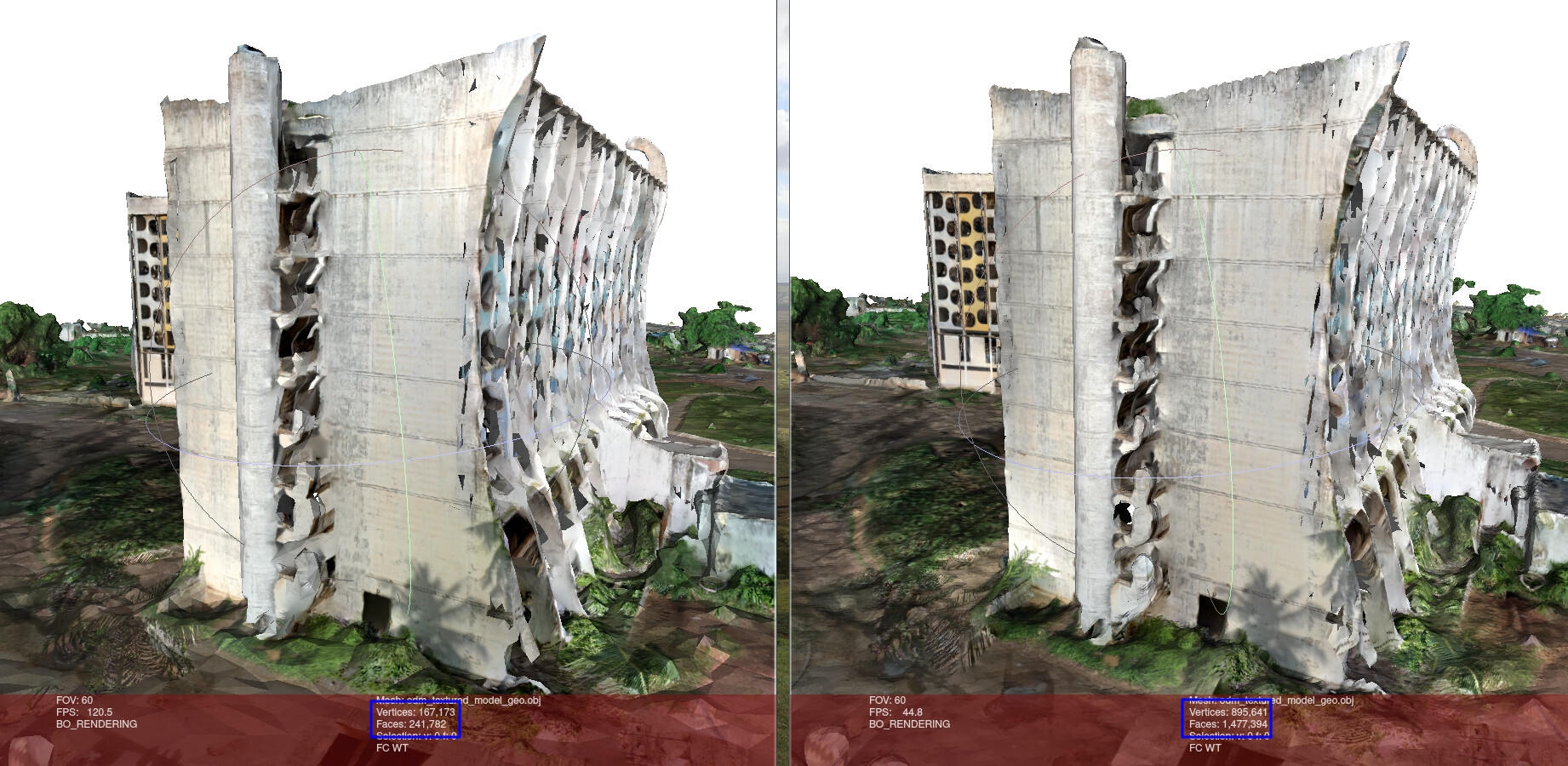
I just discovered mesh-octree-depth and mesh-size while reading the book to make a clear response. After investigating in meshlab, I am now pretty sure the default mesh-size is to low for the size of the scene. This would explain the low resolution for the entire mission.

We can see that both of the meshes have about the same number of vertices and faces.


@Saijin_Naib

Oh I clearly did not know about that. Thank you very much, I will try!

As said in the post (you might have missed it in the middle of my volume, sorry :sweat_smile:), I sticked to the default parameters until now. Is there something else that I can share ?


@smathermather

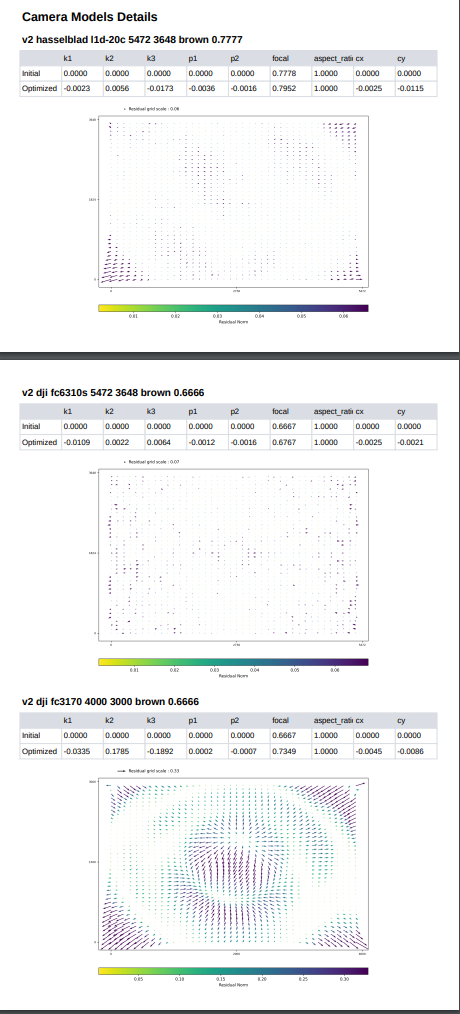
The three drones have different cameras and it seems that ODM had no problem to make the difference.
Here is the screenshot from the report:

The last one seems to have very strong distortions though.

1 Like

Merged with the post above as automatically recommanded by Discourse

1 Like

I did miss that :rofl:

Yes, if you can, start by raising feature-quality as high as you can process with.

You can also try tightening or relaxing GPS-accuracy if you have an idea of mean accuracy for the mission.

If you were moving quickly while capturing, enabling the Rolling Shutter correction might help a bit as well.

1 Like

That’s not surprising given the size of my message. :see_no_evil: But I tried to be thorough.

I was not moving at all (apart from wind for certain missions). I programmed the drone to stop and wait for 0.5 second, take the picture and again wait for 0.5 seconds for each waypoint in Litchi. So enabling Rolling Shutter should not be needed, I guess. But thanks for the advice anyway!

I just started with augmenting the mesh-size to 1 000 000 since it is less “computationally needy” and it should do a great difference, if I am not mistaken.

Thank you all very much for your advices. :rocket:
I will try changing the parameters one by one to well see the differences.
I will keep you posted.

2 Likes

You can do the GCP’s after the fact (the default ODM GCP interface is somewhat painful but the GCP editor pro improves on things a bit). By creating control points between images in different flights and then linking these to a particular location on the map, you let ODM know how the flights align with each other which makes it’s job easier and should lead to better alignment of the multiple flights. If you google info about GCP’s there are some good primers available form the major drone sites (eg pix4d, drone deploy, etc).

My hunch would be that that for GCP points on the buildings, you’d want to make sure to select points on say the middle of the roof, rather than a corner or edge, to prevent issues between the height of the building relative to the ground. But, I haven’t done a ton of work with GCP’s, so anyone else who knows what they are talking about more than I do, please weigh in on this.

1 Like

@Tim

Thanks for pointing out GCP Editor Pro! I didn’t know this tool.

If I understand it right, I would have to do a great deal of manual work, going throgh all my images and creating interest point. So, I will try this as a last resort.

Is it possible to use a GCP file wihtout any coordinates? Only referencing common points in different images. Because I won’t be able to go back on site to measure coordinates and satellite images are not that precise.

Is it possible to stop using GPS information altogether other than setting gps-accuracy very high ?


Updates

mesh-size 1 000 000

Contrary to what I expected, increasing the mesh-size parameter to 1 000 000 and re-running from odm_meshing (following The Missing Guide) had practically no impact. Here’s a comparison:

Minimal reproducible example

I am currently trying to create a minimal reproducible example with parts of images.

I am having a hard time getting finding out what to remove and what to keep, but I hope to iteratively find something I could test different options on.

This topic was automatically closed 30 days after the last reply. New replies are no longer allowed.

Hello again!
Thanks @smathermather for reopening the post! :pray:

Adventures since last post

So, I am back after different adventures:

  1. Unfortunate feature file corruption after 5 days of OpenSFM step. :see_no_evil: After some debugging and thanks to the help of an OpenSFM contibutor, I could fix the file and continue.

  2. Crash at the meshing step because each thread takes 25go of RAM/swap and I “only” have 160go of it. :sweat_smile: Easily fixed by setting max-concurrency to 6 for this step only.

    I took a look to the source code (permalink). Maybe this could be avoided by launching a single thread, tracking its memory usage and adapt max_workers before calling parallel_map. What do you think?

  3. Being a little bit greedy, I set the pc-quality argument as high at the same time as I increased min-num-features and featrue-quality. I maxed out my 2 TB hard drive. :sweat_smile:

Current issue

So, I started from the top with these parameters:

  • min-num-features: 13 000
  • feature-quality: ultra
  • gps-accuracy: 10
  • mesh-size: 1 000 000 (Am I still too greedy here?)

Now I a am facing a new issue. I investigated the source. I have an idea that may help but I would like your opinion about it.

Description

The process is crashing at the meshing step when it opens tiles.tif with rasterio in median_smoothing.

Here is the complete stack trace:

Stack trace
Traceback (most recent call last):
   File "/code/run.py", line 59, in <module>
     retcode = app.execute()
   File "/code/stages/odm_app.py", line 117, in execute
     raise e
   File "/code/stages/odm_app.py", line 81, in execute
     self.first_stage.run()
   File "/code/opendm/types.py", line 398, in run
     self.next_stage.run(outputs)
   File "/code/opendm/types.py", line 398, in run
     self.next_stage.run(outputs)
   File "/code/opendm/types.py", line 398, in run
     self.next_stage.run(outputs)
   [Previous line repeated 3 more times]
   File "/code/opendm/types.py", line 377, in run
     self.process(self.args, outputs)
   File "/code/stages/odm_meshing.py", line 54, in process
     mesh.create_25dmesh(tree.filtered_point_cloud, tree.odm_25dmesh,
   File "/code/opendm/mesh.py", line 25, in create_25dmesh
     commands.create_dem(
   File "/code/opendm/dem/commands.py", line 258, in create_dem
     median_smoothing(geotiff_path, output_path, num_workers=max_workers)
   File "/code/opendm/dem/commands.py", line 320, in median_smoothing
     arr = img.read()[0]
   File "rasterio/_io.pyx", line 336, in rasterio._io.DatasetReaderBase.read
numpy.core._exceptions.MemoryError: Unable to allocate 352. GiB for an array with shape (1, 257021, 367258) and data type float32

files.tmp.tif is 352 GiB. Gdal has no problem manage the size in gdal_translate and gdalbuildvrt. But then, trying to open tiles.tif (which is only 7.2 GB but has the same shape and type as files.tmp.tif) all at once with rasterio breaks.

Fix idea

I see that windowing is used in median_smoothing. Rasterio provides windowed reading and writing.
I think using these features should help. What do you think?

I could try it and make a PR if it helps. :smile:

2 Likes

That is always welcome. :smile:

Your thoughts on memory monitoring and thread control are compelling. A pull request for that would also be welcome.

Thanks for returning to this and updating the thread. That is always helpful.

2 Likes

For cross-reference, I open just opened a PR to optimize the memory use of median_smoothing.

(and @Saijin_Naib is so fast he already reacted on it :smile:)

2 Likes


Good test of my notifications :rofl:

2 Likes

Hello again! :waving_hand:

2.5D Mesh

I was able to run median_smoothing on my file that requested 352 GB of RAM using the PR I mentioned in my last comment. :white_check_mark:
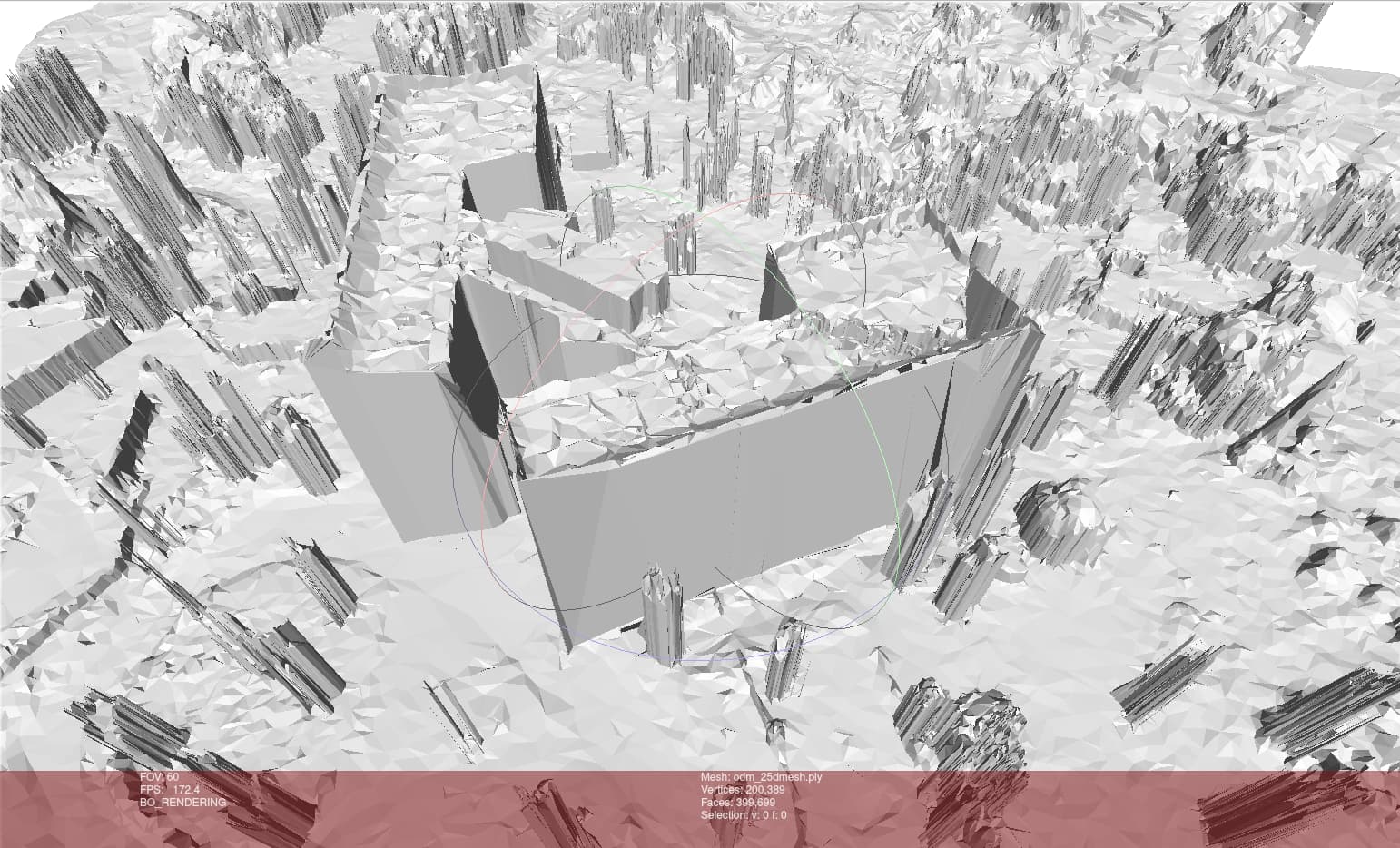
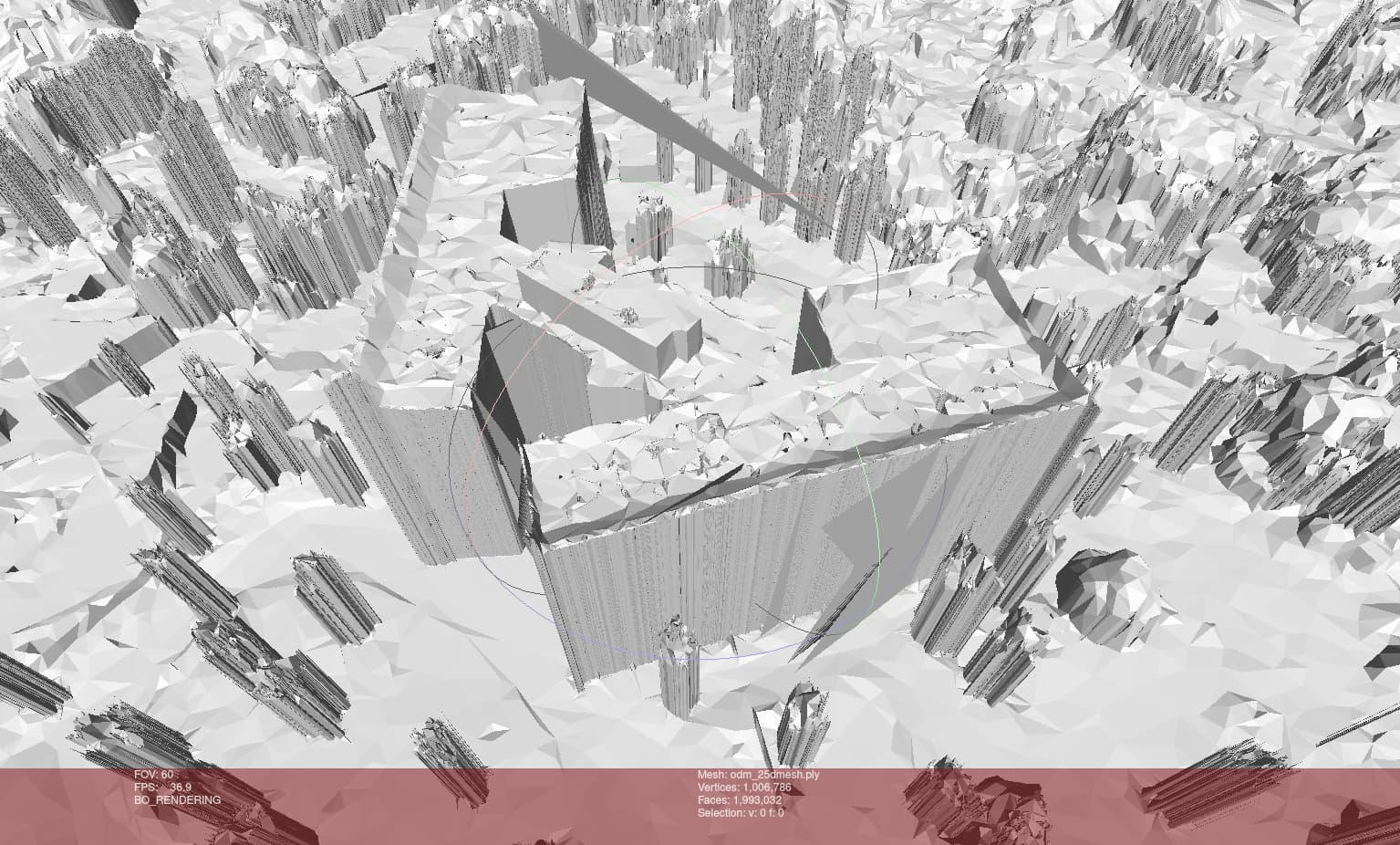
I then ran dem_to_mesh_gridded by hand. The result seems fine (even if I don’t really understand 2.5D meshes):

Old: initial processing on GPU with default parameters.
New: processing on CPU with increased parameters.

3D Mesh

Before continuing with the last steps, I had a look to the 3D Mesh.
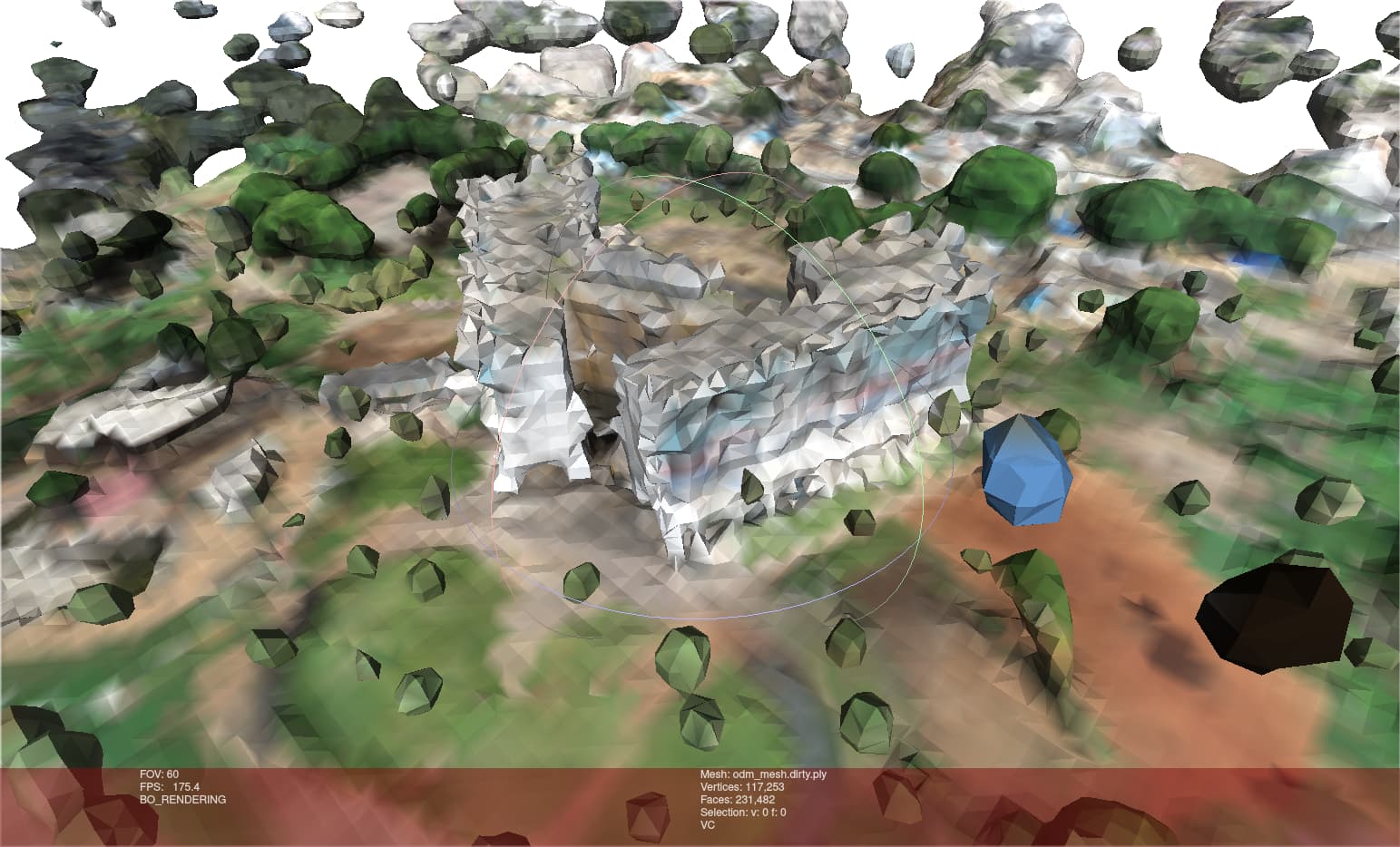
It is really bad. :face_with_head_bandage: An image is worth a thousand words, here is the odm_mesh.dirty.ply created by PoissonRecon:
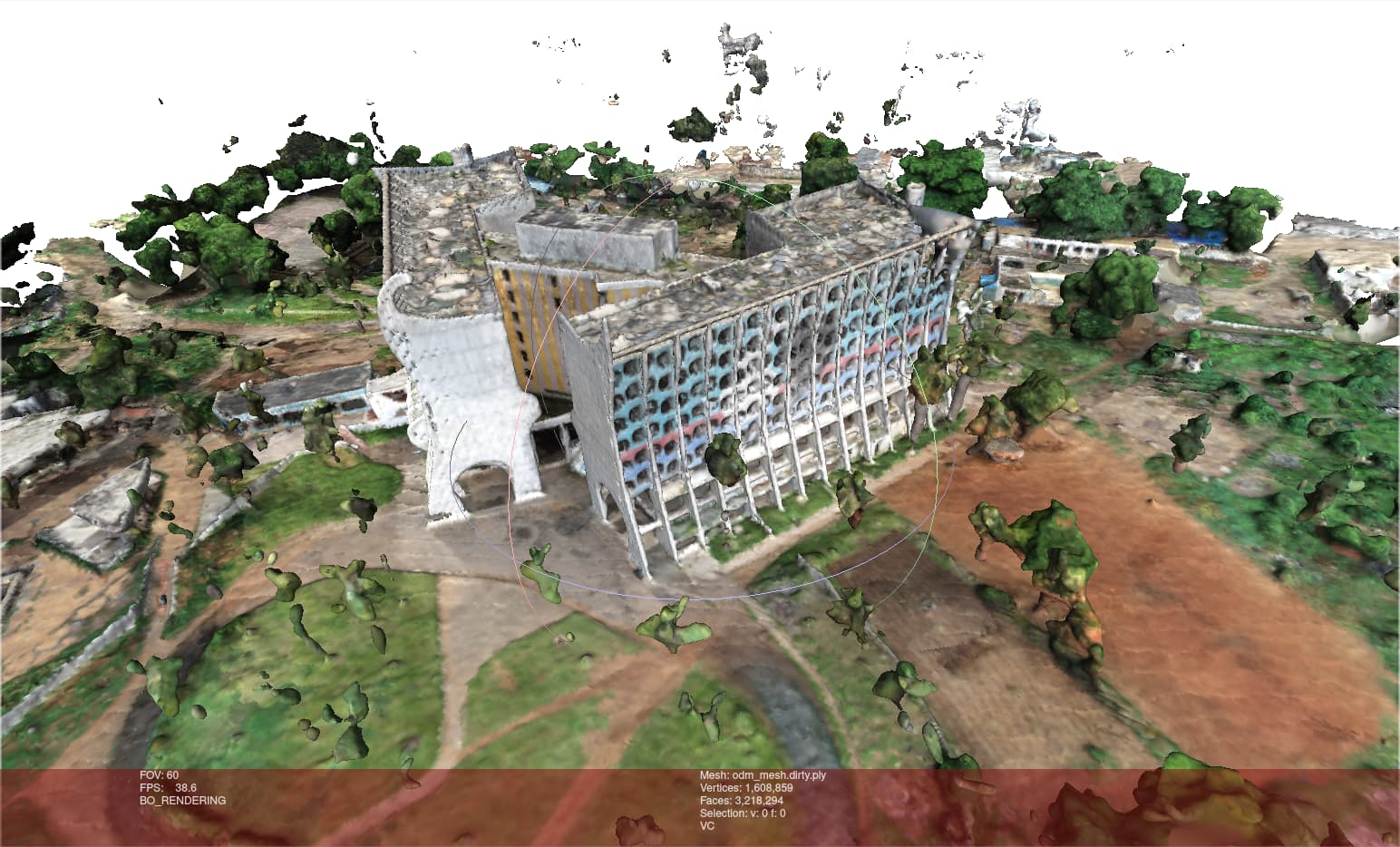
We can see that the new one has 14 times less vertices.

PoissonRecon

I ran it by hand with the same arguments plus --verbose. Here are the logs:

New PoissonRecon logs

*************************************************************
*************************************************************
** Running Screened Poisson Reconstruction (Version 13.8) **
*************************************************************
*************************************************************
        --bType 2
        --in /datasets/whole_hdp_features/odm_filterpoints/point_cloud.ply
        --depth 11
        --out /datasets/whole_hdp_features/odm_meshing/odm_mesh.dirty.ply
        --verbose
        --samplesPerNode 1.000000
        --pointWeight 4.000000
        --threads 15
        --linearFit
[WARNING] Src/FEMTree.Initialize.inl (Line 224)
          Initialize
          Found bad sample nodes: 76
Input Points / Samples: 82629645 / 84663
# Read input into tree:      58.8 (s),      25.3 (MB) /      25.3 (MB) / 26 (MB)
#   Got kernel density:       0.0 (s),      33.8 (MB) /      33.8 (MB) / 33 (MB)
#     Got normal field:       0.2 (s),      65.6 (MB) /      65.6 (MB) / 65 (MB)
Point weight / Estimated Measure: 2.96608e-10 / 0.0245086
#Initialized point interpolation constraints:       0.0 (s),      65.6 (MB) /      65.6 (MB) / 65 (MB)
#       Finalized tree:       0.3 (s),     150.3 (MB) /     150.3 (MB) / 150 (MB)
#  Set FEM constraints:       0.3 (s),     121.5 (MB) /     150.3 (MB) / 150 (MB)
#Set point constraints:       0.0 (s),     121.6 (MB) /     150.3 (MB) / 150 (MB)
Leaf Nodes / Active Nodes / Ghost Nodes / Dirichlet Supported Nodes: 1334425 / 1518776 / 6281 / 0
Memory Usage: 121.613 MB
Cycle[0] Depth[ 5/11]:  Updated constraints / Got system / Solved in:  0.001 /  0.025 /  0.008  (123.340 MB)    Nodes: 29791
Cycle[0] Depth[ 6/11]:  Updated constraints / Got system / Solved in:  0.001 /  0.008 /  0.021  (124.613 MB)    Nodes: 26672
Cycle[0] Depth[ 7/11]:  Updated constraints / Got system / Solved in:  0.002 /  0.012 /  0.022  (128.195 MB)    Nodes: 69072
Cycle[0] Depth[ 8/11]:  Updated constraints / Got system / Solved in:  0.004 /  0.022 /  0.033  (135.152 MB)    Nodes: 154112
Cycle[0] Depth[ 9/11]:  Updated constraints / Got system / Solved in:  0.008 /  0.041 /  0.063  (144.266 MB)    Nodes: 279192
Cycle[0] Depth[10/11]:  Updated constraints / Got system / Solved in:  0.011 /  0.070 /  0.095  (154.941 MB)    Nodes: 427408
Cycle[0] Depth[11/11]:  Updated constraints / Got system / Solved in:  0.002 /  0.119 /  0.111  (157.801 MB)    Nodes: 504560
# Linear system solved:       0.8 (s),     157.8 (MB) /     157.8 (MB) / 157 (MB)
Got average:       0.0 (s),     121.5 (MB) /     157.8 (MB) / 157 (MB)
Iso-Value: 4.977551e-01 = 4.11293e+07 / 8.26296e+07
Vertices / Polygons: 117253 / 231482
Corners / Vertices / Edges / Surface / Set Table / Copy Finer: 0.1 / 0.2 / 0.2 / 0.1 / 0.2 / 0.0 (s)
#        Got triangles:       3.2 (s),     219.6 (MB) /     219.6 (MB) / 221 (MB)
#          Total Solve:      63.8 (s),     219.6 (MB)

Old PoissonRecon logs

*************************************************************
*************************************************************
** Running Screened Poisson Reconstruction (Version 13.8) **
*************************************************************
*************************************************************
        --bType 2
        --in /datasets/whole_hdp/odm_filterpoints/point_cloud.ply
        --depth 11
        --out /datasets/whole_hdp/odm_meshing/odm_mesh.dirty.ply
        --verbose
        --samplesPerNode 1.000000
        --pointWeight 4.000000
        --threads 15
        --linearFit
Input Points / Samples: 72756452 / 1527913
# Read input into tree:      53.5 (s),     266.2 (MB) /     266.2 (MB) / 283 (MB)
#   Got kernel density:       0.3 (s),     317.2 (MB) /     317.2 (MB) / 317 (MB)
#     Got normal field:       3.1 (s),     622.9 (MB) /     622.9 (MB) / 622 (MB)
Point weight / Estimated Measure: 3.11733e-09 / 0.226806
#Initialized point interpolation constraints:       0.5 (s),     651.6 (MB) /     651.6 (MB) / 651 (MB)
#       Finalized tree:       2.5 (s),    1105.0 (MB) /    1105.0 (MB) / 1104 (MB)
#  Set FEM constraints:       3.1 (s),     912.9 (MB) /    1105.0 (MB) / 1104 (MB)
#Set point constraints:       0.2 (s),     912.9 (MB) /    1105.0 (MB) / 1104 (MB)
Leaf Nodes / Active Nodes / Ghost Nodes / Dirichlet Supported Nodes: 9217377 / 10529264 / 4881 / 0
Memory Usage: 912.863 MB
Cycle[0] Depth[ 5/11]:  Updated constraints / Got system / Solved in:  0.000 /  0.019 /  0.005  (953.328 MB)    Nodes: 29791
Cycle[0] Depth[ 6/11]:  Updated constraints / Got system / Solved in:  0.001 /  0.003 /  0.007  (953.328 MB)    Nodes: 26680
Cycle[0] Depth[ 7/11]:  Updated constraints / Got system / Solved in:  0.003 /  0.008 /  0.010  (953.328 MB)    Nodes: 80008
Cycle[0] Depth[ 8/11]:  Updated constraints / Got system / Solved in:  0.008 /  0.026 /  0.030  (960.188 MB)    Nodes: 267520
Cycle[0] Depth[ 9/11]:  Updated constraints / Got system / Solved in:  0.031 /  0.128 /  0.127  (1002.750 MB)   Nodes: 934088
Cycle[0] Depth[10/11]:  Updated constraints / Got system / Solved in:  0.133 /  0.450 /  0.446  (1059.285 MB)   Nodes: 2866584
Cycle[0] Depth[11/11]:  Updated constraints / Got system / Solved in:  0.001 /  1.217 /  1.171  (1090.719 MB)   Nodes: 6296680
# Linear system solved:       4.7 (s),    1090.7 (MB) /    1105.0 (MB) / 1104 (MB)
Got average:       0.2 (s),     880.6 (MB) /    1105.0 (MB) / 1104 (MB)
Iso-Value: 4.970288e-01 = 3.61621e+07 / 7.27565e+07
Vertices / Polygons: 1608859 / 3218294
Corners / Vertices / Edges / Surface / Set Table / Copy Finer: 0.4 / 2.0 / 0.7 / 0.7 / 1.2 / 0.2 (s)
#        Got triangles:      11.1 (s),    1220.4 (MB) /    1220.4 (MB) / 1222 (MB)
#          Total Solve:      80.6 (s),    1220.4 (MB)

I don’t know what is going on exactly in this programm. What are sample nodes, for example?
But the values seem strange, the number of points / samples in particular:

  • Old: 72M / 1 500k
  • New: 82M / 84k

Another major difference, there is a warning for the new process:

[WARNING] Src/FEMTree.Initialize.inl (Line 224)
          Initialize
          Found bad sample nodes: 76

Any idea what it implies? :thinking:

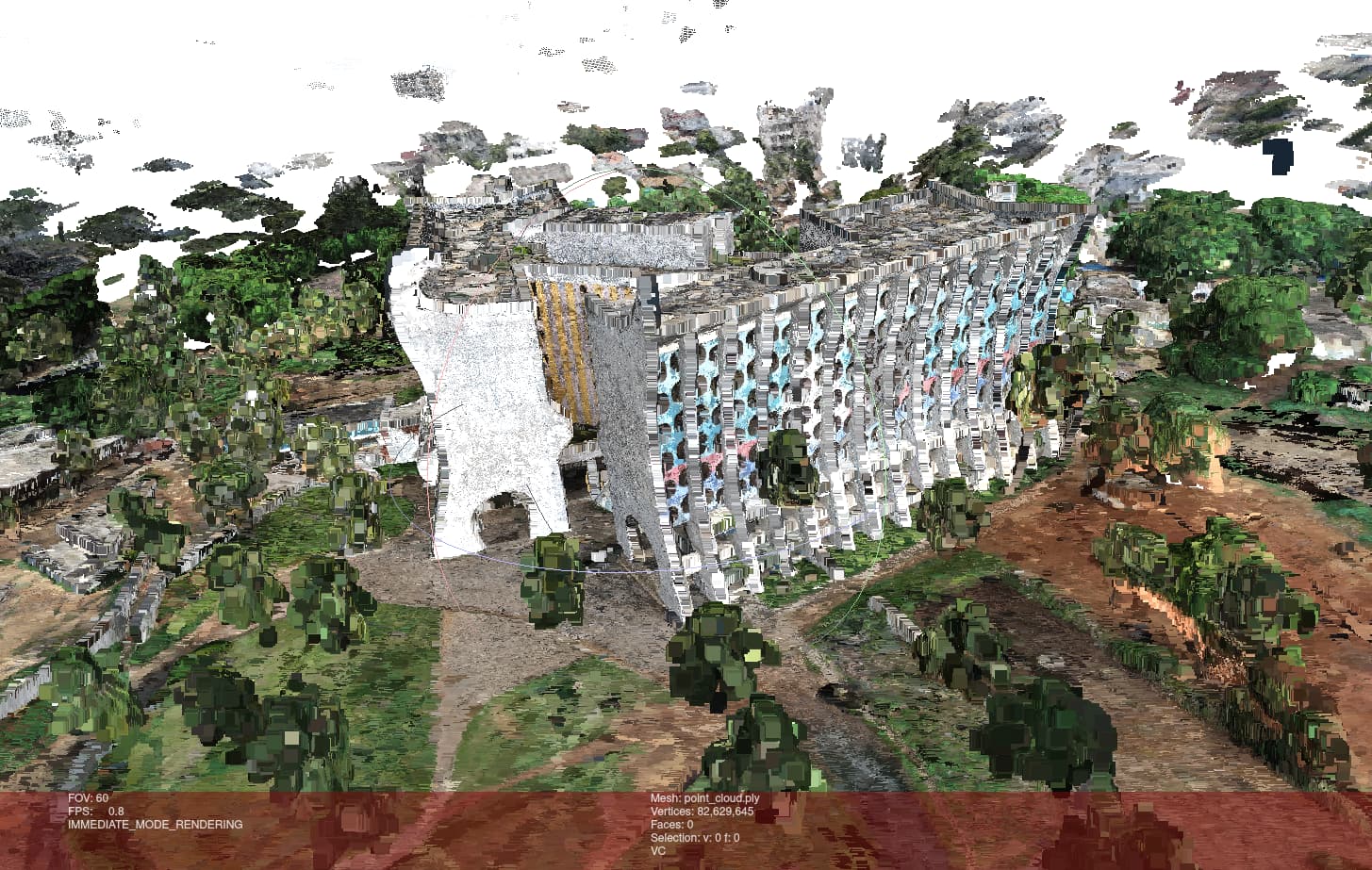
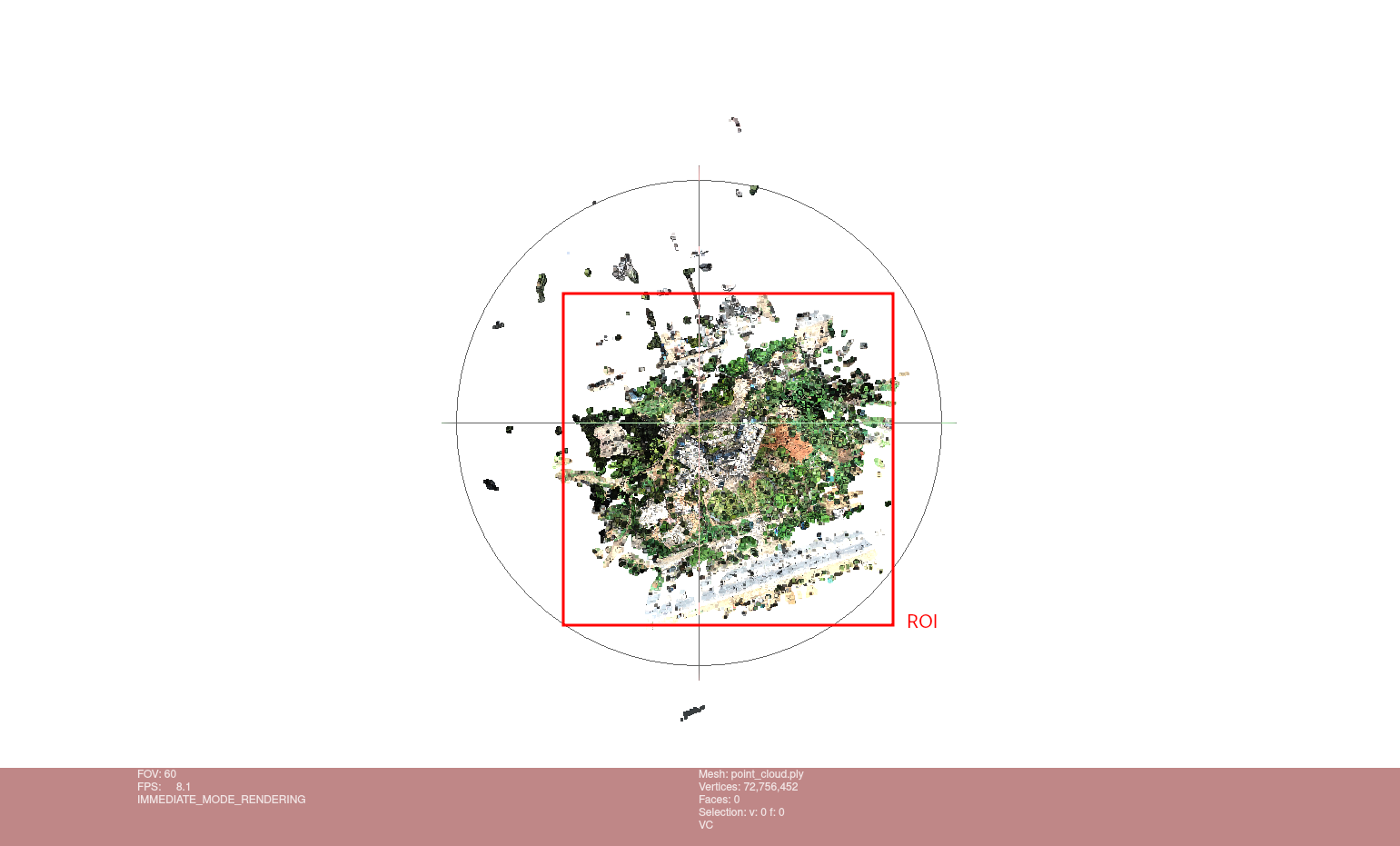
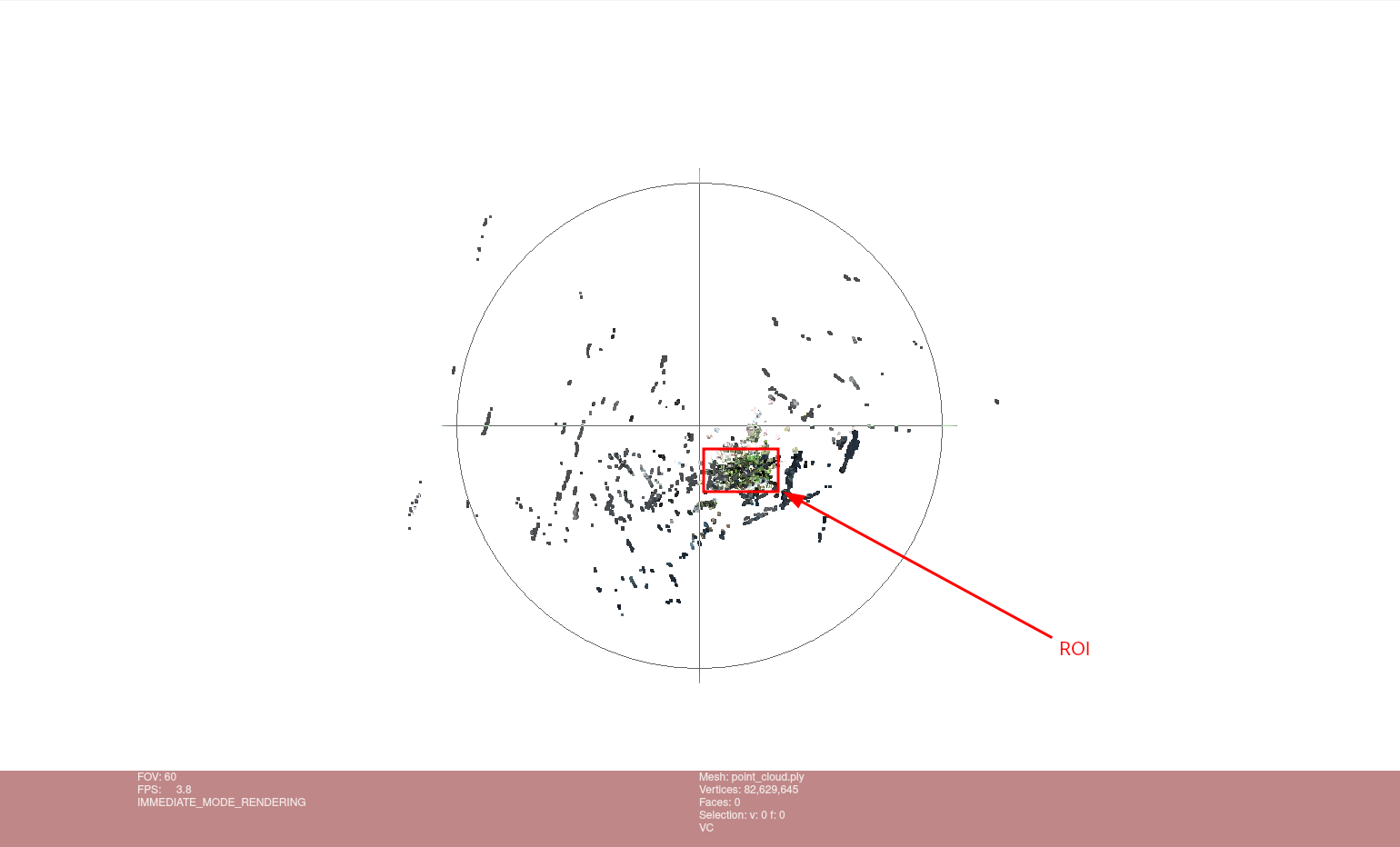
Point cloud

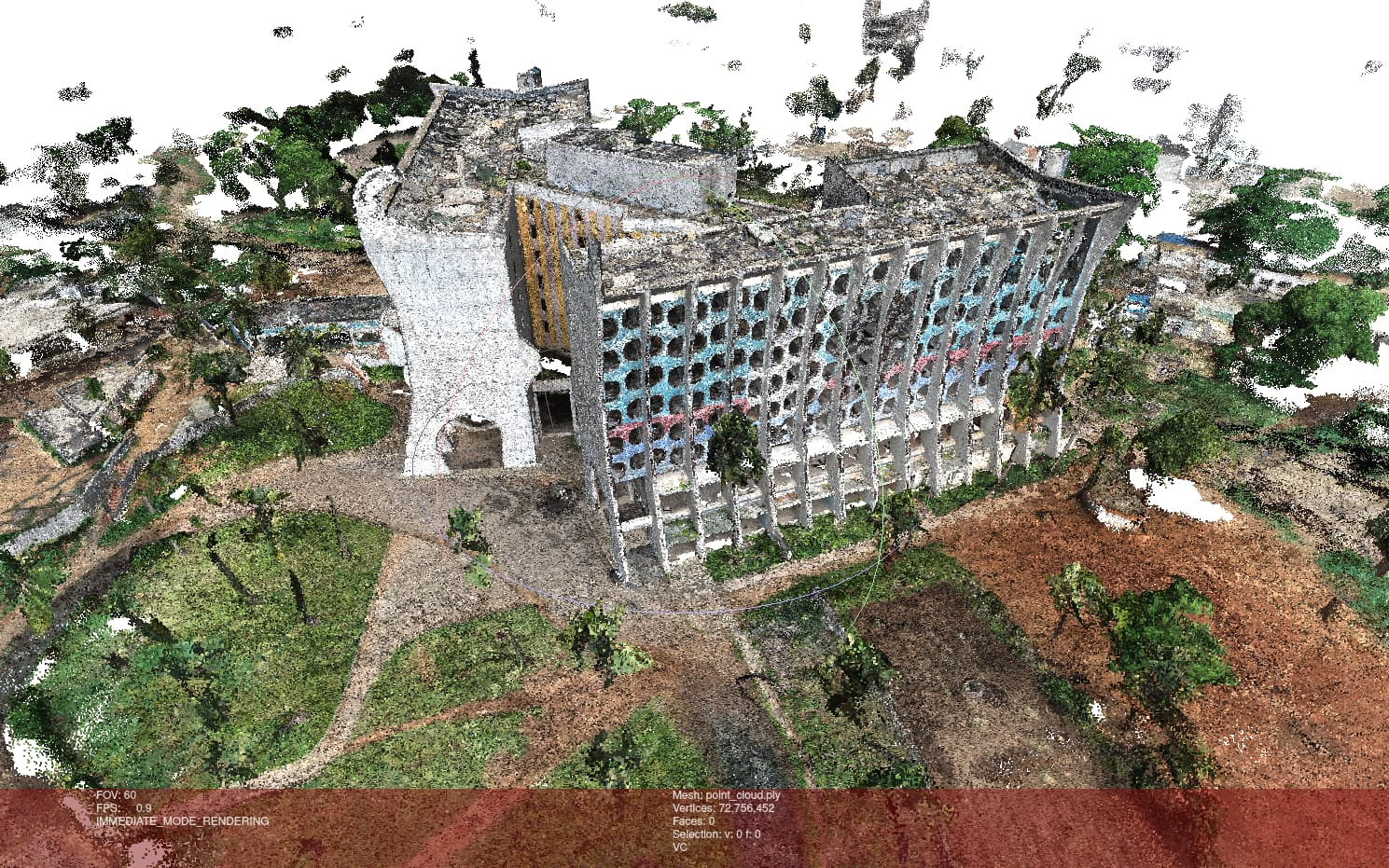
Finally, I took a look at the point clouds:

Both seems to be quite good.

The new one look strange because the points are big, but I can’t make them smaller. I suppose Meshlab’s point size is relative to the scene size. It would explain the bigger points since the scene is much more spreaded out for the new process:

Old point cloud bird’s-eye view New point cloud bird’s-eye view

Do you have any idea why PoissonRecon creates so few vertices? :thinking:

Anyway, have a nice day! :grin:

2 Likes