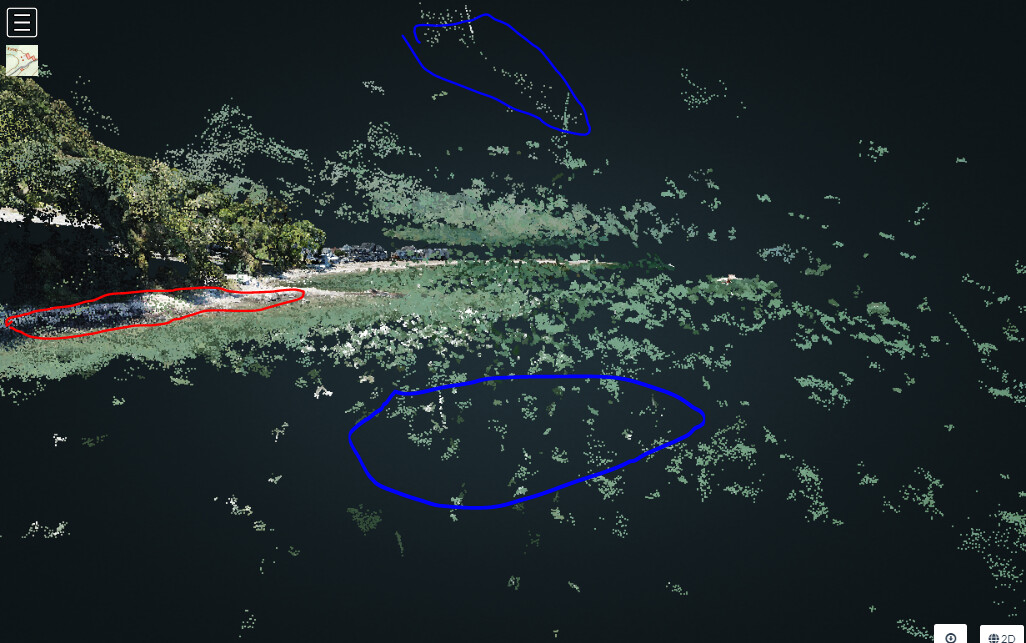
Question for your Sunday morning. More a general workflow question but I was looking for guidance. I have a coastal project that I’ve run that includes some images over the ocean and I notice that the point cloud is extremely noisy in these areas. I understand the reasoning behind that but as a result of many points in the cloud being incorrectly placed (above and below the true elevation of the calm water the mesh generated looks as if a tsunami is ready to crash on the coastal houses. (See Images below)
Point Cloud issues (Red is the seawall and blue are the points way above the surface and way below the surface.
I was going to download the mesh and attempt to edit it in Cloud compare (very new to that) but I was wondering how I could then feed the edited point cloud into WebODM Lightning and update the mesh so it uses the new cleaner point cloud to deliver it’s mesh output.
I assume this cleanup is pretty routine but I wondered if it was possible to add a boundary either digitized on the captured photos or from a shapefile that would limit the math during both point cloud generation and mesh creation, If the user has correct constant elevation info across a portion of the project could the user input the correct elevation coerce the software to not create these points that are clearly incorrect. For example if you capture a pond in your flight, it clearly has a set elevation across it’s surface, If some user input could force that elevation it would be unnecessary to clean up the mess afterwards.
One followup question: If I use cloud compare to edit the point cloud does it make sense to just delete the bad points or would I be better off altering the elevation to meet the points that are in line with expectations. I guess I was hoping to not lose any image pixels and deleting them would probably do that.
I did not know about them. Are they documented somewhere? I’d like to try them. Does the mask just not process within the masked area or does it assume a constant elevation and keep the points?
I also have an occasional point cloud issue that could be addressed (not water related) and would like the opportunity to clean up things and then run the mesh. I assume I can do that without having to re-run the entire project?
Found the mask functionality in the docs and will try that. Thanks for making me RTFM… haha. I still think it might be useful to force an elevation over an area of water so that we don’t lose coverage.
DSM and DTMs often are made of point xyz data and in order to help with the interpolation masks and breaklines are used to guide the interpolator to honor these locations. Masks would have a set elevation over the entire masked area (a pond for example) and breaklines would maybe represent streams (low points that get lower in the direction of flow). These are probably used for larger land area projects but why throw out points (pixels) if you can save them and keep the reconstruction intact.
I guess the problem is without GCPs and very accurate measurements on the images it might be hard to not end up with an elevated pond since we really can’t just use known elevations (from a topo sheet for example) and be assured the shoreline is in line with this elevation value based only on EXIF data.