Not able to view textured mesh

Hello!

I have a model I processed earlier (using WebODM Lightning), I was able to view the point cloud without issues, but the viewer crashed every time I tried to enable the textured mesh. I found the texture files to be ca 2.7 GB, and wrote it down to limitations to available RAM for the web browser - or something like that. I did get a brief glimpse of the model at one point, frozen, with lots of white areas on it before the page went blank.

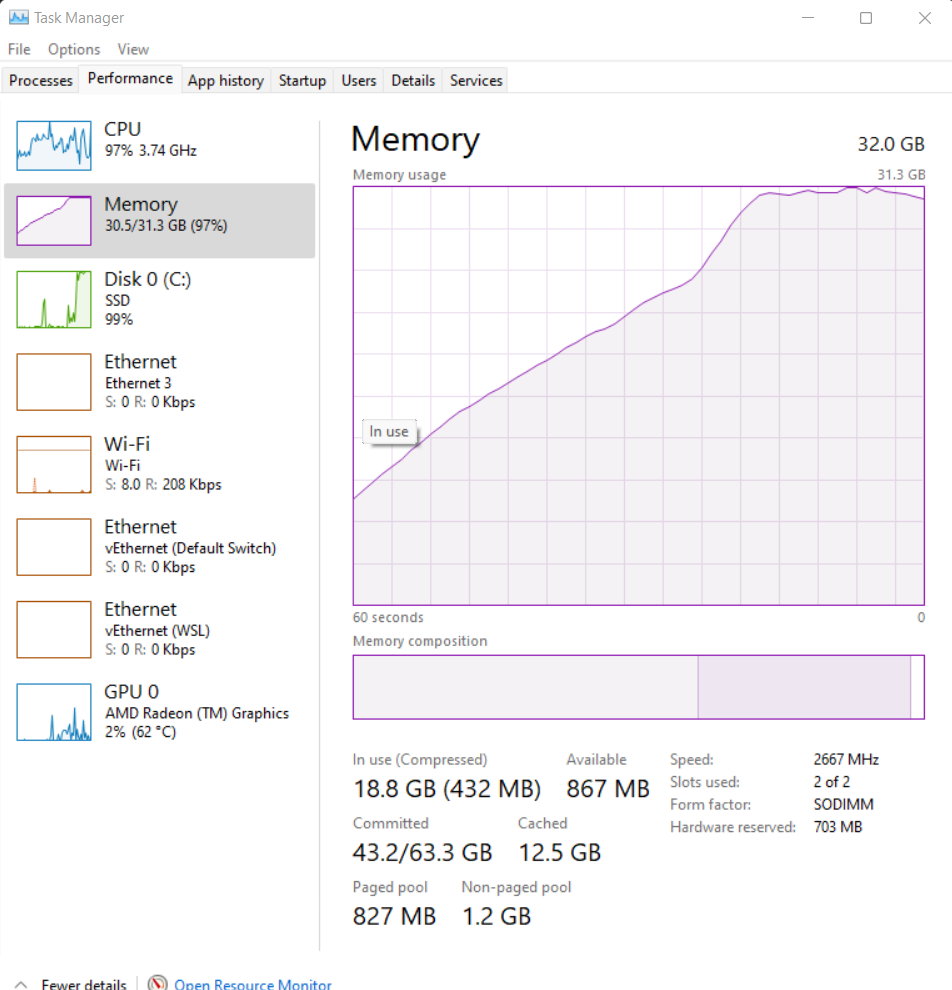
So I downloaded the textured mesh, and tried opening the .obj in Blender. No go, it quickly ate up my 32 GB RAM and crashed. Then I converted the .png files to .jpg with 90% compression and got them down to ca 600 MB. Updated the .mtl to reflect the new files. Same thing. I tried with 70% compression and was able to open the file but was still choking my laptop, and it had not loaded all the materials, leaving half of the model without any texture.

I compressed the files further in steps, using 20% jpeg compression in the end, and got the combined file size down to 164 MB. The file opens, but big patches are white. Still choking on RAM. The material files are viewable without issues in windows explorer, so it doesn’t seem like they themselves are corrupt, and the .mtl file look normal. It looks like Blender just skips loading material files …0026 to …0200.

I also tried opening the .obj with Meshlab, but it either crashes or turn out empty, just showing the stats in the sidebar.

Have anyone experienced something similar, or know of a workaround? Any suggestion on what to try?

On a side note but kind of related, is there a way to control the size / resolution of the texture files? Is it directly linked to GSD settings? I know there is an option to generate a single texture file, but I don’t know what’s worse, one massive file or hundreds of smaller ones.

Also, when using WebODM Lightning I get an option to generate a .glb-file. This file is usually a lot smaller and easier to handle when post processing for f.ex. Sketchfab, even though I want the high res model for other purposes too. How can I enable this on my desktop version? I see it is under the “Options and flags” in the documentation and in the Node JSON, but it is default to “false” and I can’t edit it or find it in the processing options / presets when starting a new task…

Screenshot when the file finally opens (compressed version):

RAM use when opening:
I’m happy to share the file on iCloud as well if someone wants to give it a go, but I have to switch computers first.

1 Like

On Desktop a .glb file is (should?) always be generated (that’s why the option is hidden) you can just download it from Download Assets.

2 Likes

Oh, that’s good to know!

Since when? I’ve looked through some older .zip files, but there are no .gbl files there… I’m in the process of changing computers (to one with less storage of course :persevere:), so I’ve got quite a few All.zip files on an external harddrive.

I see some have it others don’t…

The new laptop struggles utilizing the RAM by the looks of it, so I’ve not been able to process anything successfully locally yet. But the projects have been bigger than before too. I’ve tried changing the wsl.conf, but not tried other, smaller datasets, so I’ve used Lightning lately.

Thanks for the quick reply :slight_smile:

3 Likes

It’s a relatively new change, so makes sense that older files don’t have them.

2 Likes

When it comes to the original file though, do you think is something corrupted? I find it strange that the texture files all look OK individually, but the RAM useage ramps up to full, even though the file size has been compressed down to 164 MB - and they’re not being loaded properly in either Blender or Meshlab.

I have to admit that the whole .obj, .mtl and texture files is a bit of a mystery to me…

It is not super important either, I’m currently reprocessing the data anyways with Keep Unseen, as there were too many holes in this particular model.

1 Like

OK guys, here is an update.

It boils down to my computer not being powerful enough I guess. I reprocessed and had the same issues with the new model, also with the .glb-file. It too would only partially load the textures after banging it’s head against the RAM ceiling.

I tried uploading it to several different web based GLTF-viewers, but my browser would crash every site. One did show the textures loading though, and more than I had seen in Blender. In the end I got the core version of Nira and uploaded the original .obj and textures there, and it displays both versions nicely.

I still can’t understand why it takes more than 32 GB of RAM to open a 400 MB .glb model though. Not sure how to go about editing this one.

Thanks again for your feedback!

3 Likes

I cannot speak with authority, but if memory serves, it isn’t uncommon for graphics cards to take textures that are highly compressed on disks and expand them to a less compressed form in memory. Making it possible to maximise compression in card while working in real time is an area of active research.

In short: typically memory usage exceeds by a large factor storage on disk for most operations on a graphics card.

2 Likes

OK, that makes sense I suppose - something to that effect is happening for sure!

This might be a silly question, but is there any way to improve the built in viewer in WebODM to handle larger resolution textures / models? Like utilizing 3D tiles or something? Or does it all boil down to the computer specs? It would’ve been nice to inspect the textured mesh from the start.

1 Like

Very nice job!

3 Likes

This topic was automatically closed 30 days after the last reply. New replies are no longer allowed.