I think you have to download the plug-in version and activate it in WebODM. It was a while since I did it so I don’t remember everything.
But i prefer using it outside WebODM.
I think you have to download the plug-in version and activate it in WebODM. It was a while since I did it so I don’t remember everything.
But i prefer using it outside WebODM.
It should be in your start menu. Press the Window key and type “GCP Editor”. Does it show up?
Hi,
I am not sure about how to understand the Fair Use License in terms of commercial uses.
Can I distribute or re-sell some licenses ?
Lets say I have a pool of clients from various company that would benefit from such an app. Can I buy licenses for them (either with facturation or as a company gift) and provide them the tool ?
If I can do this should I buy licenses by groups depending on how many users by client (5 licenses for Client A at 59$ and 25 for client B at 149$) or can I buy let say 75 licenses (325 at 3149$) and then attribute the license to any users of any company as long as each license is used only once ?
If the license is binded to the user what happens for a company ? If the company gives a license to Alice and later on Alice resignes can it affect the License to Bob or does the company needs to acquire a new license ?
A lot of question but even slight answers would help me
No, UAV4GEO is the licensor. You would need permission to do so.
If the license is for the company, the company can use it company-wise, even if people leave the company (so you don’t need to buy a new license if Bob resigns).
Ok, this means the best I can do is recommand the soft to my customer and ask them to buy a/some license(s) by themselves correct ?

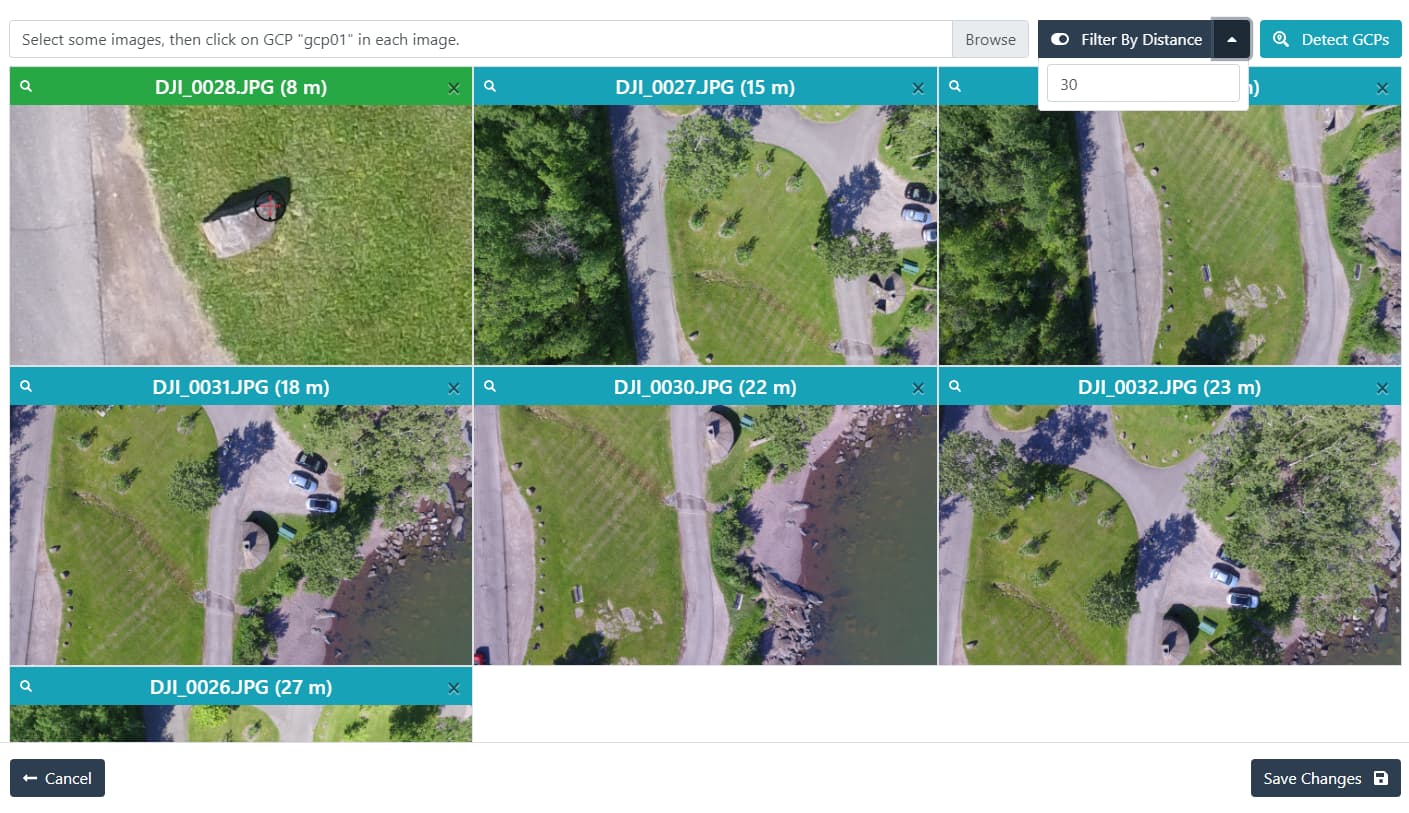
We now have support for filtering by distance, faster image loading (via pagination), and experimental auto-detection of GCPs via computer vision algorithms!
You can download the newest version (1.2.0) from GitHub - uav4geo/GCPEditorPro: Amazingly fast and simple ground control points interface. ◎

Absolutely massive stuff!
Many thanks Piero, sounds excellent! I’ve downloaded it and installed it but might be a while before I can test it out.
Would love to try out the markers too. Any thoughts on the best way to print them out? Have tried markers on foam boards but they are far too light and brittle.
awesome, just updated my pro version and I have some suggestions:

Cheers!
Great work on the new version. Can anybody help me with this: what are the instructions to add a custom base map to GCP Editor Pro? (WTMS/WMS/…)
I think there was a good discussion on the forum about this, I just don’t remember where it went, if you search a bit you might find it. I’ve never built markers myself, so I’m not sure.
Currently there’s no way to add custom WMS/WTMS basemaps.
Check here! They recommend not using a white mat since the contrast is too high, but instead a partially gray mat with black ArucoMarker print.
We are using the Find-GCP principle here for almost a year with astonishing results even if we made the GCP with White and not Gray base.
I would like to make a module for ODM to fully integrate it but for now I have not enough time for this and need more knowledge of ODM codebase and how module are pipelined.
Wonderful news!
I wonder if you could link it into the new system Piero added that uses HARR Cascades to do automated GCP Detection.
I just trained a model and submitted a PR myself:
I would like to use AruCo, too. How can I add this to WebODM / GCPeditorPro?? Any download?
Nothing quite yet, but folks can train their own AI ML detection model for GCP Editor Pro and submit it for inclusion by following the instructions here:
If you can’t donated datasets are also appreciated.
Can WEBodm import a text file in State Plane Coordinates Ohio North Zone FIPS 3401(FIPS:3401).
I tried to load this file, but to no avail and was directed to use one of the military zones(I work in U.S. Foot or WGS … again, I work in U.S. Foot.
Am I stuck with metric Military zone 17(?), or WGS, and if stuck with WGS, are there settings for format? Being a long time surveyor, I use DDD.MMSS.sss format
my file:(#### EASTING NORTHING ELEV)
FIPS:3401 (OHIO NORTH)
TB01 2345790 524987 1157.4
TB02 2345830 524970 1155.2
TB03 2345520 524980 1151.6
TB04 2346058 525048 1153.0
TB05 2346139 524893 1146.5
TB06 2345967 525148 1156.7
TB08 2346135 525424 1162.4
TB11 2346011 525932 1188.6
TB12 2345885 525917 1189.7
TB13 2345864 525924 1189.6
TB14 2345706 526022 1184.3
TB15 2345743 526020 1186.0
TB16 2345808 526026 1187.3
TB17 2345846 526033 1188.1
TB18 2345800 526083 1187.3
TB19 2345707 526079 1185.1
You can try this PROJ4 string, which I believe should be pretty close:
+proj=lcc +lat_1=40.43333333333333 +lat_2=41.7 +lat_0=39.66666666666666 +lon_0=-82.5 +x_0=600000 +y_0=0 +ellps=GRS80 +units=m +no_defs