I know this isn’t ODM related but Iwas wondering if any users of the new Mavic 3M might have a clue.
I don’t see much of an explanation on the internet or the dji user manual.
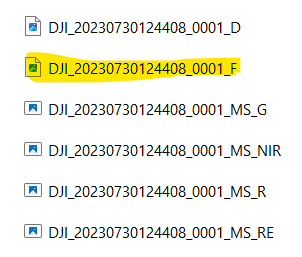
My question on the Mavic 3M. I flew a mission and the results for a single frame were below:
I understand what most of the naming conventions are MS_G is the green band, MS_NIR is the Near infrared band, etc. It also looks like the RGB images are stored with a D in the filename. My question is what does the F file represent. It looks like a pseudo color image with an example below.
Did you have response ?
I have the same question…
Moreover, on this « ndvi like » jpg, bands are not aligned from my m3m. Have you the same issue ?
(Note : question is out of webodm scope. The image is produced by the M3M)
I haven’t seen an _F file before, but one thing to check is whether you are capturing the JPG images with the regular RGB or in NDVI mode. I’m pretty sure if you have the live camera set to NDVI mode it will save all the jpg’s as NDVI so you won’t have any regular RGB outputs from the flight. This might be unrelated but I thought it worth mentioning since it tripped us up when we first got a dji multispec.