I am new to ODM and to the user forum. Let me quickly introduce myself. My name is Gabor, Geospatial Analyst for a Remote Sensing Company for Precision Agriculture. We are analysing the capability to switch from Pix4D to ODM. As an initial question, I would like to ask the power users, which setup is recommended to process ~ 100ha (GSD 1cm) for RGB orthomosaic generation in about 2 days. We use Python scripting and store our images on Google Cloud Platform.
Any shared experience is very welcome on our journey!
Hi Maurice, thanks for your quick response. The input dataset would be drone images, no aerial images: RGB sensor images would be ~1cm GSD (JPG) and multispectral images would be ~5cm GSD (geotiff). Both images sources would be uploaded in the same batch, if possible. A split process subdevides the entire flight survey into different field surveys by field boundariy geometry. Than the input data are currently submitted to Pix4D to create the orthosmosaics, which are submitted into our analytics pipeline and then stored at the Google Cloud Platform. Processing speed is of importance, so any recommendations about CPU, GPU or other performance ressources are crucial. As I could see, you can subdevide your ortho project in chunks and run them in parallel on different computers , using cloud computing. It would be great to get here more insights and user feedback, how well that process works like.
Currently we use our own hardware. Our weakest pc is 64CPU with 64Gb RAM, which would scale up to 96CPU and 623Gb RAM, depending on how many images we have to process. No GPU. Having in mind switching from Pix4D to ODM, there is maybe potential to spend some money for cloud computing. We use Python scripting and would create a Python based pipeline for ODM processing; WebODM Lightning would work well in this environment and is it the best cloud processing option for ODM? Are there any benchmarking data available to get an idea of the perfomance?
Best, Gabor
with RGB Image you mean standard drone photos? I tried webodm vs pix4d a while ago and with nearly the same results in time. There is also a Benchmark Thread where you can see comparisons of datasets, hardware, and also time. I guess this could help you a little bit. How many pictures do you have in general and how many megapixel does this images have?
Depending your question with the Cluster, this is indeed a really cool thing. You can setup as many nodes as you want and could also autoscale with a few different cloud providers like AWS. You can also use your own hardware for this. I am currently testing this part, but I am sure there are plenty of people who can tell you how good or bad it works.
Hi Maurice, thank you for the tip with benchmarking: I will have a look at. We are processing this week ~62K raw images; the average size of the fields is about 2ha; in general not more than 6ha. Let me check, how many megapixels does an average survey has.
Best,
Gabor
Looks like Maurice has given you some great information above.
The weakest machine sounds good, though I would try and aim for maybe 2-4GB RAM per thread, instead of 1GB. How much SWAP can you allocate? 1x RAM is okay, though I’ve had better luck with 2x or greater.
No GPU is fine. It can speed up processing to a great extent, but some folks are finding the results to be different than our CPU pipeline. It also can vastly increase your operating costs at the moment given how overpriced GPUs are at present.
I’m not terribly familiar with the API, unfortunately (not a programmer). Have you read our API docs here to see if it is suitable for your workflow?: https://docs.webodm.org/
From my understanding, it should be possible to enqueue jobs to Lightning via your private Token to authenticate.
I think Lightning is an incredible platform for processing, but we do have a few parameters capped or otherwise blocked to ensure the best Quality Of Service for all users, and to keep our pricing as low as possible. For instance, we cap GSD to 1cm/px, we don’t allow --ignore-gsd, we cap --feature-quality and --pc-quality to High instead of Ultra, we don’t do Split/Merge within Lightning at this time… If these are limitations that are not suitable for your workflow, you might be better served with spinning up your own Cloud or locally-hosted ODM processing nodes. We have some folks that use DigitalOcean like Lightning, while others use AWS or other hosts.
If you sign up for Lightning, you can try to process about 1000 images with your trial credits to get an idea of the speed.
We have a few plans, though we cap our maximum image count per Task to 3,000 images:
As for general speed difference, here’s two runs of the same data with the same parameters, local vs Lightning:
I never had 62K raw images within one dataset, what is your biggest dataset from one area?
I can tell you that the biggest area I created till now, had around 130 Acres, but not with this resolution, worked great.
Wow 62k images. So many picture for that area. Please let me sharing my experience
I have tested a dataset with orthophoto resolution is 2 cm/px, 115 images, 20 ha, finished in (just) 3 hours with default settings.
My computer spec :
Core i5 1,6 Ghz, 8 cores.
RAM 16 GB with 16 GB Linux swap.
SSD SATA3 Samsung Evo 870, 512 GB
MXLinux 19.4 with WebODM Docker.
Hi ichsan2895, thank you for sharing your experience. Do you have already tested ClusterODM, using several NodeODM in parallel on different machines? That is something, we are interested to explore.
Hi Saijin,
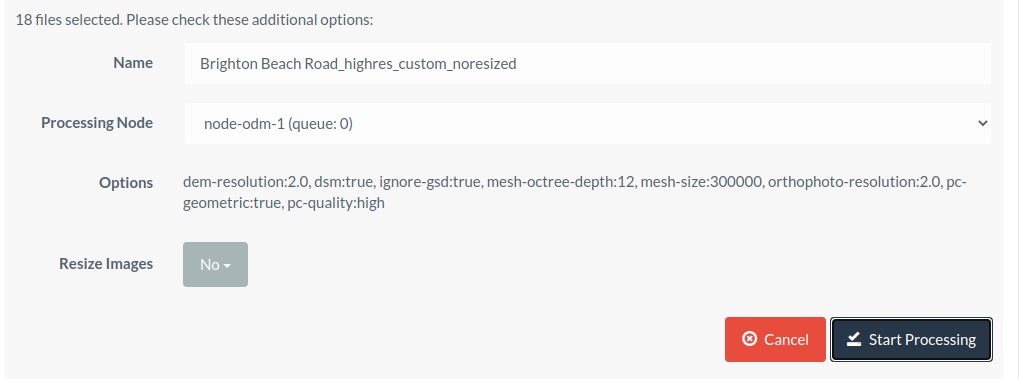
thanks for your answer; is it possible to give us a brief insight into these 3 settings? -ignore-gsd, we cap --feature-quality and --pc-quality to High instead of Ultra
Sorry, I never test ClusterODM despite I also have interest of that. I want to study how to do distributed ODM, but I still not understand the official documentation especially networking section.
You will never need this. Don’t use it. It will break things in unexpected and hard to figure out ways. It isn’t a problem that we have this blocked on Lightning, but I was including it for the sake of completeness.
What is different between “Resize images” (if yes, the default is 2048 pixels) and “Feature quality”?
If I have a photo with 3840 x 2160 pixels, then I resize to 2048 pixels, If I set feature quality is high, which ODM will use for reconstruction? 3840/2 or 2048/2 ?
The latter (resized dimensions / quality factor). The Resize Images during upload for processing sets that image size for everything that comes after. So, later on in the processing pipeline, your quality factors are scaled off of the resized image dimensions.
Hi Saijin, ok thanks for sharing all the info. I think I get the picture; for the sake of not extending to much processing times, the setting “high” for --pc-quality and --feature-quality does the job in a satisfactory manner in most cases. Is that assumption correct? I also would like to confirm with you the --ignore-gsd option; this option would be used, if you don’t want to get the “native” GSD from the survey. Deactivating this feature ignores automatically --orthophoto-resolution as you already defined the output GSD, correct?
--ignore-gsd also disables a number of other optimizations that will almost always cause memory consumption to spiral out of control. It has its purpose, but OpenDroneMap has a very robust estimation of GSD and I’ve yet to see it be wrong. In other words, forget it exists.
--orthophoto-resolution and --dem-resolution are still taken into account. However, they can not go finer than the calculated GSD (plus a bit of a safety margin).
So for instance, if your survey was 12MP at 400ft AGL / 120m AGL with an effective GSD of 4.33cm/px and you set it to 1cm/px without--ignore-gsd, --orthophoto-resolution and --dem-resolution can not go finer than 4.33cm/px. However, in that same situation, if you set them to 10cm/px, they will go coarser.
If you set them finer with --ignore-gsd, you can go finer, but you’re just interpolating and making up fake data. It has no value in such cases, I don’t think.
Hi Saijin, that is so useful information! Especially your use case, having a higher GSD for --orthophoto-resolution and --dem-resolution. Pls let me ask you; we are not interested in precise elevation output data and want just to have a DEM, that serves us to create an acurate RGB ortho.Having an RGB ortho with 1cm GSD, would it make sense to define --dem-resolution with a value of 2 to speed up processing or do you recommend to leave it “as is” (=1 cm GSD) as this step doesn’t consume a lot of processing time and a 2cm GSD DEM would lower significantly the ortho image quality.
Best,
Gabor