I’m running WebODM on Docker Desktop on Windows. I’ve allocated 5 CPU cores and 20GB RAM for Docker, but the processing node only uses 1 core and less than 2GB of memory for the task. Is that the resource limit that one processing node can utilize, or is there a way to increase this limit? Should I look for ClusterODM to split the task to multiple nodes, even though they are all running on one machine? Thanks.
You didn’t mention what size (how many images at what resolution) your project has.
But it can easily be that during some stages CPU usage is pretty low at times.
However, 5 cores and 20Gbyte of memory is very little.
If the process doesn’t fail it may take a long time to process with so few resources. At some stages of the process CPU and memory will be intensely used.
GPU generally only for very short periods, but then with 100% load.
1 Like
It’s a 1080p video 1m31s long of a drone that I filmed with my smart phone, just to test whether ODM can render its 3D model. Didn’t know 5 cores are considered few, but yes it did not even use 2 cores in my case. So it really depends on the stage of processing?
Here a graph of the hardware usage during a process:
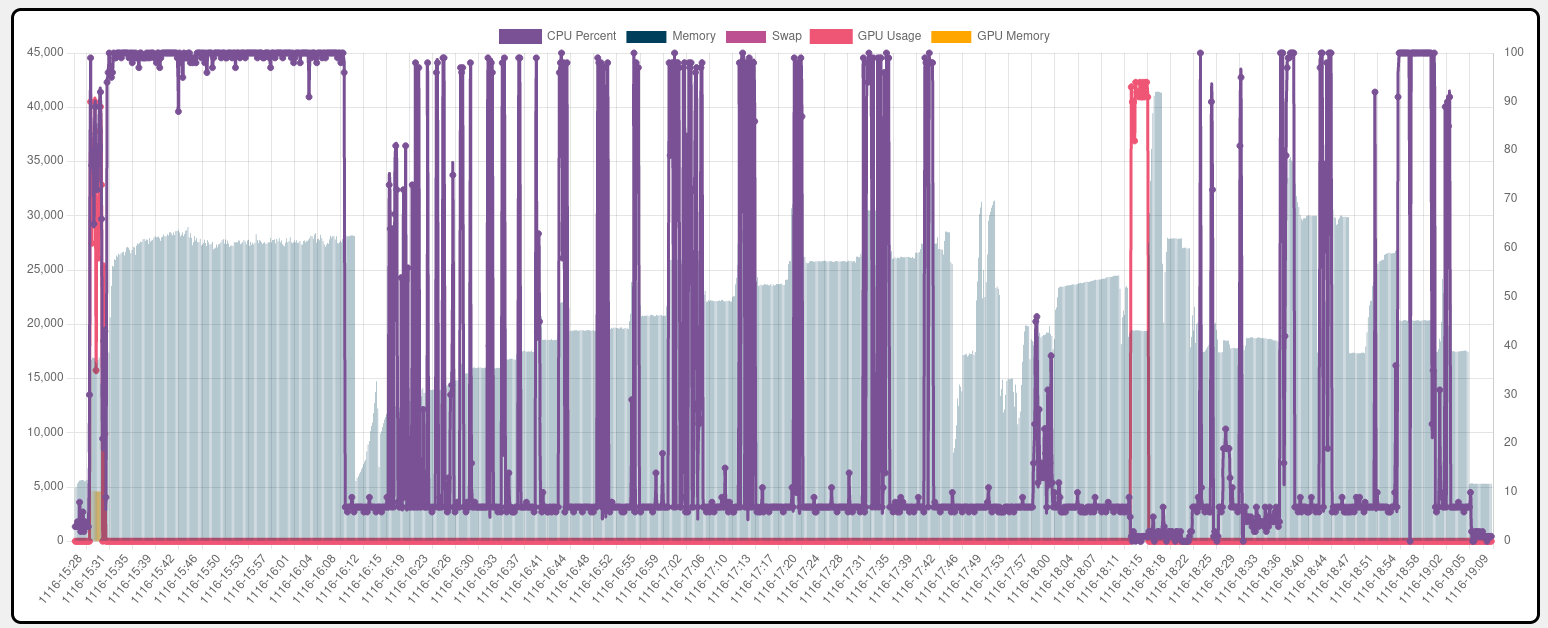
The purple line is CPU usage, the red line GPU usage and the light blue bars in the back is the memory usage.
Depending on the size of your project some parts can be much, much longer or shorter. Also depending on your settings.
In the center third you can see the many spikes in CPU usage. If you were to watch that on the windows task manager, you would probably have to stare for minutes to catch one of the spikes.
In between the spikes only 1 or 2 cores are used.
Also see the red line only spikes twice during the whole project run. Those are the only parts that the GPU can contribute.
And you can expect that a process takes from 1-2 hours up to weeks. Depending on your settings and the images you use.
If the swap/pagefile settings in Docker or Windows aren’t set properly or the pagefile resides on an HDD and allocated memory is little, processing times will grow towards eternity.
If you have doubts about your settings, first make sure that your setup works at all. Under
you can find test datasets that are known to work. Run a small one <100 images and you know your setup works.
4 Likes
This topic was automatically closed 30 days after the last reply. New replies are no longer allowed.