Can anyone guide me to a good description of how best to use GPS markers in an aerial survey and also how to use the coordinates recorded on the ground in the orthomap creation process in WebODM? My latest job requires more positional accuracy and also the use of a scale rod somewhere in the resulting map.
Distribute them well: towards the edge of your survey area (but not all the way on the edge) as well as center. Five is enough, so if it’s a rectangular area, get some points near the corners and one near the center.
If there’s a fair amount of relief / Z variance, make sure your GCPs are also well distributed across the vertical.
In theory, the spec allows you to not specify an elevation for GCPs. In practice, I find this doesn’t work well.
If the relative vertical accuracy is to the spec you need, then you shouldn’t have any challenges. Otherwise, you’re probably better off processing without GCPs and then using QGIS or other software to post process the images to match GCPs horizontally.
I reason that with the GPS locations of each of the 5 or so markers, one can obtain the elevation above mean sea level from Google Earth at each location. I would expect that to be accurate enough for the ‘z’ factor in the file. What I have yet to try out is creating the GCP file in the first place and using which format WGS84 etc. The guide I was directed to suggests one, so I will have a go and come back with any queries. Thank you.
In your initial post you state that you need more positional accuracy and therefore want to use GCPs. What is the required / requested accuracy? Do you want the accuracy to be in XYZ or just XY? I don’t think using the “z” from Google Earth is the best datasource.
Lot’s of governments publish (3D) data as open data. I know in the Netherlands we’re a bit spoiled with the amount of open datasets. For example, the whole country is available as a digital elevation map (every 0.5m a x y z measurement) in geotiffs and LAS. Also high resolution aerial orthophotos are provided (GSD 8cm). From these two sets it’s possible to “make / create” your own GCP values. Maybe your location / country provides similar sets.
However: my recommendation if you want to obtain higher accuracy:
(- Use RTK on your drone?)
Use CGPs and measure them in the field with a (external) gnss rtk receiver
Thanks, but I don’t have any RTK devices. If the ‘z’ elevation of each GCP in an area is not accurate, does that affect the knitting together of the photos in the X and Y directions? I am in Cornwall, UK so will try and find some more accurate data sources for elevations. There is LIDAR based DTM data for my area so I would hope it is possible and freely available. To answer your question, I need accuracy in the X-Y plane for accurate location of map features rather than elevation (Z) data. If that is the case, can I leave out the Z figure and just use the UTM Easting and Northing figures? Will the GCP file work without the Z data?
You said earlier that You have markers but now You saying that You do not have any RTK equipment so how do You measure precise position of the markers ?
I have a set of markers but no roaming GPS station to record the position with cm precision. Instead, I take a photo of each of the 5 markers on the ground using the drone (in my hand) when it is connected to 22 satellites. This gives me about a 1-2m accuracy.
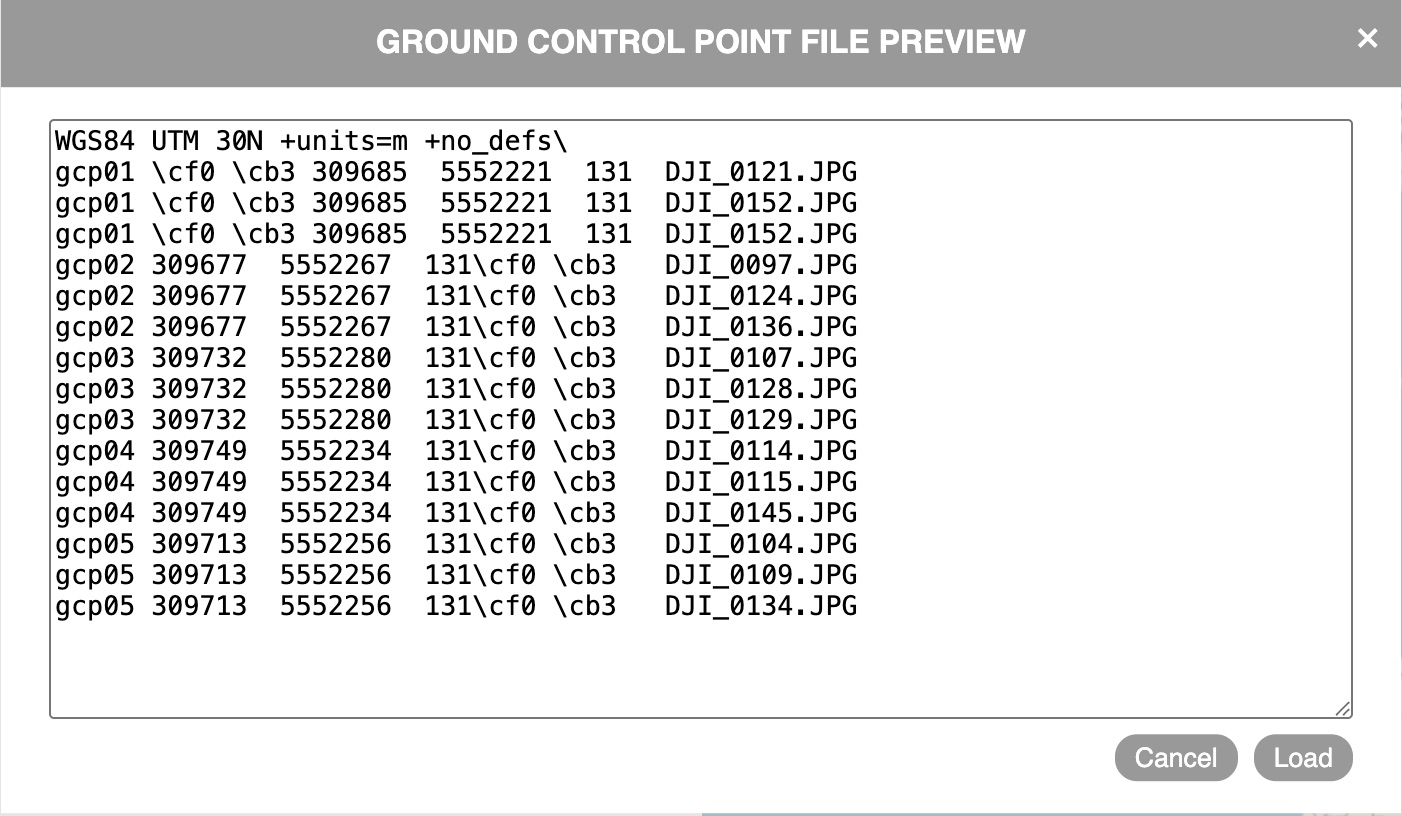
I followed the format shown in the guidance but it did not like something. So I changed it to the following and that did not give any errors, except that there are now additional characters in each line in the file. I guess something is not as it should be.
Having done all that, I am having trouble starting the process going since if I load all the survey images in the main dashboard as normal, then before pressing Review, I go the GCP interface to load the txt file and the marker specific photos (15 of them), then I’m not clear what to do next. There are instructions that suggest I do something on the big map to the side but all the information is already in the txt file and the linked photos. If I return to the main dashboard, all the uploaded photos have gone. There is clearly a correct sequence for doing these two parts.
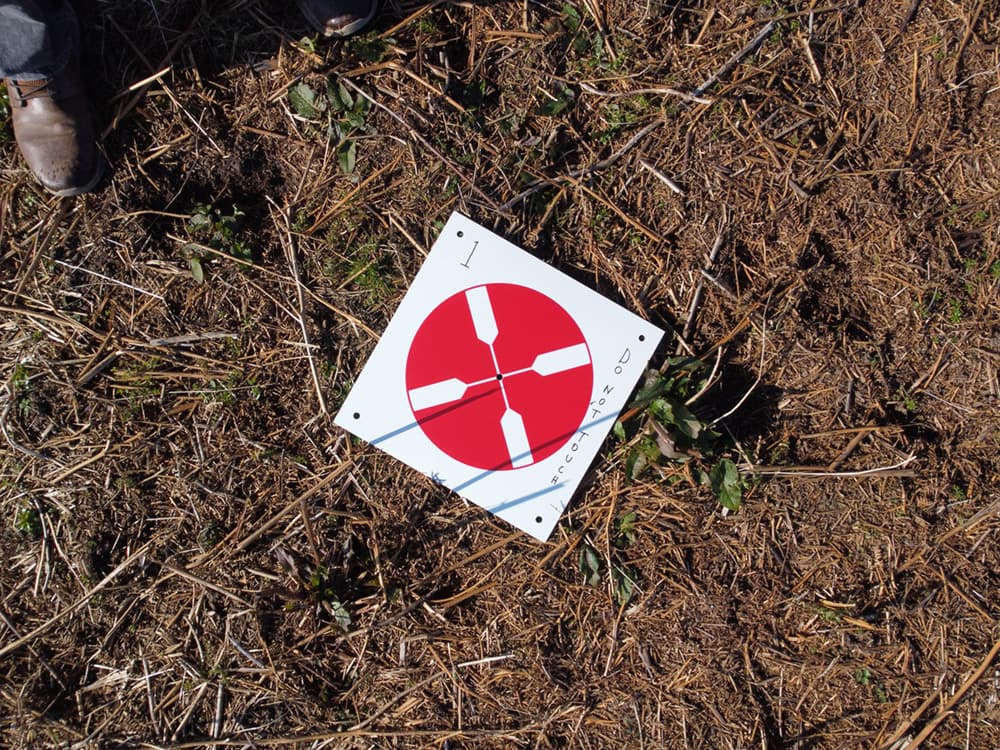
NICE marker … I wonder if I might find a way to make something similar, with environmentally friendly dissolvable 12" material?
My old bones barely get me to where I can place these random reference points in brushy areas … returning to pick them up is about out of the question … until I get my hip replaced … maybe.
These were about $60 for a set of 10 and are waterproof and about 2mm thick, red on one side and black on the other. I wrote on them with a marker pen since there is a survey coming up where somebody may be inclined to treat them as a removable find when I am too far away to say otherwise. As you say setting them out and retrieving them is the hardest part!
I am still trying to get the GCP file to work from the point of view of its contents and the correct sequence re the main and GCP interfaces.
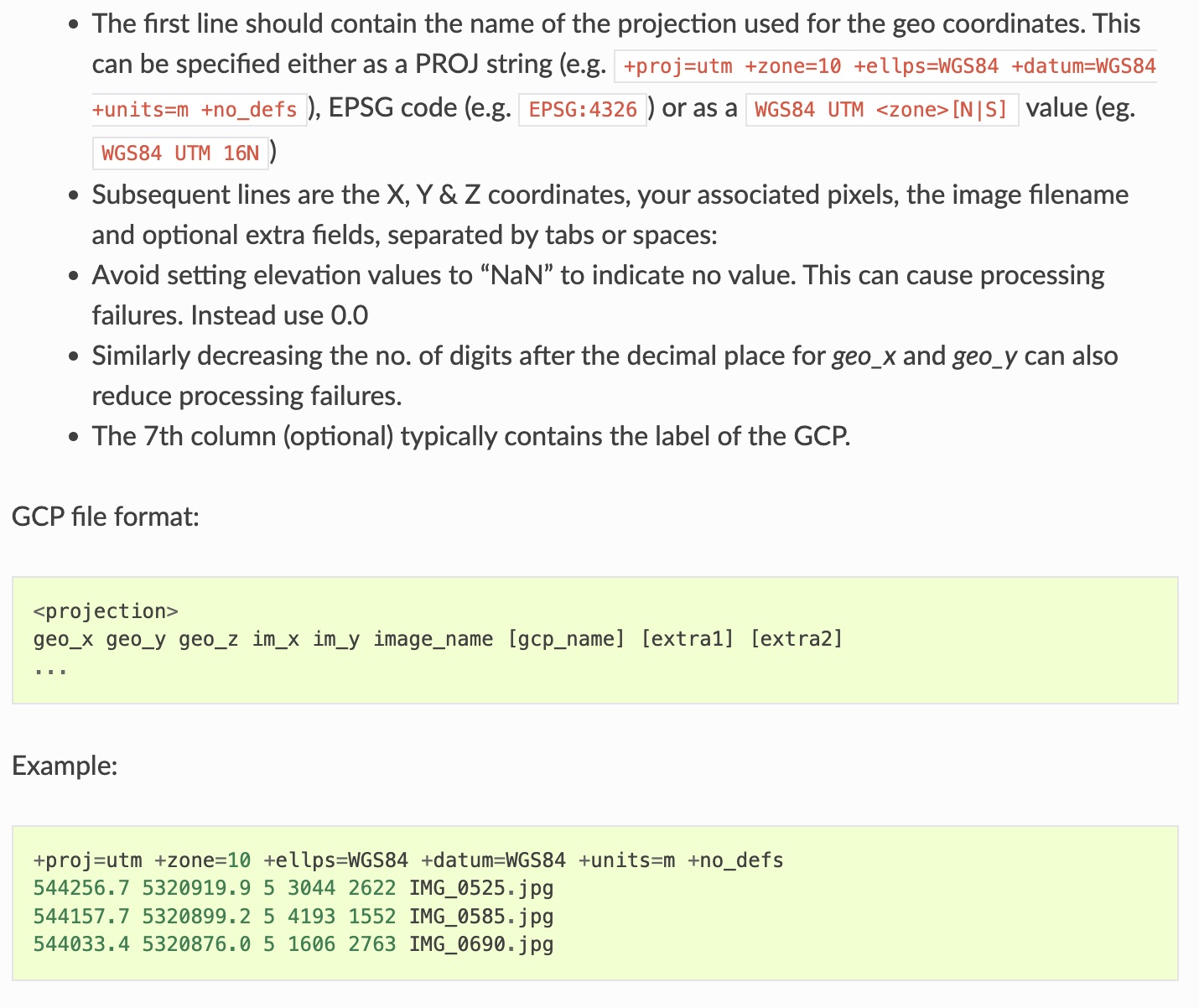
Looking at another part of the guidance notes it mentions including ‘associated pixels’ in the txt file (see grab below). What are those? The height and width of each of the marker image files? Perhaps I need to use a higher resolution value for the X and Y with more decimal places, although it does say that reducing the number of digits after the point will reduce the number of processing failures?
There is no specific guidance on the image loading sequence and only reference is made to the upload of the marker images. Reading other posts it seems that all the survey images are loaded via the GCP interface and then those that are relevant to the GCP txt file are marked and show on the map to the right. For me this is a big duplication since I have already found the photos with the markers in them by a different route and included those file names in the GCP file. Is there a way around this duplication?
I think that it is refering to the x,y count of the pixel nearest to the center of the target of the jpg photo. You should find the same target in several different photos. In each row of the gcp.txt file, the gcp coodinate values will be repeated while the pixel x,y will vary with the jpg.
I’m not sure this technique gets You a 1-2 meters accuracy because even when its specified that way by drone manufacturer i done some tests to find the accuracy of a cellphone or commercial gps reciever for navigation like garmin and the errors was close to 7 meters sometmes, depending of the gps satellites constellation.