I have a problem with the creation of the gcp…in a sopecific way in the header … could you give me some help? does anyone have any videos …?
Welcome!
Can you please give us an example of what your GCP file is like by copying the text and pasting it here?
Please also see documentation here about GCP files:
https://docs.opendronemap.org/gcp/
here is …whitout header…so i can how can I build the header
1,531353.239,167284.273,460.914
2,531018.446,167426.808,458.742
3,531299.415,167434.863,474.195
4,530948.692,167347.812,572.394
5,530746.974,167457.004,566.361
6,530571.401,167608.280,558.969
7,530774.684,167805.404,565.863
8,530917.478,167638.643,574.465
9,531102.063,167578.015,574.874
In which datum are your coordinates? You should be able to look up the string or code at http://epsg.io/.
In WGS84
What particular CRS? If you can provide an EPSG code or PROJ4 string, that’s quite helpful.
I have this information : |Location|Switzerland|
| — | — |
|Average Ground Sampling Distance (GSD)|5.40 cm / 2.13 in|
|Area covered|0.5776 km2 / 57.7565 ha / 0.223 sq. mi. / 142.79 acres|
|Output coordinate system|CH1903 / LV03
Geoid Height Above Bessel 1841. Ellipsoid = 0 meters|
|Image acquisition|
|UAV|eBee Classic (senseFly)|
|Image acquisition plan|1 flight, double grid flight plan|
|Camera|senseFly S.O.D.A.|
|Images|
|Number of images|347|
|Image size|5472x3648|
|Image geolocation coordinate system|WGS84|
|GCPs|
|Number of GCPs|9 3D GCPs|
|GCPs coordinate system|CH1903 / LV03|
What particular CRS? If you can provide an EPSG code or PROJ4 string, that’s quite helpful.
What particular CRS? the EPSG should be EPSG:21781
So, for your example, the CSV file to import to GCP Editor Pro or POSM GCPi is this:
GCP Label,Y,X,Z
1,531353.239,167284.273,460.914
2,531018.446,167426.808,458.742
3,531299.415,167434.863,474.195
4,530948.692,167347.812,572.394
5,530746.974,167457.004,566.361
6,530571.401,167608.280,558.969
7,530774.684,167805.404,565.863
8,530917.478,167638.643,574.465
9,531102.063,167578.015,574.874
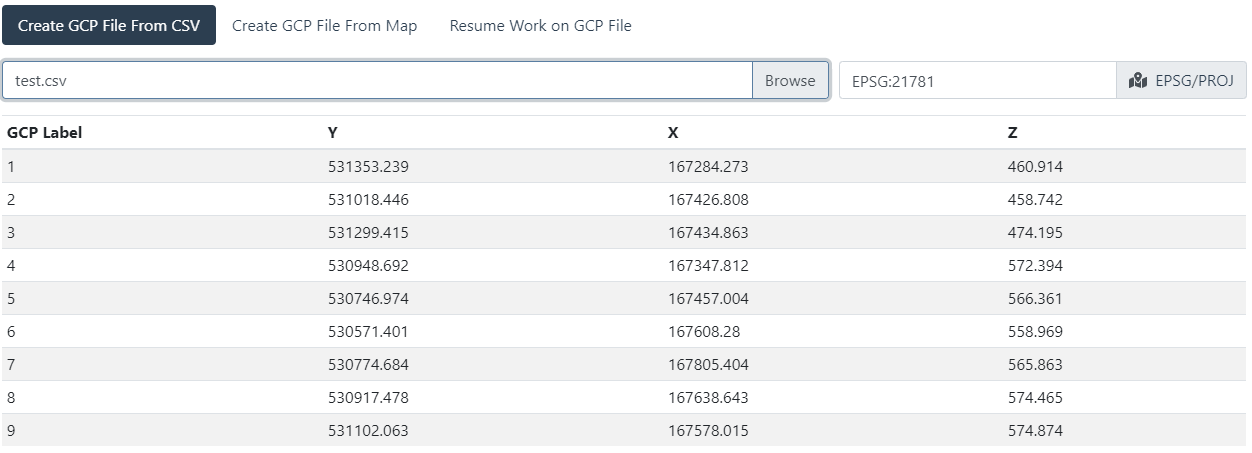

At this point, you’d need to tag the images to generate a valid GCP file.
However, the first two lines of a valid gcp_list.txt would look like this (file to be space or tab delimited):
EPSG:21781
geo_x  geo_y   geo_z   im_x    im_y    image_name  [gcp_name]
Yes that’s work fine…but when i try to proccesing the image in webdom i’ll receve this message error
File “C:\WebODM\resources\app\apps\ODM\stages\dataset.py”, line 162, in process
reconstruction.georeference_with_gcp(tree.odm_georeferencing_gcp,
File “C:\WebODM\resources\app\apps\ODM\opendm\types.py”, line 94, in georeference_with_gcp
raise RuntimeError(“A GCP file was provided, but no valid GCP entries could be used. Note that the GCP file is case sensitive (".JPG" is not the same as ".jpg").”)
RuntimeError: A GCP file was provided, but no valid GCP entries could be used. Note that the GCP file is case sensitive (“.JPG” is not the same as “.jpg”).
EPSG:21781
167426.808 531018.446 458.742 1852.0530222693533 1368.5853658536587 all_gcp_overview.png 2
167426.808 531018.446 458.742 1667.8154825026513 879.6182396606575 gcp_2.png 2
167434.863 531299.415 474.195 2696.261930010605 1338.8335100742313 all_gcp_overview.png 3
167434.863 531299.415 474.195 1667.8154825026513 887.0307529162249 gcp_2.png 3
167347.812 530948.692 572.394 2697.2627388535034 1340.2547770700637 all_gcp_overview.png 4
167347.812 530948.692 572.394 613.6167396496816 675.343949044586 gcp_3.png 4
167457.004 530746.974 566.361 1641.8121019108282 1602.721337579618 all_gcp_overview.png 5
167457.004 530746.974 566.361 891.4630225080386 650.1773512861737 gcp_4.png 5
167608.28 530571.401 558.969 518.7202572347267 828.8247588424437 all_gcp_overview.png 6
167608.28 530571.401 558.969 989.855305466238 678.9067524115756 gcp_6.png 6
167805.404 530774.684 565.863 1122.014469453376 248.0836012861736 all_gcp_overview.png 7
167805.404 530774.684 565.863 1316.3233520900321 624.5357717041801 gcp_7.png 7
167638.643 530917.478 574.465 1556.16077170418 738.612540192926 all_gcp_overview.png 8
167638.643 530917.478 574.465 1121.4405144694533 703.8728898713827 gcp_8.png 8
167578.015 531102.063 574.874 2103.072347266881 907.7604501607716 all_gcp_overview.png 9
167578.015 531102.063 574.874 1053.1043760048233 604.282380426045 gcp_9.png 9
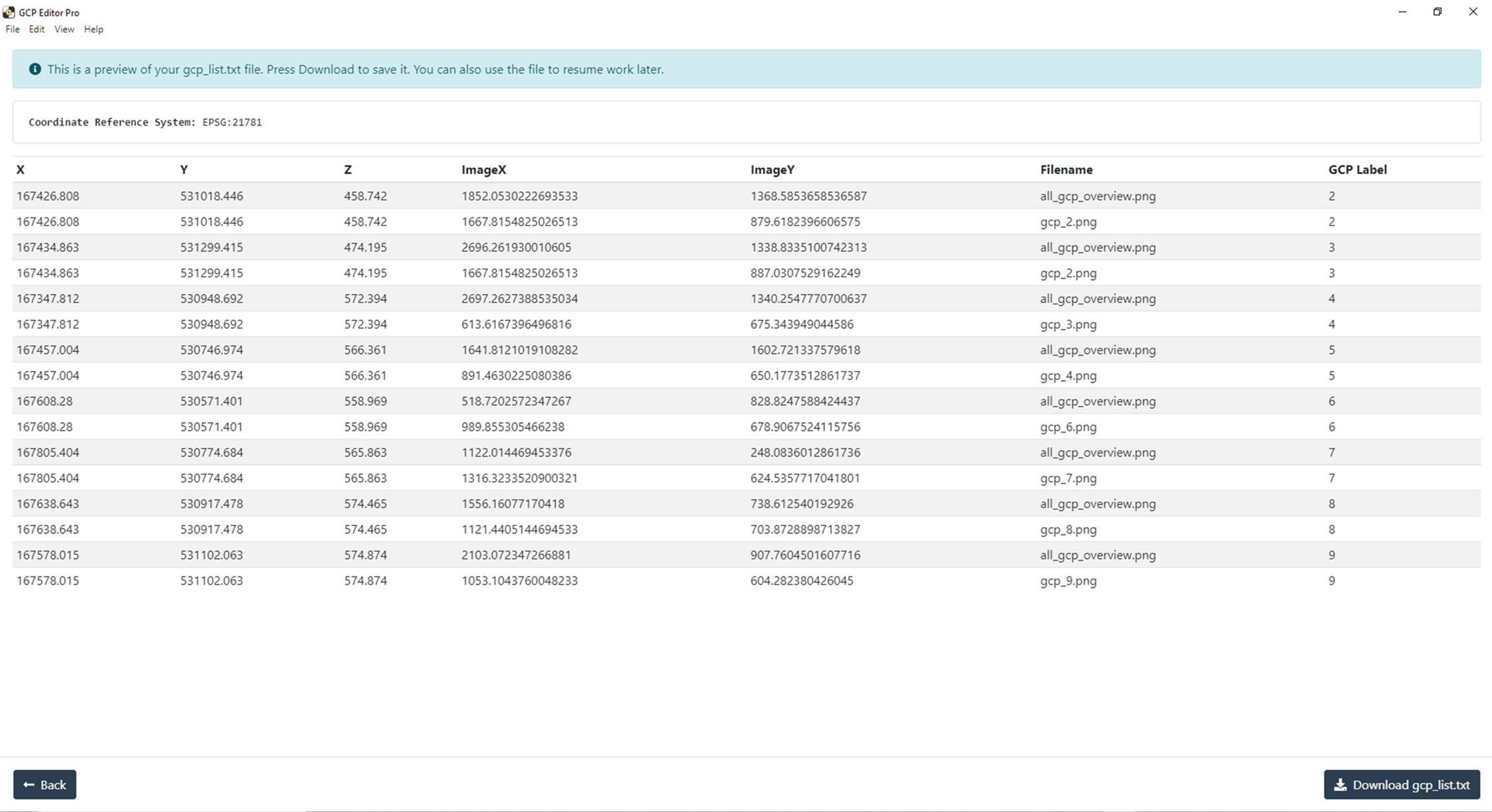
What exactly are you tagging with that GCP image line of all_gcp_overview? You need to have 3-5 images tagged per GCP, not the same image over and over for each different GCP.
Can you share your dataset?
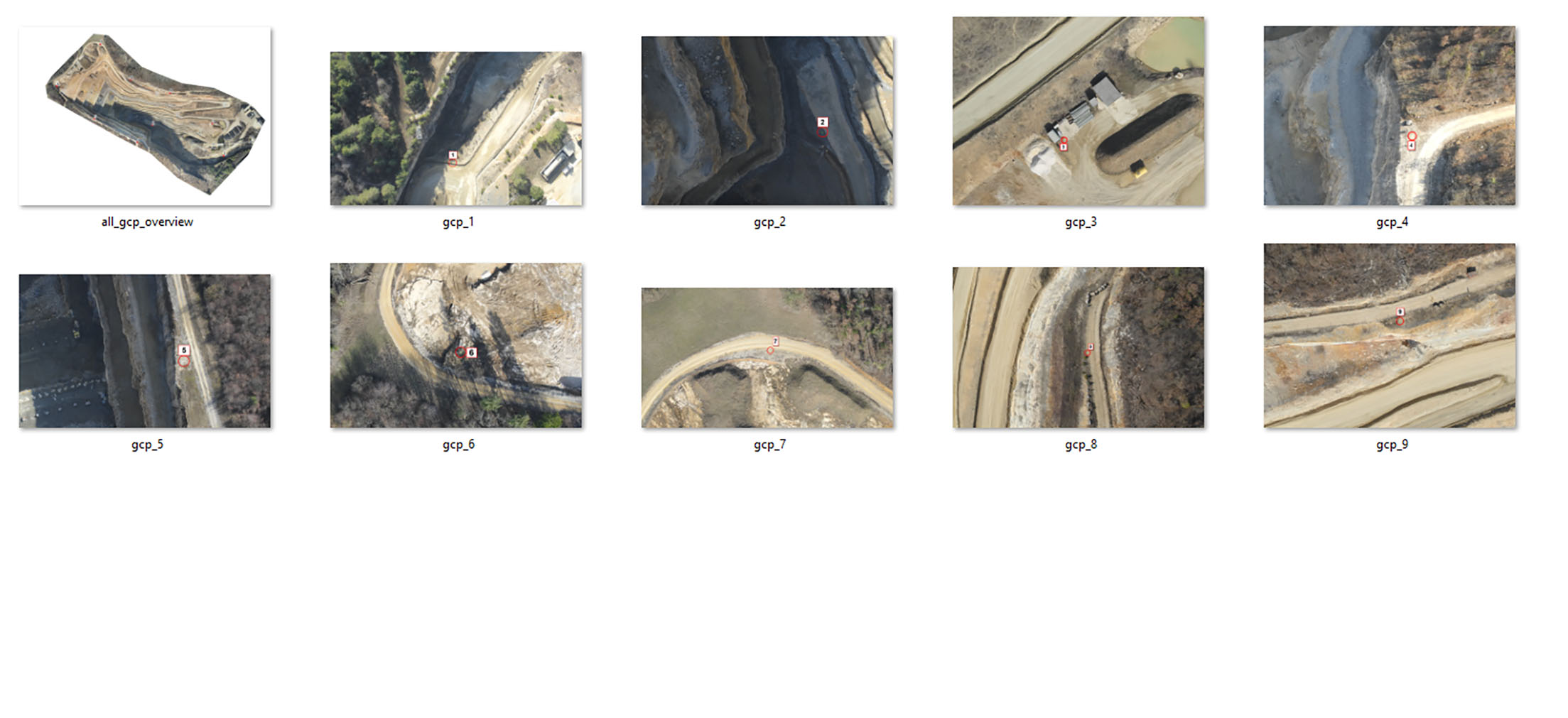
Yeah, that’s not really going to cooperate well with GCPs, unfortunately.
You’ll need a minimum of 3-5 images per GCP for it to function properly, and you really shouldn’t use an aggregate product like your all_gcp_overview image.