Cropping Orthophoto (Boundary Lines)

Hi All,

I’m currently working with some agriculture data. Is there a way to crop the orthophoto exactly along the boundary lines of the drone images captured?

I plan on calculating Vegetation Indices, Crop Count & Crop Height data in the future so only want to analyse the field data without any overlap.

I’ve tried tweaking the input parameters, however it hasn’t worked as shown below:

Create a NodeODM task with the image files and updated parameters

            task = node.create_task(
                image_files,
                {
                    'crop': 0,
                    'dem-resolution': 1,
                    'dsm': True,
                    'feature-quality': 'high',
                    'matcher-neighbors': 5,
                    'mesh-size': 200000,
                    'min-num-features': 12000,
                    'orthophoto-resolution': 1,
                    'pc-classify': True,
                    'pc-filter': 0,
                    'pc-quality': 'medium',
                    'pc-rectify': True,
                    'resize-to': -1,
                    'use-3dmesh': True,
                }
            )


1 Like

two ways you can accomplish this. first you can include in the processing of ODM a boundary file in the form of a geojson type. if you go this route set crop to 0. Or and a bit easier is to just use qgis to clip the raster by mask layer after processing is done. Hope this helps.

2 Likes

Thanks for the response.

Is there any way to automate this using python? I assume for the boundary file I’d have to pre-define this and then send to ODM?

Also for using qgis to clip the rater by mask layer, would I have to manually define this area?

1 Like

I wouldn’t doubt there is a possibility of automating this process, but there is not currently to my knowledge a process in place. so you would need to manually create a boundary file and include in the ODM by selecting it in the boundary parameter. There are instructions on how to do this in the ODM documentation.

in qgis yes you have to manually create the singleparts polygon and clip the raster by that layer.

3 Likes

Convex hull of the camera locations would do the trick and is eminently doable in python.

2 Likes

Why don’t you cut it off via the boundary function in WebODM?

  1. You can use the measurement function in WebODM, export the polygon as GeoJSON and use this as the boundary json in WebODM.

or

2a) Define an area in geojson.io , copy this geojson area (upper right area)


2b) Paste this area in the boundary field in WebODM

EXAMPLE

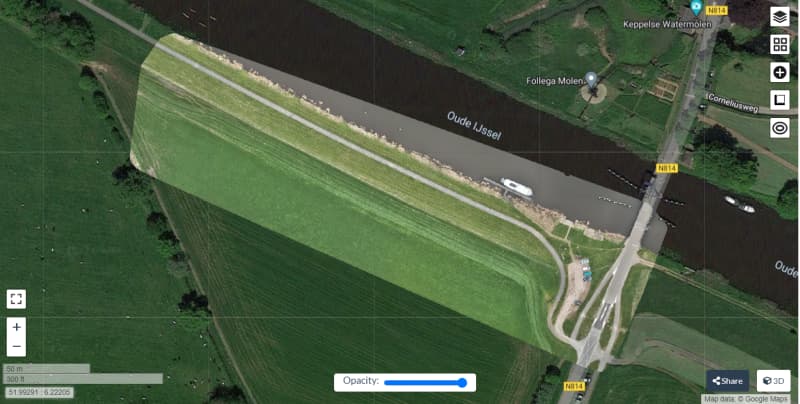
non clipped by boundary

clipped by geojson boundary

2 Likes

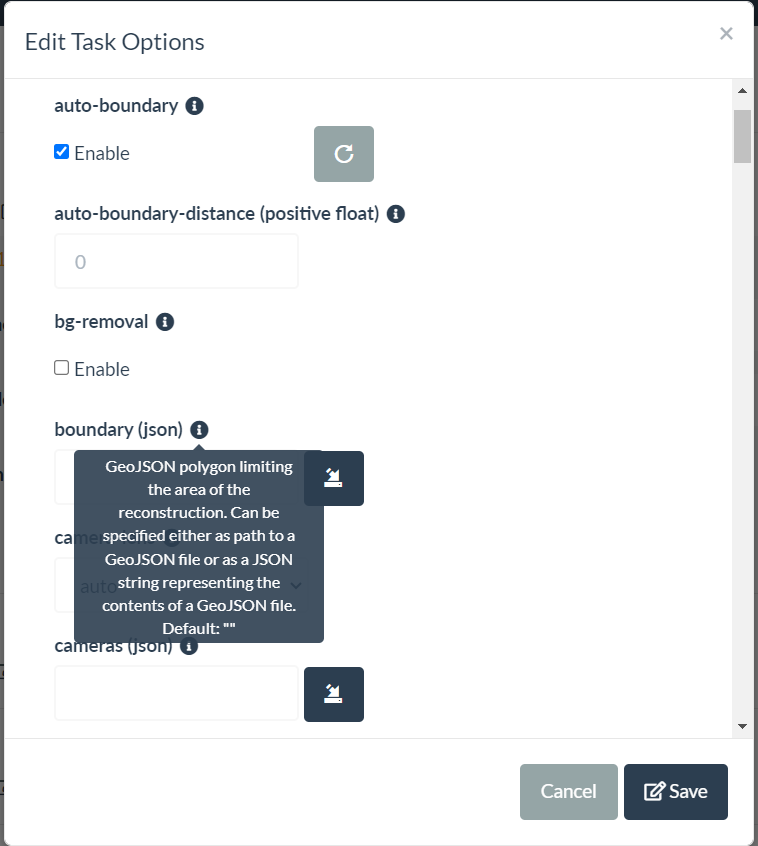
Sounds like you might just need to set --auto-boundary --crop 0 --auto-boundary-distance 0?

3 Likes

WebODM noob here, what should I expect the difference between using

--auto-boundary --crop 0 --auto-boundary-distance 0

vs measuring and defining the geojson boundary? cause the 2nd way sounds more accurate, but more time consuming…especially with areas not so square.

2 Likes

If memory serves me (and I haven’t looked at the code for this in a few years), this will calculate the convex hull of the input camera positions for you.

Also, give it a run on some test data and see what it looks like vs. manual!

3 Likes

Thanks mate, great shout, I did think about this previously but didn’t know how accurate it would be, will add this into my code this week and let you know how it goes.

Another idea I had was to use pre-defined Field Boundaries from some Mapping companies and send the average GPS coordinates of my fields to their API which would return a GeoJSON I could then attach to my container, however it looks like this could incur additional costs.

Hi Aeret,

Yep this is a great idea and works well but I’m aiming for a fully automated workflow at the moment, I’m working with a farm that has 57 fields and then another soon that has 80 fields so I was looking for an approach that can detect the field boundary automatically using python.

If I can’t get that working I’ll use your suggestion for now so thank you!

1 Like

So using --auto-boundary --crop 0 --auto-boundary-distance 0 will calculate the convex hull of the input camera positions for me?

This topic was automatically closed 30 days after the last reply. New replies are no longer allowed.