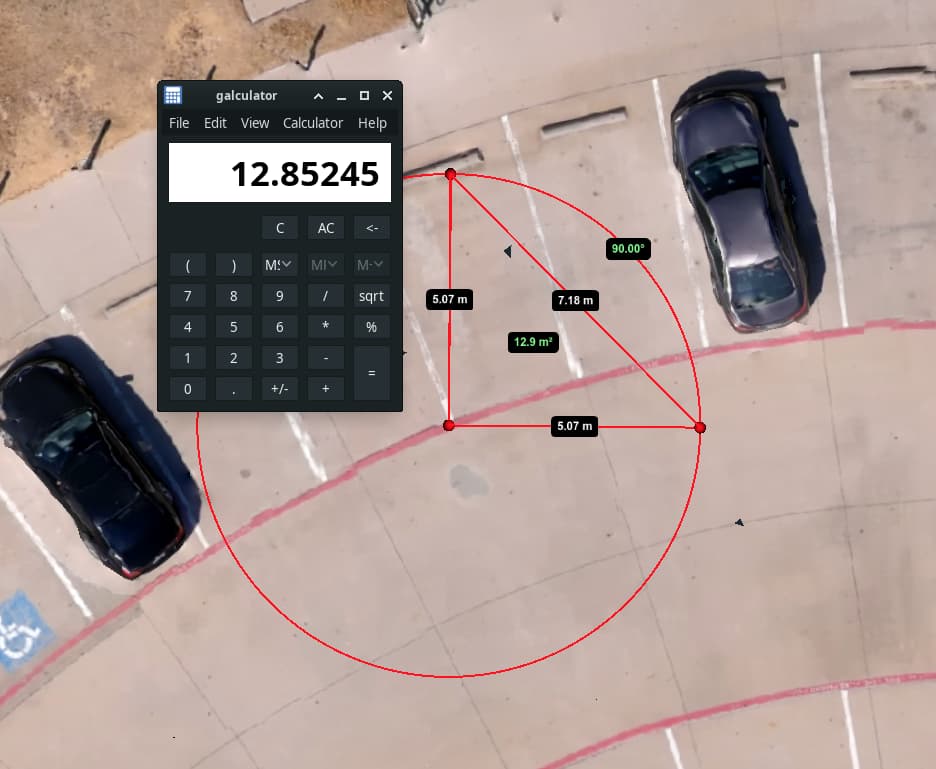
I wanted to reproduce a workflow. I am doing some roof measurement calculations from a 3D model and the WebODM 3D measurement tool seems off. Using the formula for an acute triangle (A = a*b/2), I get 16.24. The WebODM 3D area measurement tool calculates 14.7 (attachment). Am I missing something or could this be a bug. I plan to fly a better model tomorrow and will try again, but that shouldn’t matter in my opinion.
Lots of things could be at play here: that’s a 15% error, which is high, but could be attributed to GPS error, depending on a few different factors.
What is the expected accuracy of your GPS (are you flying RTK or PPK)? Are you using GCPs? And finally, do you know if your drone records the PDOP/HDOP/ or ZDOP of your data?
If you don’t know, feel free to share some unmodified versions of either a subset or your whole dataset on dronedb or google drive or similar.
Try setting gps-accuracy to what you know your gps accuracy to be. This should better constrain the model and hopefully give you more sane measurements.
My guess is the default value for that + the relatively small area you are flying is contributing to poor error constraints. Telling ODM what your actual error is will help.
You’ll need to rerun from load-dataset once you change tnat parameter.
Thank you for all the responses. My first assumption was that all roof top triangles were right triangles. So, I moved to the flatest part of my model and dropped the Azimuth Measurement tool (BTW, no tooltip label). Then, I used the Area Measurement tool to add a true right traingle. So, 5.07 x 5.07 / 2 is 12.9 m2.