I need to split a map of 1 hectare into 1000 blocks of 10m2 each. These grid tiles could be exported as individual images, perhaps named with 4 GPS coordinates for each corner of the tile.
I’ve used WebODM and I don’t think it’s possible there, but is there a way with ODM? Any ideas how it could be done?
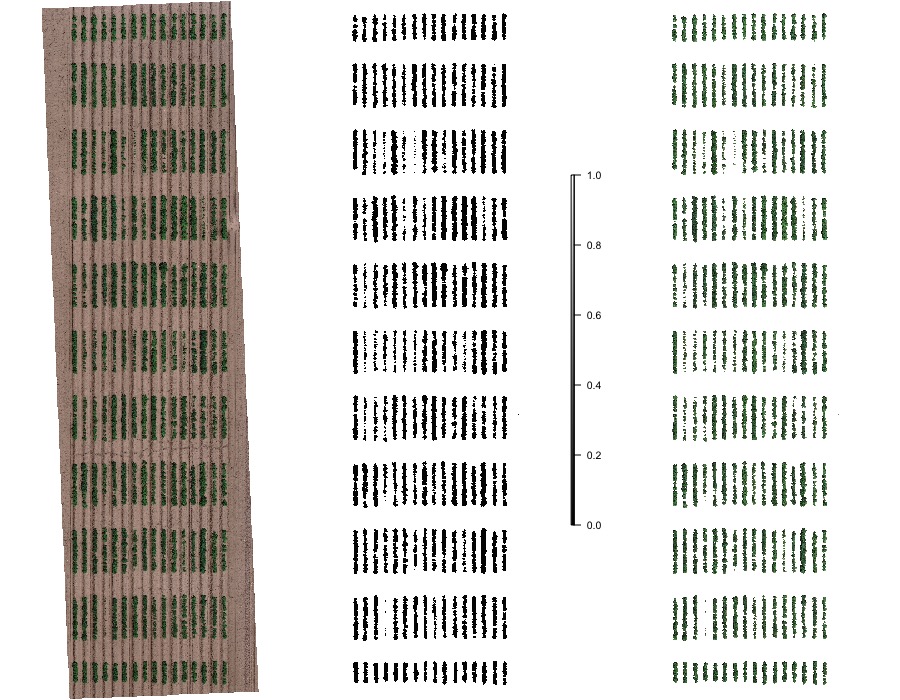
I’m thinking this could be modified for our needs even though what I am working with is forestry. I can see it lets you crop an image, rotate it, draw a box and then split the image into plots for analysis. Really amazing that this is possible. Has anybody used this for forestry analysis?
From what I can see the initial crop area is done manually and it doesn’t seem like the plot gridding tool is controlled with gps or measurements. e.g:
Is that a distance scale? I’m not sure what it is. I’m wondering how I would know if I manually created a mosaic and crop how I’d go about ensuring that each plot is exactly 10m2.
You didn’t mention what kind of imagery you are using, but I’ve had some success using the following to create vector grids from drone imagery:
QGIS > Vector > Research Tools > Create Grid
ArcGIS Fishnet
ArcGIS DataReviewer has a Create Grid Wizard where you can specify dimensions
The vector grid could then be used to clip your underlying raster.
Alternatively, you could use the tiles option when processing in WebODM to create the chips, and then use the appropriate zoom level. The downside is that the scale is predetermined and might not meet your 10x10 requirement.
Thanks for the Fieldimager link… hadn’t seen that before!
I would have a look at clipping your raster image (geotiff) with a vector mask (gridded block) in QGIS.
I know this can be done manually in QGIS as this is the method I use to clean up the edges of geotiffs and produce clean edges for overlay onto google data.
Here’s one example QGIS Tutorial: Clip raster [EN] Youtube
Someone smarter than me could tell you if it could be programmed in python iteratively to save time.
Cheers,
Jeff
Hi Jeff, That is great to know. I watched the video and clipping looks perfect. It would be great if it could be programmed because I’m hoping to do regular flights and compare many tiles over time.
Many thanks, Robert
This is really nice as it seems to let you enter a beginning coordinate and orientation, as well as an opposite coordinate. Similar to Fieldimager it lets you then specify how many rows and columns you want, but it also has the additional option to specify exactly the size of the cells instead. e.g.
# Set the origin of the fishnet
originCoordinate = '1037.26 4145.81'

# Set the orientation
yAxisCoordinate = '1037.26 4155.81'

# Enter 0 for width and height - these values will be calcualted by the tool
cellSizeWidth = '0'
cellSizeHeight = '0'

oppositeCoorner = '19273.61 18471.17'
I wonder if there are others in need of this. I imagine if arcgis has a ‘contact us for a price’ it’s a hefty fee for this. Do we have some sort of bounty program here to make plugins or features to improve Fieldimager? Would prefer to contribute financially to an opensource project personally.
Agreed on all points. Just presenting options I’m familiar with.
In QGIS here’s what I came up with:
Vector > Research Tools > Create Grid (make initial grid)
Vector > Data Management Tools > Split Vector Layer (explode grid into individual geometries)
Raster > Extraction > Clip Raster by Mask Layer (to clip raster by each grid cell)
The last step should probably be scripted - batch processing is looking tedious.
Alternatively, just register the rasters and use the grid output for reference?
And I’m happy to say with a bit of tweaking we’ve managed to produce grids and export big batches of 10m2 images. This QGIS is really quite good!
Thank you for the pointers @and-viceversa!
Yes @Saijin_Naib it does seem expensive. Very powerful though to be able to do these things at the command line so I can understand the work behind it all to make it possible.