# New user: Process exited with code 1
**URL:** https://community.opendronemap.org/t/new-user-process-exited-with-code-1/5859
**Category:** OpenDroneMap Desktop
**Created:** [November 6, 2020, 7:23pm UTC](https://community.opendronemap.org/t/new-user-process-exited-with-code-1/5859 "2020-11-06T19:23:55Z")
**Posts on this page:** 11
**Page:** 1
### Author:  [@DroneMapperDK](https://community.opendronemap.org/u/DroneMapperDK)
#### Post date: [November 6, 2020, 7:23pm UTC](https://community.opendronemap.org/t/new-user-process-exited-with-code-1/5859/1 "2020-11-06T19:23:55Z")
I just purchased the Windows/Mac bundle - and I was getting an uneasy feeling it was a wrong decision.
Have tried a about 10 times with different settings, but each time, I get a “Process ended with code 1” error.
I then realized, that I was on Windows (Normally use a Mac) and did a reboot.
Problem solved - at least for a mini test with 2 images.
I did not notice any warnings in the installer about doing a reboot - but perhaps it would be a good idea to include one and save a lot of headace for new users in the same situation.
Now for the big Q: Anyone have success generating GeoTiff files using images from an Autel EVO II ?
Regards
Mike
---
### Author:  [@Saijin\_Naib](https://community.opendronemap.org/u/Saijin_Naib)
#### Post date: [November 6, 2020, 7:29pm UTC](https://community.opendronemap.org/t/new-user-process-exited-with-code-1/5859/2 "2020-11-06T19:29:56Z")
Welcome! I don’t think purchasing ODM could generally be a wrong decision 🤔
That warning might be best served by Docker, since that’s likely what needed the restart, though I’ve not needed to in the past… perhaps because I have the required virtualization features enabled regardless of docker’s presence.
No! I only have access to a 3DR Solo.
If you have a dataset that stitches nicely and you’d like to share, we’d love contributions to our Public Datasets repository.
Stich some stuff and share it with us so we know how it goes!
---
### Author:  [@DroneMapperDK](https://community.opendronemap.org/u/DroneMapperDK)
#### Post date: [November 6, 2020, 7:40pm UTC](https://community.opendronemap.org/t/new-user-process-exited-with-code-1/5859/3 "2020-11-06T19:40:49Z")
Thanks Naib
I see may people do have success with WebODM, so expect I will have too.
But much to learn, first attempt at stitching with no image resizing did not go well, will give it a few more tries and upload a couple of images if I can not make it work - hopefully someone can give them a try and tell if they contain the required information.
---
### Author:  [@Saijin\_Naib](https://community.opendronemap.org/u/Saijin_Naib)
#### Post date: [November 6, 2020, 7:51pm UTC](https://community.opendronemap.org/t/new-user-process-exited-with-code-1/5859/4 "2020-11-06T19:51:10Z")
Mhm! Also, please don’t forget to include all the processing parameters that you change from default. It’ll be in the WebODM UI when you expand the Task under the Options menu. Same goes for the processing log.
See this post of mine for an idea of what that would look like:
> [@O'Brien's Failed To Process - ODM v.2.1.0 (Regression - Fixed with 1da7077)](https://community.opendronemap.org/t/obriens-failed-to-process-odm-v-2-1-0-regression-fixed-with-1da7077/5852):
>
> OS: Solus v4.1 (Fortitude) - Budgie Kernel 4.14.201-162.LTS ODM: v2.1.0 (SNAP) Hostname webodm\_node-odm\_1 Port 3000 API Version 2.0.0 Engine odm Engine Version 2.1.0 Queue Count 0 Max Images Limit None Label node-odm-1 Last Refreshed 0 minutes ago (Nov. 5, 2020, 3:11 p.m.) WebODM: GIT clone & update [image] Dataset: [https://community.opendronemap.org/t/obriens-field-2017-07-22/5794?u=saijin\_naib](https://community.opendronemap.org/t/obriens-field-2017-07-22/5794) Processing Options: Created on: 11/2/2020, 2:16:12 PM Processin…
Having all of that makes it way more reproducible for other people, as they know what the actual error message(s) are, and what exact settings you used.
That being said, if you’re using all defaults, you should get a proper stitch, and that’s not a bad place to start.
---
### Author:  [@DroneMapperDK](https://community.opendronemap.org/u/DroneMapperDK)
#### Post date: [November 6, 2020, 8:32pm UTC](https://community.opendronemap.org/t/new-user-process-exited-with-code-1/5859/5 "2020-11-06T20:32:53Z")
First attempt at a high-resolution processing job did not go quite as planned.
I selected 5 out of about 140 images - all sequentially and overlapping about 80% along the flight path.
The red box marked is the total survey area - the processed images are a small rectangle a over the buildings visible along the treeline in the middle left of the Google Maps image.
The processing result has spread the data randomly (or so it appears) over a much larger area.
I did a new job, selected Fast Orthophoto - and result was much better as seen on the third image - but scaling is off with the generated image larger than the reference Google Map - and I see entirely missing patches in this image.
HiRes
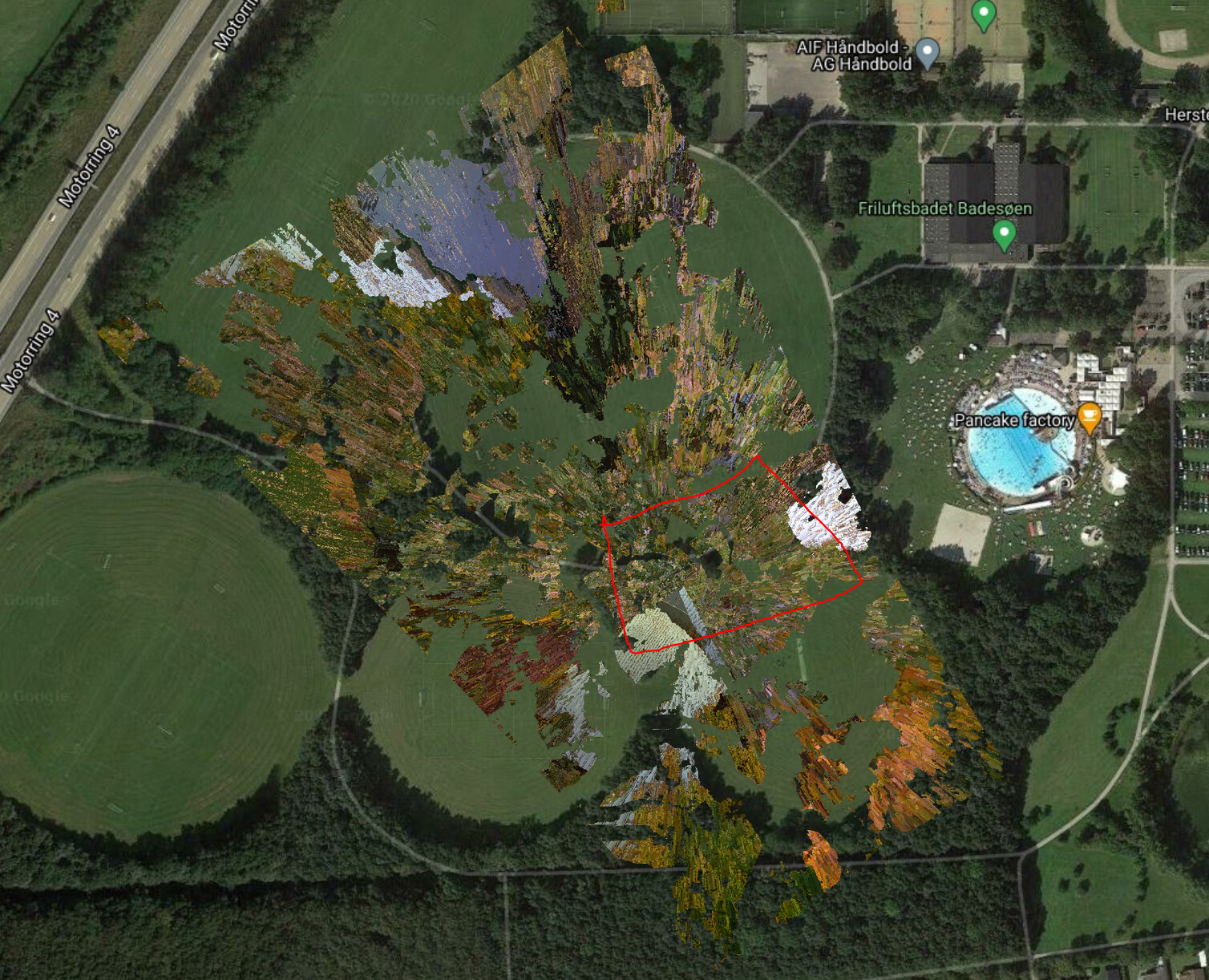
(Had to delete two images, as I can only attach one…\_
Have purchased the ‘Missing manual’
---
### Author:  [@DroneMapperDK](https://community.opendronemap.org/u/DroneMapperDK)
#### Post date: [November 6, 2020, 8:58pm UTC](https://community.opendronemap.org/t/new-user-process-exited-with-code-1/5859/6 "2020-11-06T20:58:26Z")
Replying to myself - and asking:
Found this statement on [autelpilots.com](http://autelpilots.com):
“Remember to set your photos to 4:3. Using 16:9 will ruing the end results.”
I was shooting 16:9 - anyone can confirm the above
Regards
Mike
---
### Author:  [@Saijin\_Naib](https://community.opendronemap.org/u/Saijin_Naib)
#### Post date: [November 6, 2020, 9:10pm UTC](https://community.opendronemap.org/t/new-user-process-exited-with-code-1/5859/7 "2020-11-06T21:10:15Z")
You might need more images, maybe around 15 or so, and not only sequential. Think more like a box or so of coverage (so might be images from multiple flight lines, instead of just sequentially one by one).
Shouldn’t matter if they are coming out of camera that way… I’ve processed 16:9 4K video using Pix4D before, so I know that it is certainly possible in general.
I’ve yet to specifically try 16:9 in ODM, but I suppose I could try something.
---
### Author:  [@DroneMapperDK](https://community.opendronemap.org/u/DroneMapperDK)
#### Post date: [November 6, 2020, 9:28pm UTC](https://community.opendronemap.org/t/new-user-process-exited-with-code-1/5859/8 "2020-11-06T21:28:35Z")
Thanks, will load all 143 images an let it run overnight 🙂
This is an I7-7700 2.8 Ghz processor with 16 GB RAM - and still working hard.
---
### Author:  [@smathermather](https://community.opendronemap.org/u/smathermather)
#### Post date: [November 6, 2020, 9:58pm UTC](https://community.opendronemap.org/t/new-user-process-exited-with-code-1/5859/9 "2020-11-06T21:58:39Z")
16GB on an I7 will do just fine with 143. Good luck!
---
### Author:  [@DroneMapperDK](https://community.opendronemap.org/u/DroneMapperDK)
#### Post date: [November 7, 2020, 8:20pm UTC](https://community.opendronemap.org/t/new-user-process-exited-with-code-1/5859/10 "2020-11-07T20:20:25Z")
Moved to my MacBook Pro, gave WebODM 48 GB of memory - and I now have both a 3D and a 2D model. Need to study the parameters in the 3D browser a bit, but looks promising.
Doing another one this evening with 4x3 images shot at 4K - the Evo 2 camera is really only 12 Mpixel anyway.
Thanks all for your help
---
### Author:  [@system](https://community.opendronemap.org/u/system)
#### Post date: [December 7, 2020, 8:20pm UTC](https://community.opendronemap.org/t/new-user-process-exited-with-code-1/5859/11 "2020-12-07T20:20:25Z")
This topic was automatically closed 30 days after the last reply. New replies are no longer allowed.