# Minimum number of overlapping images for point-cloud generation
**URL:** https://community.opendronemap.org/t/minimum-number-of-overlapping-images-for-point-cloud-generation/514
**Category:** ODM
**Created:** [April 18, 2018, 5:27pm UTC](https://community.opendronemap.org/t/minimum-number-of-overlapping-images-for-point-cloud-generation/514 "2018-04-18T17:27:56Z")
**Posts on this page:** 16
**Page:** 1
### Author:  [@geofis](https://community.opendronemap.org/u/geofis)
#### Post date: [April 18, 2018, 5:27pm UTC](https://community.opendronemap.org/t/minimum-number-of-overlapping-images-for-point-cloud-generation/514/1 "2018-04-18T17:27:56Z")
I am doing geomorphological mapping with historical aerial images (framed photos from photogrammetry survey), which typically overlaps 60%-65% along flight line, and 20%-30% across lines. Surprisingly, I am getting good results using ODM with these images.
**The problem**
I am aware that ODM was designed to work with images overlapping 70% or greater, so in general, the point-cloud is produced only in areas covered by three or more images taken from different angles. In any case, I think that it should be possible to have the point-cloud generated in areas with only 2 images.
**The question**
Is there a way to tweak OpenSfM parameters in order to have point-cloud generated in areas covered only by 2 images? I saw that PMVS has a flag for minimum number of images (–pmvs-min-images), but I couldn’t find a similar one in OpenSfM.
**My example**
A reproducible example can be executed with [these raw images](http://geografiafisica.org/consigna/visitante/opendronemap/aerial_historical_photos.zip) (a shapefile with footprints is included). I used the following parameters:
`./run.sh projectname --project-path path/to/project --resize-to 5976 --force-focal 152.929 --orthophoto-resolution 1 --min-num-features 30000 --matcher-neighbor 14 --mesh-octree-depth 12`
I also used images without the black border as inputs, but again, point-cloud was produced only in areas covered by three or more images, showing a strip pattern.
**Update 2018/04/18, 18.54 AST**
Found a mistake in “gcp\_list.txt” contained within the ZIP file, but it is already updated.
Thanks.
---
### Author:  [@smathermather](https://community.opendronemap.org/u/smathermather)
#### Post date: [April 19, 2018, 7:02pm UTC](https://community.opendronemap.org/t/minimum-number-of-overlapping-images-for-point-cloud-generation/514/2 "2018-04-19T19:02:19Z")
The parameters aren’t exposed yet on the command line, but you can change the minimum number of matching images within OpenSfM. See this thread here for more context:
[https://github.com/OpenDroneMap/OpenDroneMap/issues/769](https://github.com/OpenDroneMap/OpenDroneMap/issues/769)
But, in short change depthmap\_num\_matching\_views to 2. This is at OpenDroneMap/SuperBuild/src/opensfm/opensfm/config.py.
---
### Author:  [@geofis](https://community.opendronemap.org/u/geofis)
#### Post date: [April 19, 2018, 11:39pm UTC](https://community.opendronemap.org/t/minimum-number-of-overlapping-images-for-point-cloud-generation/514/3 "2018-04-19T23:39:35Z")
Thanks @smathermather.
I just opened OpenDroneMap/SuperBuild/src/opensfm/opensfm/config.py. I wonder if the parameter I may change is `depthmap_min_consistent_views`, from `3` to `2`. As far as I can see, `depthmap_num_matching_views` is set to 2, so I guess that I should leave it as it is.
---
### Author:  [@smathermather](https://community.opendronemap.org/u/smathermather)
#### Post date: [April 20, 2018, 1:56am UTC](https://community.opendronemap.org/t/minimum-number-of-overlapping-images-for-point-cloud-generation/514/4 "2018-04-20T01:56:28Z")
Hmm, default used to be 3. If you want more points, look at the other parameters listed in that issue, especially depthmap\_resolution.
---
### Author:  [@smathermather](https://community.opendronemap.org/u/smathermather)
#### Post date: [April 20, 2018, 6:26pm UTC](https://community.opendronemap.org/t/minimum-number-of-overlapping-images-for-point-cloud-generation/514/5 "2018-04-20T18:26:37Z")
Oops – wrong parameter. Use depthmap\_min\_consistent\_views and set that to 2.
---
### Author:  [@geofis](https://community.opendronemap.org/u/geofis)
#### Post date: [April 22, 2018, 4:13pm UTC](https://community.opendronemap.org/t/minimum-number-of-overlapping-images-for-point-cloud-generation/514/6 "2018-04-22T16:13:03Z")
Thanks again @smathermather. Yes, I noticed that the parameter to change is `depthmap_min_consistent_views`. I made new tests tweaking that one and others mentioned in the [github thread](https://github.com/OpenDroneMap/OpenDroneMap/issues/769) recommended by you. As far as I can see, ODM generated better results wth `--use-pmvs` (OpenSfM results were noisy), which I can use for geomorphological mapping. In the following lines, I show some results obtained with PMVS.
A sample photo frame of the Ocoa town, year 2003, from the National Institute for Hydraulic Resources (INDRHI) of the Dominican Republic. This and 5 additional photos were introduced as input to the ODM toolchain:

This is the point cloud (2.5 million points):
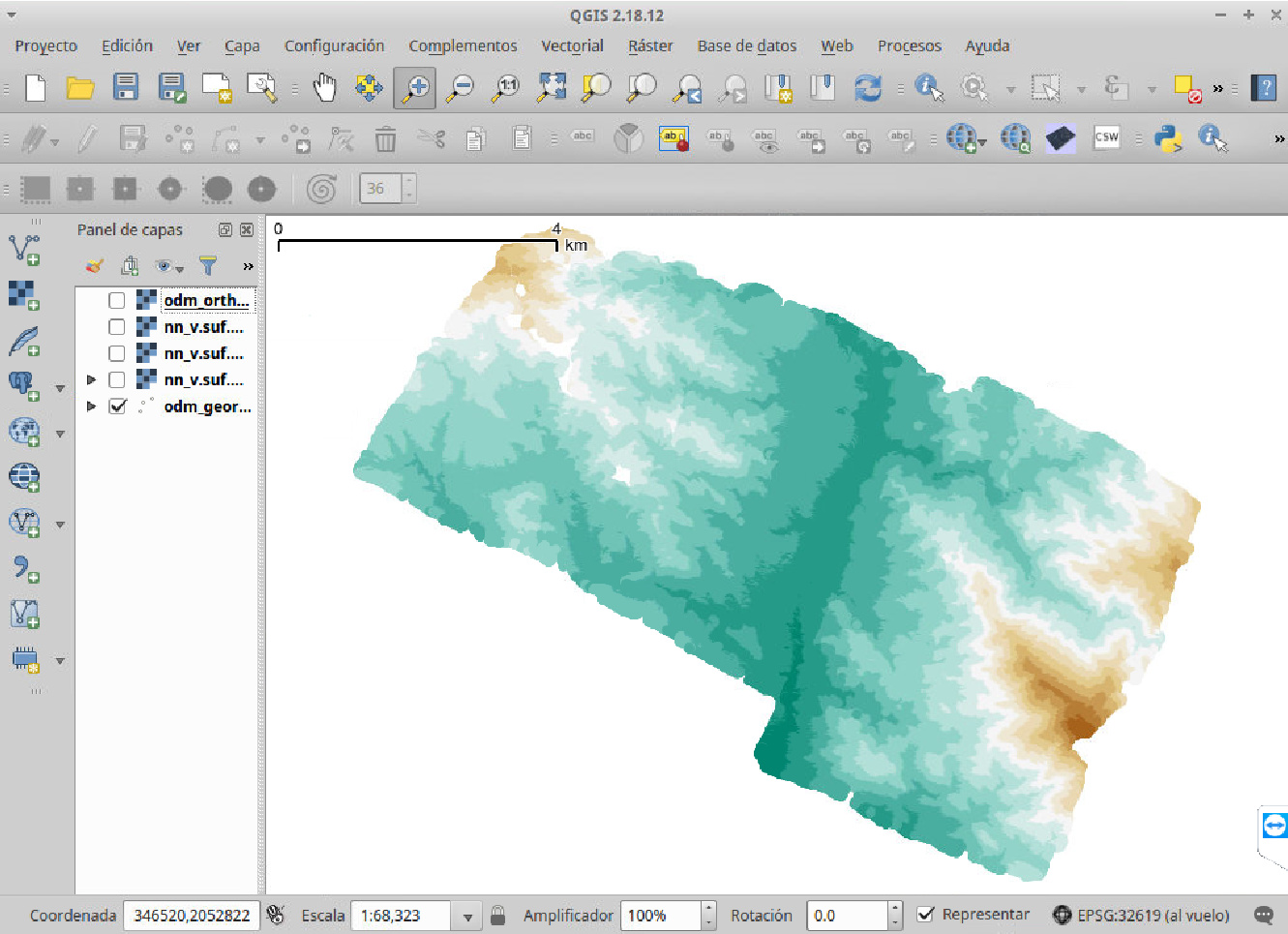
The DEM, 2 m resolution, made with bicubic spline (GRASS GIS):

The DEM with shaded relief:

The orthophoto with shaded relief, 1 m resolution:

Zoom to the orthophoto:

Shaded relief without denoising:

Denoised shaded relief with [Sun _et al._](http://personalpages.manchester.ac.uk/staff/neil.mitchell/mdenoise/) algorithm:

Profile lines from the original DEM and the denoised one:

And this is the “geomorphon” image, made with [Jasiewicz & Stepinski](https://www.researchgate.net/profile/Jaroslaw_Jasiewicz/publication/256843276_Geomorphons-a_pattern_recognition_approach_to_classification_and_mapping_of_landforms/links/5a0c185a458515e482751bf4/Geomorphons-a-pattern-recognition-approach-to-classification-and-mapping-of-landforms.pdf) algorithm, which helps me to speed up the digitizing process:

---
### Author:  [@smathermather](https://community.opendronemap.org/u/smathermather)
#### Post date: [April 22, 2018, 11:59pm UTC](https://community.opendronemap.org/t/minimum-number-of-overlapping-images-for-point-cloud-generation/514/7 "2018-04-22T23:59:33Z")
Oh my, this is just exquisite, and I love the use of geomorphon’s in order to aid in digitization. Honestly this is some of the coolest stuff to come out in this project. Do you mind if I link to this from my personal blog?
---
### Author:  [@geofis](https://community.opendronemap.org/u/geofis)
#### Post date: [April 23, 2018, 12:57am UTC](https://community.opendronemap.org/t/minimum-number-of-overlapping-images-for-point-cloud-generation/514/8 "2018-04-23T00:57:32Z")
Thanks @smathermather.
It’ll be great if you can link to this thread from your blog.
In addition, I’m writing a manuscript that I’ll hopefully finish in two months. By that moment, I’ll let you know in case you want to share the document.
---
### Author:  [@smathermather](https://community.opendronemap.org/u/smathermather)
#### Post date: [April 23, 2018, 1:54pm UTC](https://community.opendronemap.org/t/minimum-number-of-overlapping-images-for-point-cloud-generation/514/9 "2018-04-23T13:54:24Z")
Excellent! Thanks.
---
### Author:  [@smathermather](https://community.opendronemap.org/u/smathermather)
#### Post date: [April 24, 2018, 1:27am UTC](https://community.opendronemap.org/t/minimum-number-of-overlapping-images-for-point-cloud-generation/514/10 "2018-04-24T01:27:00Z")
Not a big blog post as your post here says it all, but:
> **[OpenDroneMap for non-drone applications](https://smathermather.com/2018/04/23/opendronemap-for-non-drone-applications/)**
>
> This is an interesting application for ODM that is close to my heart: using it to process historical imagery into elevation models for geomorphological mapping:
---
### Author:  [@geofis](https://community.opendronemap.org/u/geofis)
#### Post date: [April 24, 2018, 2:18am UTC](https://community.opendronemap.org/t/minimum-number-of-overlapping-images-for-point-cloud-generation/514/11 "2018-04-24T02:18:01Z")
YES!
Thanks for sharing. Hope it helps more people out there.
---
### Author:  [@JacSlo](https://community.opendronemap.org/u/JacSlo)
#### Post date: [October 10, 2018, 6:19pm UTC](https://community.opendronemap.org/t/minimum-number-of-overlapping-images-for-point-cloud-generation/514/12 "2018-10-10T18:19:42Z")
I was really pleased to find out that ODM could also be used with historical aerial images. After successful tests with running command line version of ODM with photos from my Department’s UAVs, I decided to give a try and process some historical aerial images from my University’s images archive.
I hope that you can help me with setting up the ODM to perform this task. I’ve got questions concerning preprocessing of sample set of images, and setting up ODM itself.
1. In geofis’ prescript ([https://osf.io/sq7na/](https://osf.io/sq7na/)) I’ve read that images should be transformed (e.g. with affine transformation) or registered to coordinate system of one of the images to have images with same sizes. Another step in preprocessing is masking border area with uniform color (black).
Are those steps required prior to use sample data (Dominicana aerial images) from this thread in ODM?
1. After reading prescript mentioned above I deduce that I should run ODM following way:
`docker run --rm -ti -v $(pwd)/aerial_images:/code/images -v $(pwd)/odm_orthophoto:/code/odm_orthophoto -v $(pwd)/gcp_list.txt:/code/gcp_list.txt -v $(pwd)/odm_opensfm:/code/opensfm -v $(pwd)/odm_georeferencing:/odm_georeferencing -v $(pwd)/odm_meshing:/code/odm_meshing -v $(pwd)/odm_texturing:/code/odm_texturing -v $(pwd)/odm_dem:/code/odm_dem opendronemap/opendronemap --resize-to 5976 --force-focal 152.929 --orthophoto-resolution 1 --min-num-features 30000 --matcher-neighbor 14 --mesh-octree-depth 12 --opensfm-depth-method BRUTE_FORCE --opensfm-depthmap-min-consistent-views 2 --dsm --dtm`
Am I correct? Are there any other options I should use to complete this task and reproduce results described in the geofis’ prescript?
---
### Author:  [@smathermather](https://community.opendronemap.org/u/smathermather)
#### Post date: [October 10, 2018, 6:31pm UTC](https://community.opendronemap.org/t/minimum-number-of-overlapping-images-for-point-cloud-generation/514/13 "2018-10-10T18:31:54Z")
I would skip all the opensfm related flags as the new dense point cloud generated by smvs is far better.
---
### Author:  [@geofis](https://community.opendronemap.org/u/geofis)
#### Post date: [October 12, 2018, 12:28am UTC](https://community.opendronemap.org/t/minimum-number-of-overlapping-images-for-point-cloud-generation/514/14 "2018-10-12T00:28:56Z")
Hi @JacSlo.
Regarding question number 1, performing the affine transformation is not a mandatory step, but it improves the accuracy of the point cloud and the orthophoto as well.
In order to accomplish the affine transformation, a “.points” file containing the image coordinates as well as the coordinates of frame of the camera, is needed for each photo. The “.points” file is used to apply the transformation to each photo in batch mode using ImageMagick. I wrote an R script to transform the images in batch mode, but you can use the programming languages of your choice. The procedure, which I perform regularly on an Ubuntu 16.04 machine, is detailed as follows:
1. Create the destination frame in a shapefile layer (e.g. in QGIS). If the coordinates of the camera frame are available, the corner coordinates to be digitized must follow the theoretical fiducial marks of the frame (e.g. point1(-125,125), point2(125,-125), … and so on); otherwise, the digitized frame may follow the fiducial marks of an arbitrary selected photo. This procedure assumes that all the photos were taken with the same camera.
2. Create “.points” files. Using the Gereferencer Plugin from QGIS, generate a “.points” file for each photo by clicking first on a fiducial mark in the Georeferencer window and afterward click on the corresponding corner of the rectangle layer in the map window (a dialog will prompt you whether to write the coordinates or pick them from the map display, so select the later one). This task is greatly simplified by activating the Snap tool in QGIS (Setting\>Snapping Options).
3. Apply the affine transformation to each photo. With the “.points” files named consistently as the images (QGIS do this by default), run [this R script](https://github.com/geofis/rodm/blob/master/affinefrompoints.R). This script assumes you have ImageMagick installed on your computer. The script will perform the affine transformation to each photo, one by one. When the script finishes, a set of new images files may appear in the working directory folder. Finally, move the newly created images to a new folder.
4. Generate and apply a mask. In order to avoid interfere with both the SfM and the dense matching algorithms, it is recommended to apply a mask to the frames of the images. Since the affine transformation applied in the previous step warps all the images, a mask created for one image will match to all of them. You can create the mask with GIMP or the image manipulation software of your choice. To do this in GIMP, first open any of the photos and create a new layer. Then select the area to mask (e.g. using the intelligent scissors or with the magic wand). Fill the selected area of black color with the bucket tool. Delete the photo layer and Export as a new PNG file, which may only contain the mask. Apply the mask to each photo one by one or in batch mode. I use the following bash script, which assumes the photos are saved in JPG format and the mask file is named “maskfile.png”:
`for f in *.jpg; do convert "$f" maskfile.png -compose darken -composite m_"$f"; done`
Again, the script assumes you have ImageMagick installed on your computer.
If you would like to check the Dominican Republic sample images, download [this compressed file](http://geografiafisica.org/consigna/visitante/opendronemap/dominicanaerials.zip), which contains the raw photos and the transformed/masked ones.
Finally, regarding question number 2, I am not familiar with the most recent version of ODM. When I posted this thread, the version available then was 0.3.1. After several trials, I decided to run ODM with the following parameters:
`./run.sh PROJECTFOLDER --project-path PATHTOODMPROJECTS --resize-to -1 --force-focal 152.929 --force-ccd 226.5 --use-pmvs --pmvs-min-images 2 --orthophoto-resolution 1 --min-num-features 30000 --mesh-octree-depth 12 --texturing-keep-unseen-faces --texturing-skip-visibility-test --texturing-data-term area`
You will notice that I preferred the PMVS algorithm for the dense matching. In addition, I customized the `OpenDroneMap-master/SuperBuild/src/opensfm/opensfm/config.py` file with these parameters:
> #Params for depth estimation
> depthmap\_method: BRUTE\_FORCE # Raw depthmap computation algorithm (PATCH\_MATCH, BRUTE\_FORCE, PATCH\_MATCH\_SAMPLE)
> depthmap\_resolution: 1280 # Resolution of the depth maps
> depthmap\_num\_neighbors: 10 # Number of neighboring views
> depthmap\_num\_matching\_views: 2 # Number of neighboring views used for each depthmaps
> depthmap\_patchmatch\_iterations: 3 # Number of PatchMatch iterations to run
> depthmap\_min\_patch\_sd: 1 # Patches with lower standard deviation are ignored
> depthmap\_min\_correlation\_score: 0.7 # Minimum correlation score to accept a depth value
> depthmap\_same\_depth\_threshold: 0.005 # Threshold to measure depth closeness
> depthmap\_min\_consistent\_views: 2 # Min number of views that should reconstruct a point for it to be valid
> depthmap\_save\_debug\_files: no # Save debug files with partial reconstruction results
I hope this reply helps.
---
### Author:  [@JacSlo](https://community.opendronemap.org/u/JacSlo)
#### Post date: [October 12, 2018, 9:31am UTC](https://community.opendronemap.org/t/minimum-number-of-overlapping-images-for-point-cloud-generation/514/15 "2018-10-12T09:31:17Z")
Hi smathermather-cm, geofis!
Thank you both for answering so quickly!
@geofis - I am also very grateful for for such detailed answer and for providing me (and other forum users) full set of sample data! I will experiment with parameters proposed by you and check how it works in my instance of ODM.
By the way, you have also answered my unspoken question about parameters of PMVS which I should use in replace of OpenSfM parameters.
Because I am newbie user of docker, I don’t know if (and how) I could customize config.py file in docker image. You probably have possibility of changing files in project directories because of use of ODM as a native installation in Ubuntu…
So, I’ve got a question (probably for @smathermather) concerning running ODM in docker. Is there any possibility to change temporarily option values from the file config.py shown by @geofis using parameters of docker call?
---
### Author:  [@smathermather](https://community.opendronemap.org/u/smathermather)
#### Post date: [October 12, 2018, 1:09pm UTC](https://community.opendronemap.org/t/minimum-number-of-overlapping-images-for-point-cloud-generation/514/16 "2018-10-12T13:09:47Z")
Two things: PMVS has been removed in favor of SMVS, so skip all PMVS flags as well. And yes, flags can be used for all ODM settings.